

Before almost every campaign, you need to decide when to send and how often to email people. Many blog posts recommend a day and an hour, but published studies give different answers.
Research suggests that the day and hour matter less than many posts claim. Sending more often can bring more activity, but it can also mean losing contacts. A fair test on your own list gives you an answer that fits your readers.
This guide covers:
- Why every "best time to send" study gives a different answer
- What tests and studies found about the day and the hour
- Why open times do not reliably show when people read
- Time zones: whose clock your send follows
- How often: more email brings more activity, and more people leaving
- Spacing, promises and what mailbox providers expect
- Finding your own answer: a fair test
- Timing and frequency in AcelleMail
It ends with the most common mistakes and a one-screen summary.
1. Why every "best time to send" study gives a different answer
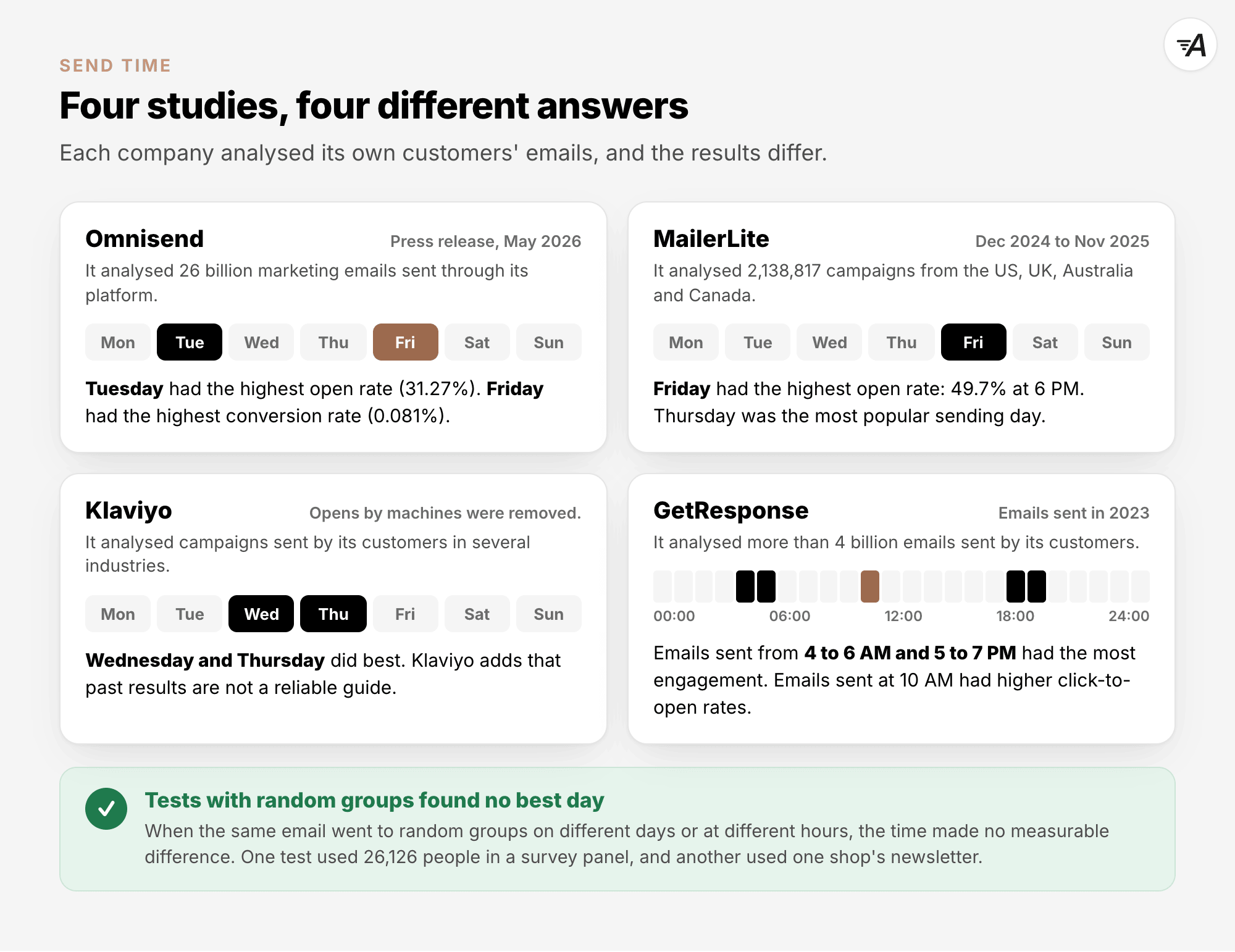
Omnisend analysed 26 billion marketing emails sent through its platform. Its own data showed that Tuesday had the highest open rates at 31.27%, while Friday had the highest conversion rates at 0.081%. A conversion is an action you want a reader to take, such as placing an order. In its press release, Omnisend tells brands to treat these findings as "a starting point rather than a universal rule".
MailerLite's own data covered 2,138,817 campaigns from December 2024 to November 2025 across the US, UK, Australia and Canada. Friday came out on top for opens, with its highest rate, 49.7%, at 6 PM. Thursday was the most popular sending day. MailerLite also notes that "Open rates are surprisingly consistent across the entire week, generally hovering between 46.5% and 47.5%". These findings come from MailerLite's analysis of its own customers.
Klaviyo's own customer data favoured Wednesday and Thursday for campaign performance. It left out opens made by machines, which other reports may count.
GetResponse suggested 4 to 6 AM and 5 to 7 PM, based on its analysis of more than 4 billion emails sent by its customers in 2023. Emails sent at other times, such as 10 AM, had higher click-to-open rates (CTOR). This rate is the number of people who clicked divided by the number with a recorded open. These results appear in GetResponse's own benchmark analysis.
Each company uses data from its own customers, who come from different industries and countries and have different sending habits. The companies also count opens differently, so you cannot compare their open rates directly. An average across thousands of senders says little about the best time for one list.
The diagram brings the four companies' different answers together.
2. What tests and studies found about the day and the hour
A controlled timing test sends the same email to random groups at different times. This design can show whether the sending time caused a difference.
Howard et al. (2023) randomly assigned sending days to 26,126 existing participants in a New Zealand national panel. The experiment was registered in advance and ran over 14 consecutive days. It found no effect on how likely participants were to respond. These were survey invitations, not marketing emails. So the result may not apply directly to a marketing list. The study's abstract describes the experiment.
Biloš, Turkalj & Kelić (2016) ran ten A/B tests on one Croatian retailer's newsletter, with all campaigns sent on weekdays. Two compared Thursday mid-morning with Thursday afternoon, and another compared Tuesday with Wednesday at the same hour. Those comparisons found no significant difference in open rates. The full study explains the tests.
Chaparro-Peláez, Hernández-García & Lorente-Páramo (2022) analysed 5,765 promotional emails sent between 2013 and 2018. Tourism and hospitality companies sent them to 455 million users in 73 countries. The study measured open rates. Monday had the highest and Wednesday the lowest. The researchers analysed emails that had already been sent instead of running an experiment, so the pattern does not show that the day caused the difference. A statistical problem kept them from testing the sending hour at all. Open rates were also linked to how often the companies sent and whether they used segments, which are groups of contacts chosen by rules. The study describes these limits.
The controlled tests found no measurable effect of timing. The study of past emails found a pattern by day. Timing may still matter for your list, but these results do not support one best time for every list.
3. Why open times do not reliably show when people read
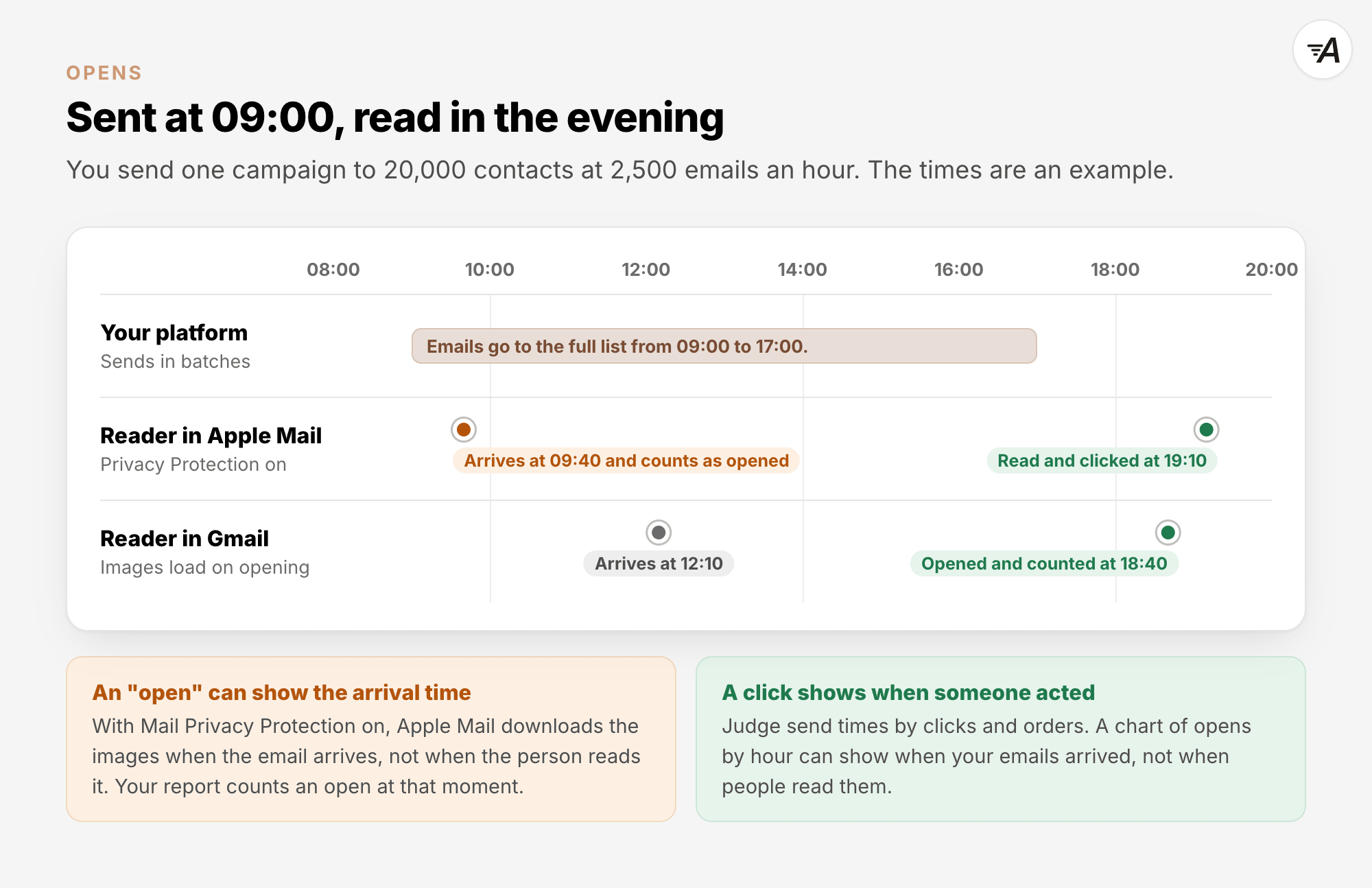
With Mail Privacy Protection, Apple says "remote content is privately downloaded in the background when you receive a message (instead of when you view it)".
Open tracking records an open when a tiny image in the email loads. For these readers, an open can be recorded when the email arrives, even if they have not read it. If many of your readers use Apple Mail, an hourly open chart can follow your own sending times.
Gmail serves message images through Google's secure proxy servers when users open the email. Because mail apps record opens in different ways, your report cannot reliably show when people read.
A campaign sent in batches also takes time to leave your sending server. At 2,500 emails an hour, a campaign for 20,000 contacts takes 8 hours. If it starts at 09:00, the last contacts may receive it at about 17:00. Email Sending Explained covers sending limits.
Clicks and orders can give you a more useful view of timing than opens. Email Marketing Metrics Explained explains how to read those results.
The diagram shows why sending, arrival, recorded opens and reading can happen at different times.
4. Time zones: whose clock your send follows
When you schedule an email for one time zone, contacts elsewhere receive it at a different local time. In winter, 09:00 in London (UTC+0) is 04:00 in New York (UTC−5).
If your list has a country field, you can create one segment for each region. Some countries cover several time zones, so these groups are approximate. Choose a good local time for each region and convert it to your AcelleMail account's time zone. Then schedule a separate campaign for each segment.
In AcelleMail: scheduling a campaign
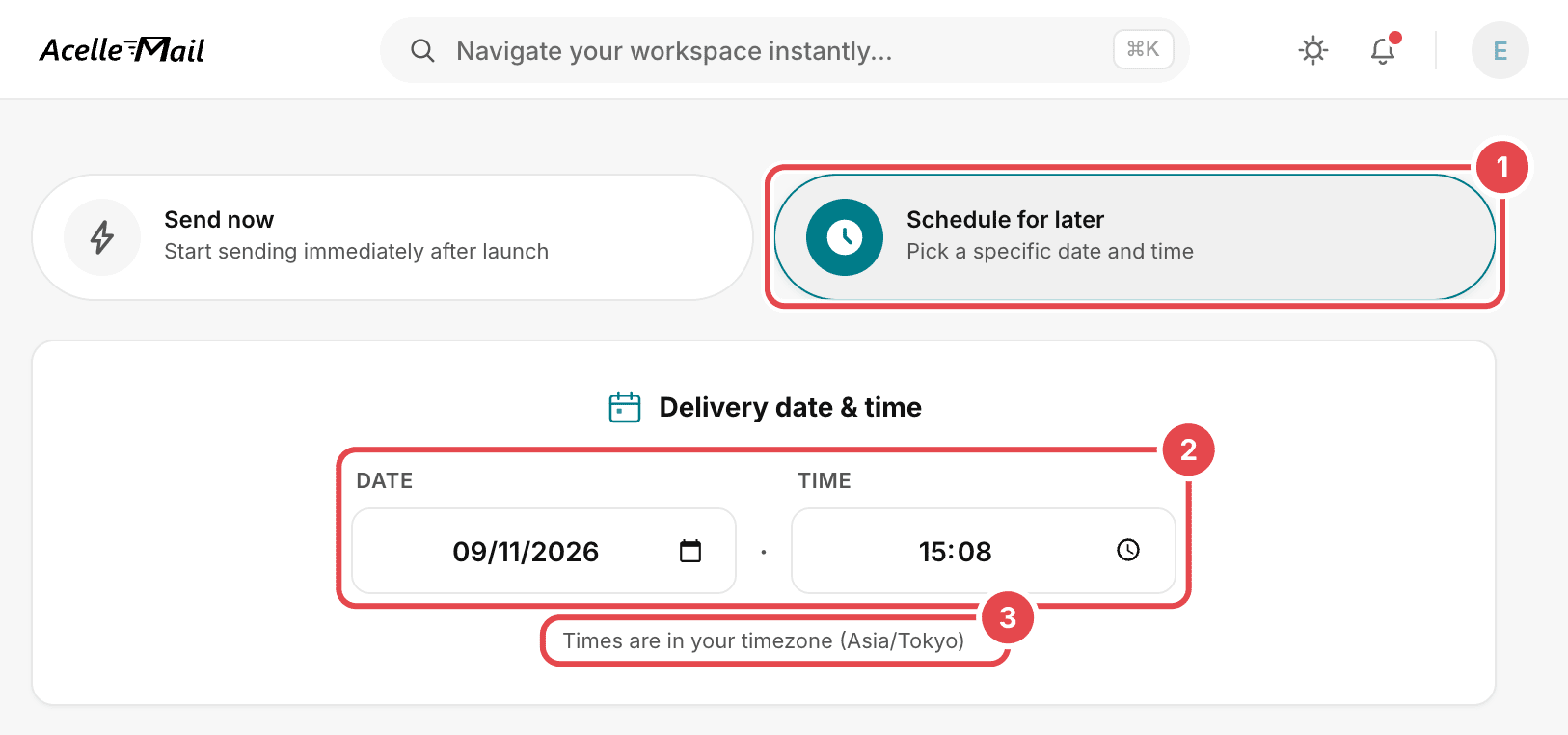
The campaign's Schedule step is step 4 of 5 and is titled Schedule your campaign. You can choose Send now to start sending immediately after launch.
The Schedule for later option (1) lets you choose a date and time. You enter the Date and Time in the Delivery date & time fields (2).
The line "Times are in your timezone (Asia/Tokyo)" (3) shows the demo account's time zone. The time you enter is in your own account's time zone.
AcelleMail does not have a setting to deliver emails at each contact's own local time. Regional segments and separate campaigns let you choose different scheduled times yourself.
The screenshot shows the scheduling choices and the account time zone.
5. How often: more email brings more activity, and more people leaving
Research on email frequency shows both benefits and costs, often within the same experiment.
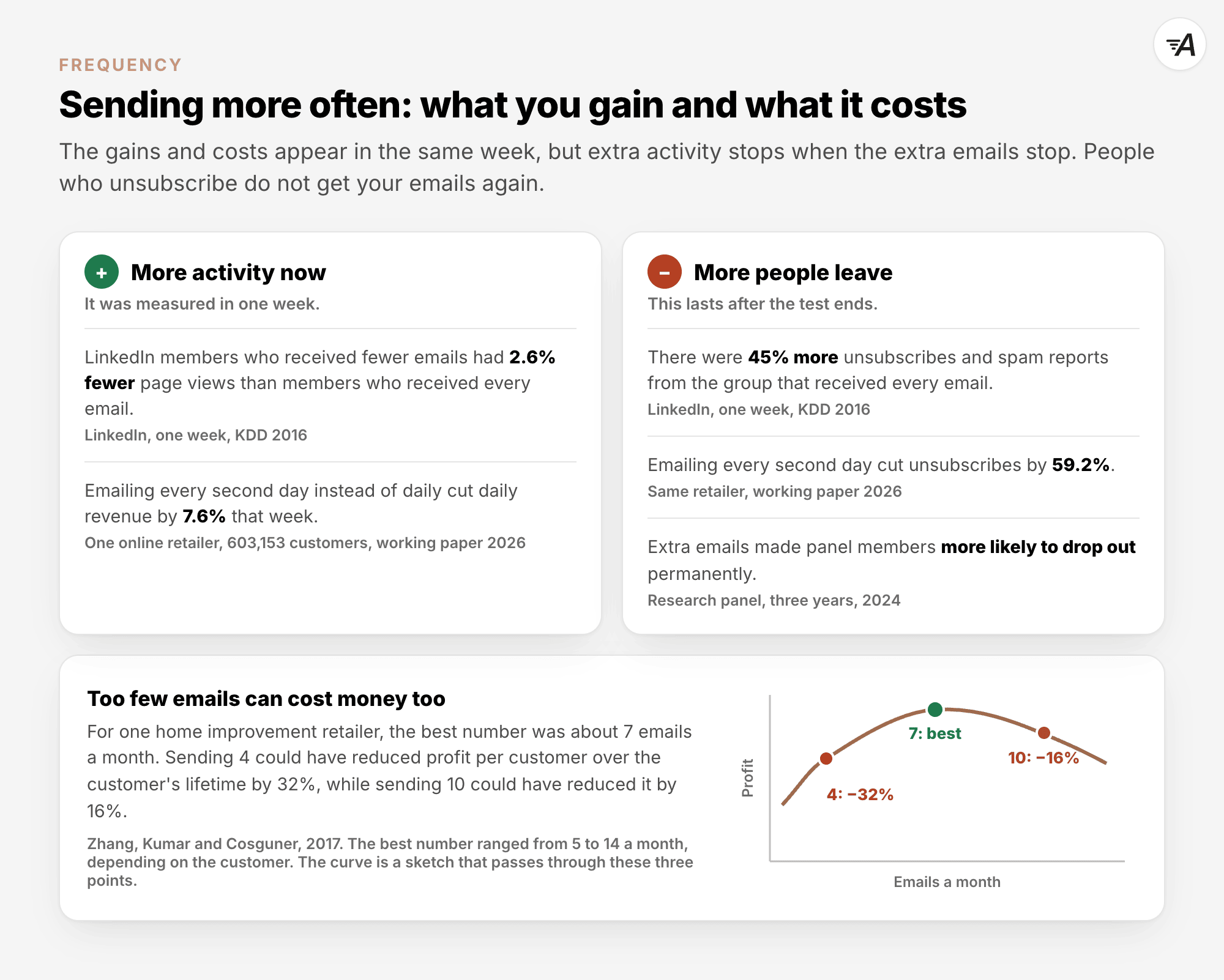
In a one-week experiment at LinkedIn, published in 2016, researchers randomly held back some emails from one group. Another group received every email. The group that received fewer emails made 2.6% fewer page views than the group that received every email. The group that received every email sent 45% more negative responses, which were unsubscribes and spam complaints. LinkedIn's paper reports both outcomes.
The study by Zhang, Kumar & Cosguner (2017) focused on one US home improvement retailer. Customers who were active on email were not always active buyers. Up to a point, more emails brought more purchases, and after that point more emails could reduce them. The model found that seven emails a month gave the highest lifetime profit per customer. That is the profit from one customer over the whole time they buy from the firm. Sending four instead could cut that profit by 32%, and sending ten could cut it by 16%.
The AMA summary says this firm should send 7 emails a month on average. For individual customers, the model's figures ranged from 5 to 14 emails per month. These results came from one company, so they are not a recommended schedule for every list.
Ferecatu, De Bruyn & Mukherjee (2024) studied more than 150,000 research panel invitations over three years. Extra invitations made people less likely to take part for a while. They also made people more likely to leave the panel for good, probably because they grew tired of the invitations. Their study shows why costs can continue after a single email.
Wang, Lu & Shi (2022) tested two emails half a month apart among car wash subscribers. Five months after the experiment began, the emails had increased the chance of subscribers staying by 7.4%. The field experiment also found signs that the effect on how often subscribers used the service weakened after the second email.
Baek, Chen, Ma & Mitrofanov's February 2026 working paper has not been peer reviewed. Its one-week experiment assigned 603,153 online retail customers to daily coupon emails or one every two days. Fewer emails cut the unsubscribe rate by 59.2%, from a starting rate of only a few tenths of a percent a week. Average daily revenue fell by 7.6% during that week. Using the retailer's past data, the authors estimate that unsubscribing cut a customer's monthly spending by 36%.
Sending more emails can bring short-term activity, but people can also unsubscribe, complain or stop responding. These figures from individual companies do not give you a rule for your list.
The diagram shows the benefits and costs that can come with sending more often.
6. Spacing, promises and what mailbox providers expect
Drèze & Bonfrer (2008) studied permission-based email in the entertainment industry. Their study found that gaps that were too long caused fewer problems than gaps that were too short.
The AMA summary of the home improvement retailer reported the opposite: for that retailer, sending too few emails cut lifetime profit more than sending too many. Different businesses can therefore get different results.
Micheaux (2011) found that people feel different amounts of pressure from the same sender. The study suggests that senders can reduce this pressure by making it easy to skip irrelevant emails.
Your signup form should explain what you will send and how often. M3AAWG warns that unexpected increases in frequency often lead to more abuse complaints. Yahoo asks senders to honour the frequency people signed up for. The section on signup forms in Email Consent Explained covers this promise.
Mailbox providers also watch your total sending rate, which is the number of emails you send over time to all your contacts together. If you send large amounts of email, Google recommends a steady rate without bursts. It advises starting with a low volume of email to engaged contacts, then increasing it gradually. If you have no history of sending large volumes, Google warns that suddenly doubling your volume can lead to rate limiting or a drop in reputation. It also says you can increase volume more quickly with daily sending than with weekly sending. These recommendations appear in Google's sender guidelines.
Before a sale such as Black Friday (27 November 2026), add extra campaigns only if they fit what people signed up for. Plan them weeks ahead, start with engaged contacts and increase the volume gradually, as Google advises. Sender Reputation Explained explains how to warm up a new domain or IP address.
Readers can also see how often you send in Gmail's Manage subscriptions view, which lists active subscriptions by sending frequency. It shows recent email counts and lets readers unsubscribe in one click.
7. Finding your own answer: a fair test
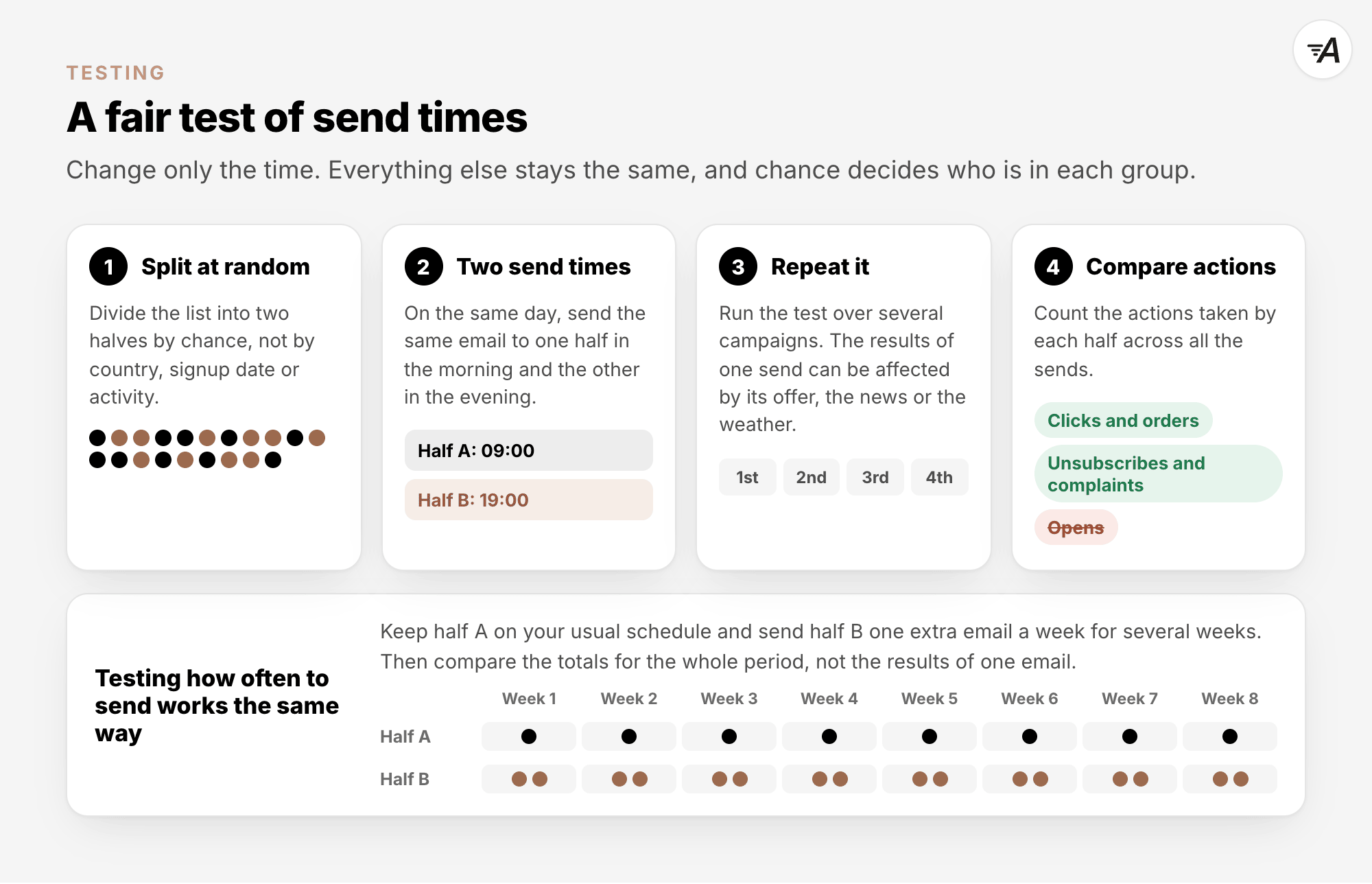
A fair timing test splits your list at random into two equal groups. Each group receives the same email at a different time, and you repeat the test across several campaigns. Give both groups the same amount of time to respond after each send. Then compare clicks, orders, unsubscribes and complaints, rather than opens.
A frequency test looks at results over a longer period. One randomly chosen group keeps your usual schedule, while another receives more or fewer emails for several weeks. You compare each group's totals for the whole period because people can grow tired of your emails over time. The unsubscribe rate for one email cannot show the total effect of a different schedule.
Tests also need enough contacts to make differences visible. Email A/B Testing Explained explains sample size and how to read the result.
Klaviyo's data science team checked whether a sender's own past results can show the best day to send. It found that historical data "isn’t a reliable way to determine the best email send days". Its advice is to run your own tests.
In AcelleMail
AcelleMail sends all versions in an A/B test at the same time, so this feature compares emails rather than sending times. The A/B campaign card mentions send times, but every version goes out in the same send. AcelleMail has no built-in way to split a list at random for a timing test.
You can do the split in a spreadsheet. Add a list field such as Test group in Manage list fields.
Export your contacts and open the file in a spreadsheet. In a temporary column, enter =RAND() in the
first row and copy it down to the last contact. Then sort all the rows by that column. Next, enter A in
the Test group column for the first half of the contacts and B for the rest, and delete the temporary
column. Import the file into the same list with Update existing subscribers, which leaves each
contact's status and tags as they are. Then create one segment for Test group A and one for Test group
B, and send two campaigns with the same email at different times.
The diagram shows how groups chosen at random receive the same email at different times.
8. Timing and frequency in AcelleMail
Sending hours
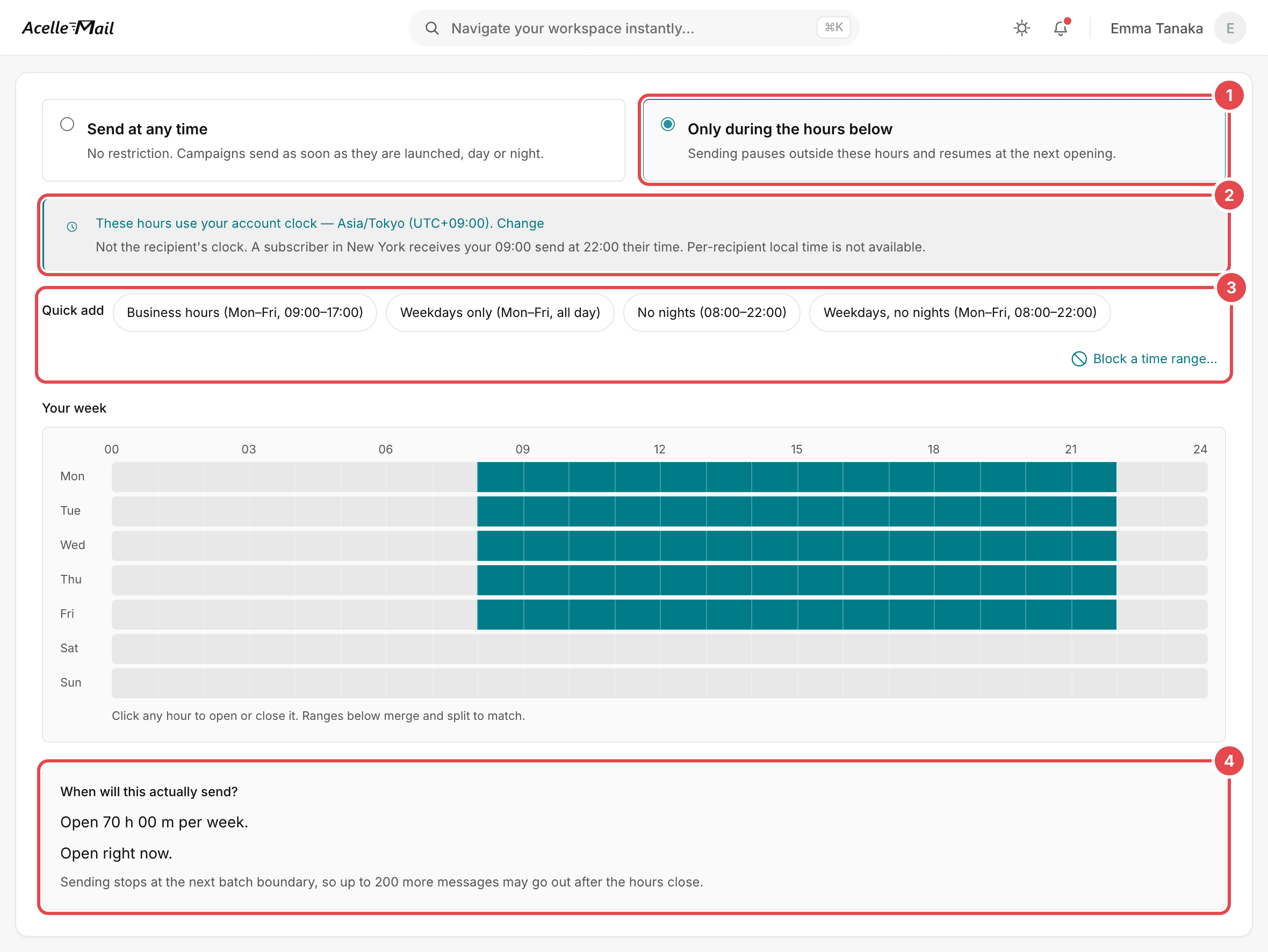
The Schedule step also sets the hours when this campaign can be sent. Each campaign has its own setting. The Send at any time option does not restrict sending hours.
The Only during the hours below option (1) pauses sending outside your chosen hours. Sending resumes when those hours begin again, and nothing is cancelled. Each email is checked against your hours just before it is sent, so only emails already on their way can go out after the hours close.
The clock notice (2) says "These hours use your account clock — Asia/Tokyo (UTC+09:00)." It also says "Not the recipient's clock."
The Quick add presets (3) include Business hours (Mon–Fri, 09:00–17:00) and Weekdays only (Mon–Fri, all day). You can also choose No nights (08:00–22:00) and Weekdays, no nights (Mon–Fri, 08:00–22:00).
The Block a time range… control removes a time range, such as nights, from your sending hours. The Your week grid shows the sending hours that remain.
The When will this actually send? summary (4) shows how many hours a week are open. It also warns that up to 200 more messages may go out after the hours close. That is an upper limit, and in practice far fewer go out late.
These hours apply only to campaigns. Automation emails are never paused by this setting, so you need to plan their timing separately.
The screenshot shows the sending hours controls and the account clock notice.
An engaged segment
An engaged segment can help you choose contacts for extra campaigns or sale periods.
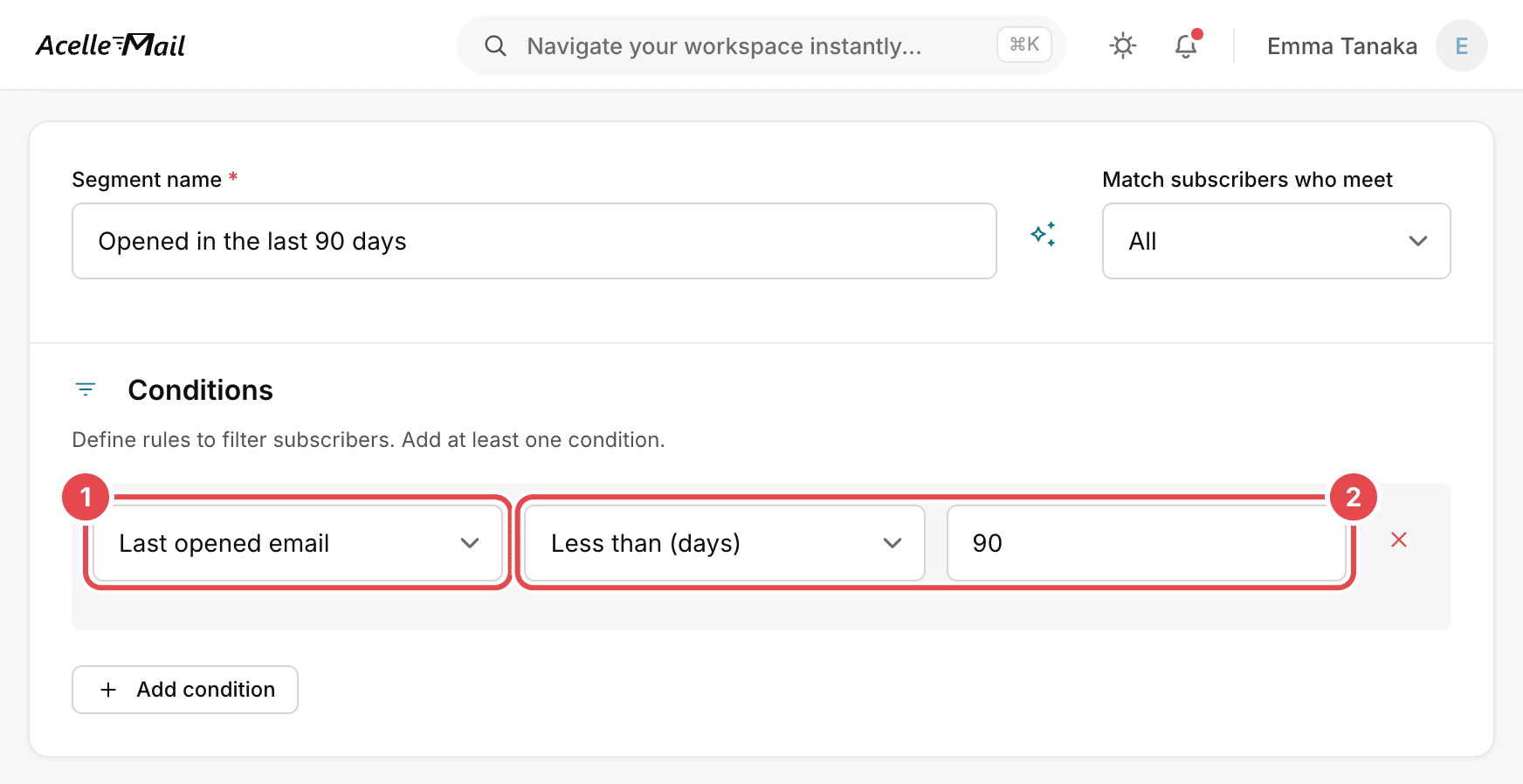
Go to Lists and open your list. Open its Segments menu and choose Add, then enter a Segment name on the Create a new segment page.
Under Match subscribers who meet, choose All to include contacts who meet every condition, or Any to include contacts who meet at least one. Use Add condition to set the rules.
The Last opened email condition (1), with Less than (days) set to 90 (2), selects contacts with a recent email open. Apple Mail's automatic opens can count, even when the person has not read the email.
For a stricter segment, use Last link click instead of Last opened email, with Less than (days) still set to 90. Then choose Save segment.
The screenshot shows the condition for an open in the last 90 days.
To send to the segment, choose your list and then the segment on a campaign's Recipients step. Exclude lists & segments, on the same step, removes selected groups from that campaign's recipients.
AcelleMail has no setting that limits how many emails one contact gets in a week. Your sending calendar should count both campaign emails and automation emails.
9. Common mistakes
| What you see | Why it is a problem | What to do |
|---|---|---|
| You send every campaign at a time recommended in a blog post. | Each company's study covers its own customers, and the studies disagree. The controlled tests found no measurable difference between sending days. | Treat the published time as a first guess, and test it on your list. |
| You choose the hour with the most opens in your report. | With Mail Privacy Protection, an open can be recorded when the email arrives. Your open peak may then follow your own sending time. | Compare sending times using clicks and orders. |
| You schedule 09:00 for contacts around the world. | The email is sent according to your account's clock, so many contacts get it at night. | Create one segment for each region and schedule a campaign for each segment. |
| You double the number of emails you send in the week of a sale. | Google warns that a sudden jump can lead to rate limits or a drop in reputation. Yahoo asks senders to keep to the frequency people signed up for. | Add extra emails only if they fit what people signed up for. Increase the number gradually in the weeks before the sale, starting with engaged contacts. |
| You judge a higher frequency by one email's unsubscribe rate. | Unsubscribes and complaints build up over weeks, and more people stop responding. | Compare random groups over the whole test period. |
| You use an A/B test to compare sending times. | AcelleMail sends all versions at the same time. | Send two campaigns to two segments split at random. |
| You expect Sending hours to delay your automation emails. | Sending hours apply only to campaigns. | Add a Wait step before the email in the automation to control when it goes out. |
Summary
- Published studies disagree, and the controlled tests described here found no measurable effect from timing. Your list may still respond differently.
- An open time can show when an email arrived rather than when someone read it.
- Scheduled campaigns use your AcelleMail account's time zone, and there is no setting for each contact's local time.
- Sending more often can increase short-term activity, unsubscribes, complaints and the number of contacts who stop responding.
- Your sending frequency should match the signup promise. You should send at a steady rate and increase the volume gradually.
- Fair tests compare random groups over several sends or weeks, using clicks, orders, unsubscribes and complaints.
- AcelleMail provides Schedule for later, Sending hours and segments based on recent opens or clicks. Sending hours apply only to campaigns, and there is no weekly frequency cap, so your calendar should include automation emails too.
Terms used here are defined in the Email Marketing Glossary.
0 comments
No comments yet — be the first to share a tip or question.