Consent is the permission a person gives you to send them email. It is what separates email marketing
from spam: in most countries the law draws that line, and the largest mailbox providers police it by
watching how people react to what you send.
This guide covers:
- What valid consent looks like
- Single opt-in vs double opt-in
- The signup form: say what they will get
- Keeping proof of consent
- The rules in the United States, the EU and UK, and Canada
- Making unsubscribing easy
- How long consent lasts
Each part shows where the same idea lives in AcelleMail. The guide ends with the most common mistakes
and a one-screen summary.
Not legal advice. This guide explains the general models. Which rules apply to you depends on where > you and your recipients are; the official texts are linked in section 5.
1. What valid consent looks like#
The EU's General Data Protection Regulation (GDPR) gives the definition most other rules echo. Consent
is a "freely given, specific, informed and unambiguous indication" of what a person wants, given "by a
statement or by a clear affirmative action" (GDPR, Article
4(11)). On a signup form, those four words become four
tests:
| Test |
What it means on a signup form |
It fails when… |
| Freely given |
Saying no costs nothing. |
Agreeing to marketing is a condition of buying, downloading or registering. |
| Specific |
It covers email marketing, from you, about what you described. |
The wording is "I agree to receive communications". From whom, about what? |
| Informed |
They know who you are, what you will send, and that they can leave at any time. |
The form names no sender and says nothing about the content or about leaving. |
| Unambiguous |
They did something: typed their address and pressed the button, or ticked an empty box. |
The box was ticked before they arrived, or the page says "by continuing, you agree". |
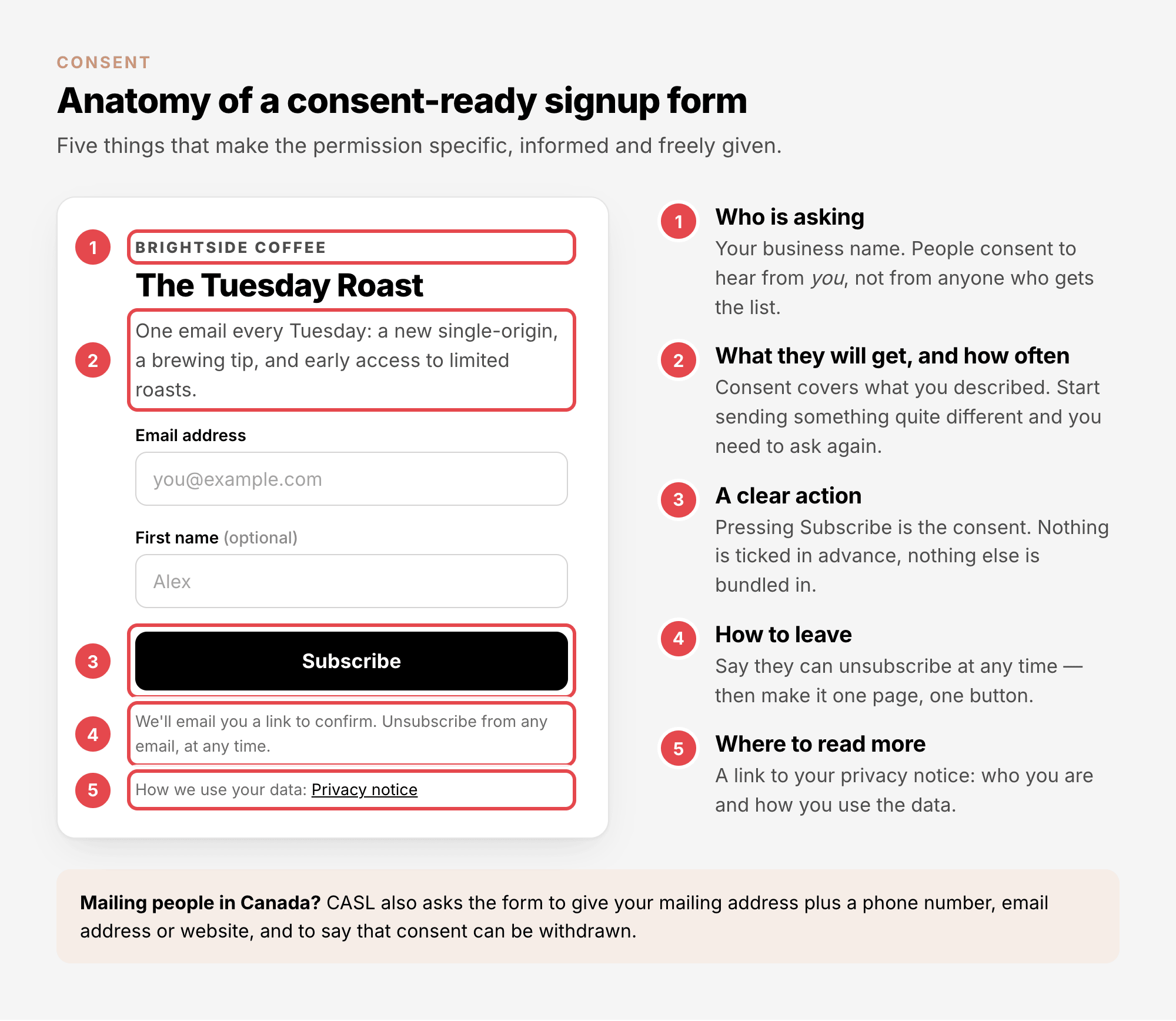
The European Data Protection Board (EDPB), the EU's joint body of data protection regulators, spells out
what a person must be told for their consent to count: who you are, what you want their data for, what
data you collect, and that they can withdraw at any time (Guidelines 05/2020 on
consent,
§64; its two other items, automated decisions and transfers abroad, rarely apply to a newsletter). A
good signup form covers all of it in a few lines:
What does not count#
Some things look like permission and are not:
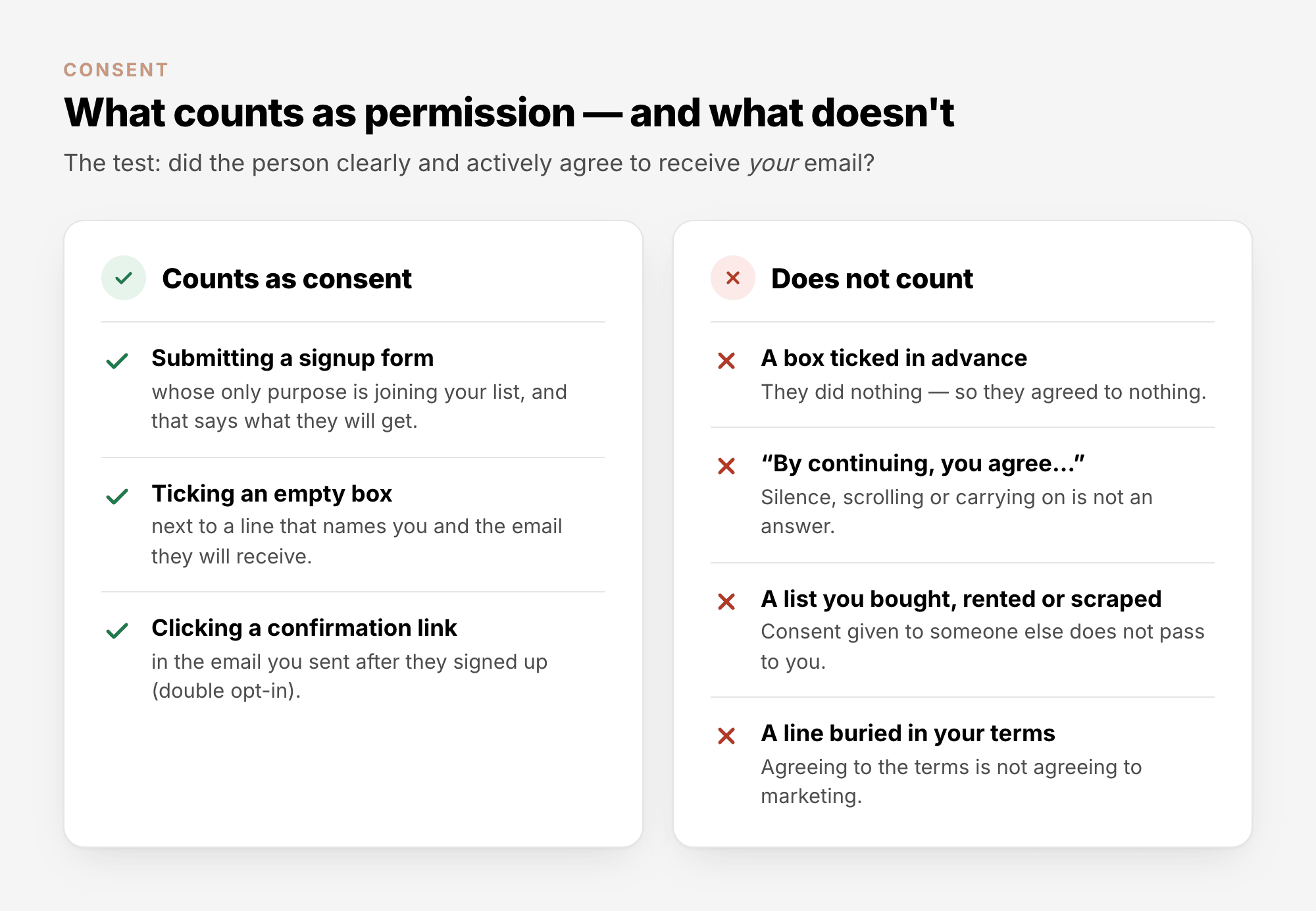
- A box ticked in advance. "The use of pre-ticked opt-in boxes is invalid under the GDPR," the EDPB
says, and "silence or inactivity" does not count either (§79).
- A list you bought, rented or scraped. The people on it agreed, if at all, to hear from someone
else. The UK's Information Commissioner's Office (ICO) accepts a bought-in list only if each person's
consent named your organisation: "If the consent doesn't name you … then it is not valid"
(ICO).
Recipients who do not know you report the mail as spam, and most sending services forbid such lists in
their terms. More in Email List Quality Explained.
- A line hidden in your terms. The ICO asks you to "keep the consent separate from other things,
such as terms and conditions". Agreeing to your terms is not agreeing to marketing.
Implied consent and the "soft opt-in"#
A few rules allow marketing email without explicit consent, in narrow cases:
- EU and UK: the soft opt-in. You may email your own customers about similar products or services
when all of these are true (the ICO's list for the UK's Privacy and Electronic Communications
Regulations, PECR; the EU's ePrivacy Directive has a similar exception):
- you got their contact details yourself,
- while selling them something, or negotiating to,
- you only market your own similar products or services,
- you gave them a chance to opt out when you collected the details,
- and you give them a chance to opt out in every message.
- Canada: implied consent. Canada's Anti-Spam Legislation (CASL) treats an existing business
relationship as implied consent: a purchase in the past two years, or an inquiry in the past six
months, and it ends when that period does. CASL also accepts a business address that someone published
or gave you, without saying they do not want messages, for mail about their work (CASL, section
10).
- United States. The CAN-SPAM Act does not require consent at all (section 5). But people who never
asked for your mail report it as spam, and Gmail and Yahoo set limits on spam complaints (section 6).
2. Single opt-in vs double opt-in#
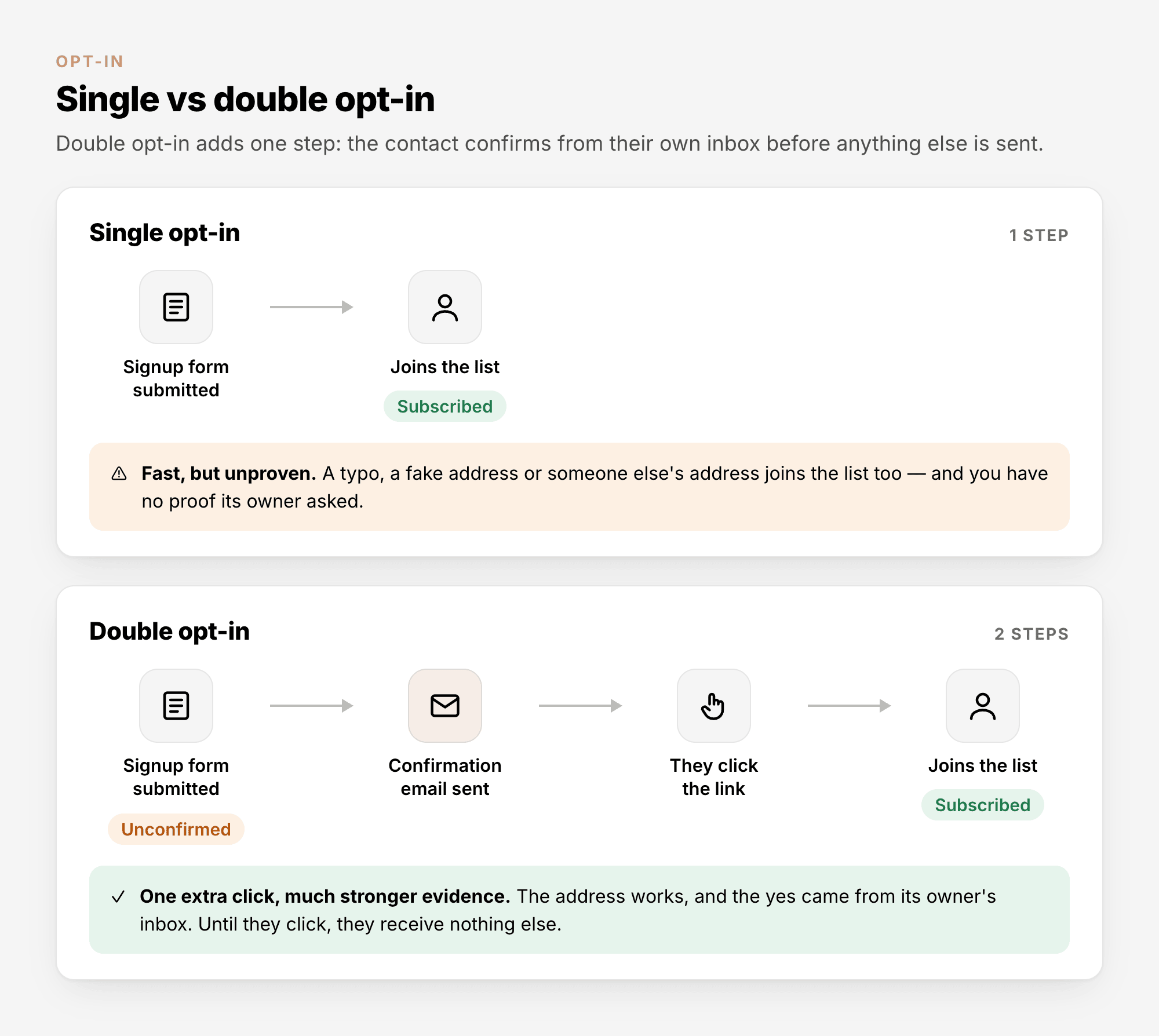
With single opt-in, an address joins your list as soon as the form is submitted. With double
opt-in (also called confirmed opt-in), you first send a confirmation email, and the address joins only
when its owner clicks the link inside.
|
Single opt-in |
Double opt-in |
| The address joins |
as soon as the form is submitted |
after the confirmation link is clicked |
| Shows the address works |
No |
Yes |
| Shows its owner asked |
No |
Strong evidence, because the click comes from their own inbox |
| Typos, fake and malicious sign-ups |
Join the list, then bounce or complain |
Never confirm, so never receive a campaign |
| The cost |
None |
Some people never click, so the list grows a little slower |
Few laws name double opt-in, but it is the strongest evidence of consent you can have (in Germany it is
the generally expected way to show it), and it keeps mistyped addresses, including the typo domains used
as spam traps, off your list. Use it on every form the public can reach.
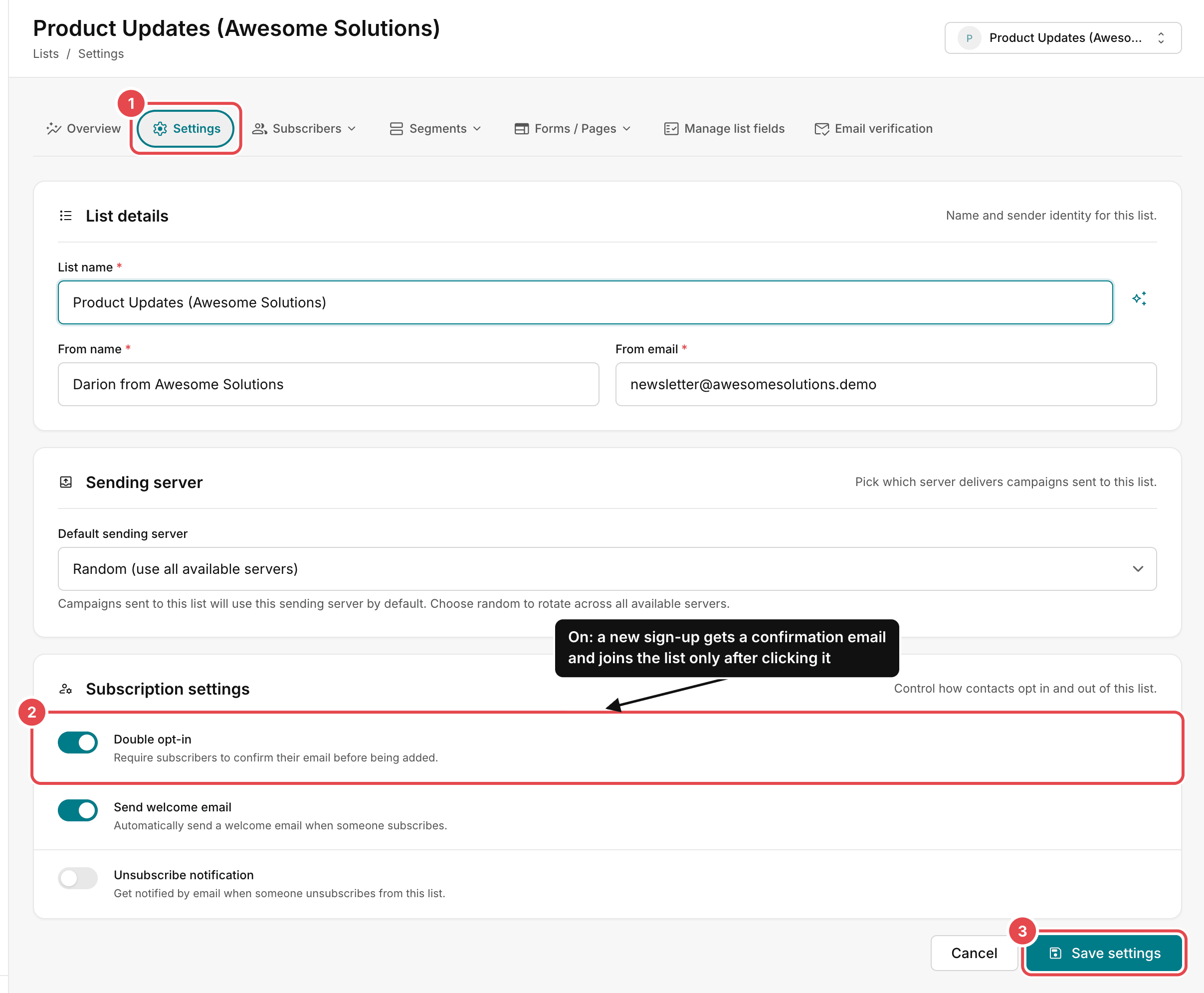
Turn on double opt-in for a list#
- Open Lists, choose the list, and open its Settings tab.
- Under Subscription settings, switch on Double opt-in ("Require subscribers to confirm their
email before being added").
- Click Save settings.
What a new subscriber sees#
The list's Forms / Pages → All templates page shows every page and email of the sign-up journey, in
the order a new subscriber meets them:
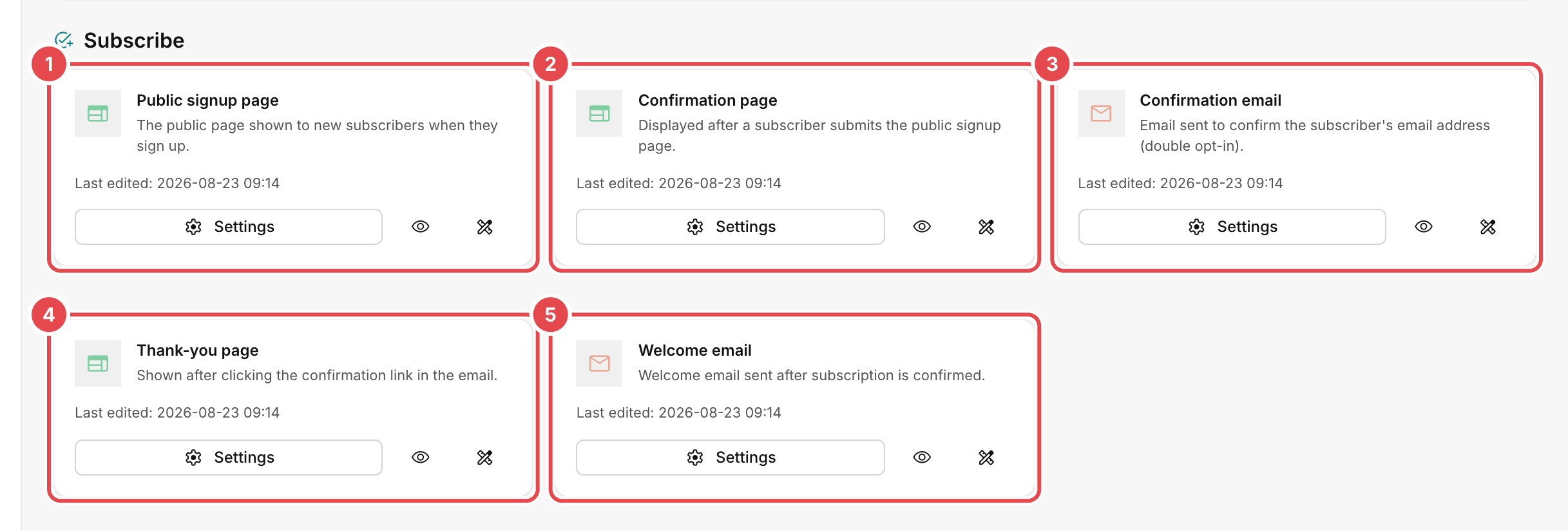
- Public signup page: a hosted page with your signup form.
- Confirmation page: shown after they submit the form. Tell them to check their inbox, and their
spam folder, for the confirmation email.
- Confirmation email: the email with the confirmation link. Keep it short: who you are, what they
signed up for, one button. No offers yet.
- Thank-you page: shown after they click the link.
- Welcome email: sent once the subscription is confirmed, if Send welcome email is on in the
list's settings.
Click Settings on a card to open that page or email and edit it.
Contacts who have not confirmed#
Until they click the link, new contacts wait with the status Unconfirmed, and campaigns skip them:
only Subscribed contacts receive campaigns. If some never confirmed, you can send the link once
more:
- Open Subscribers → View all and set the status filter to Unconfirmed.
- Tick the contacts.
- Choose Actions → Send confirmation email.
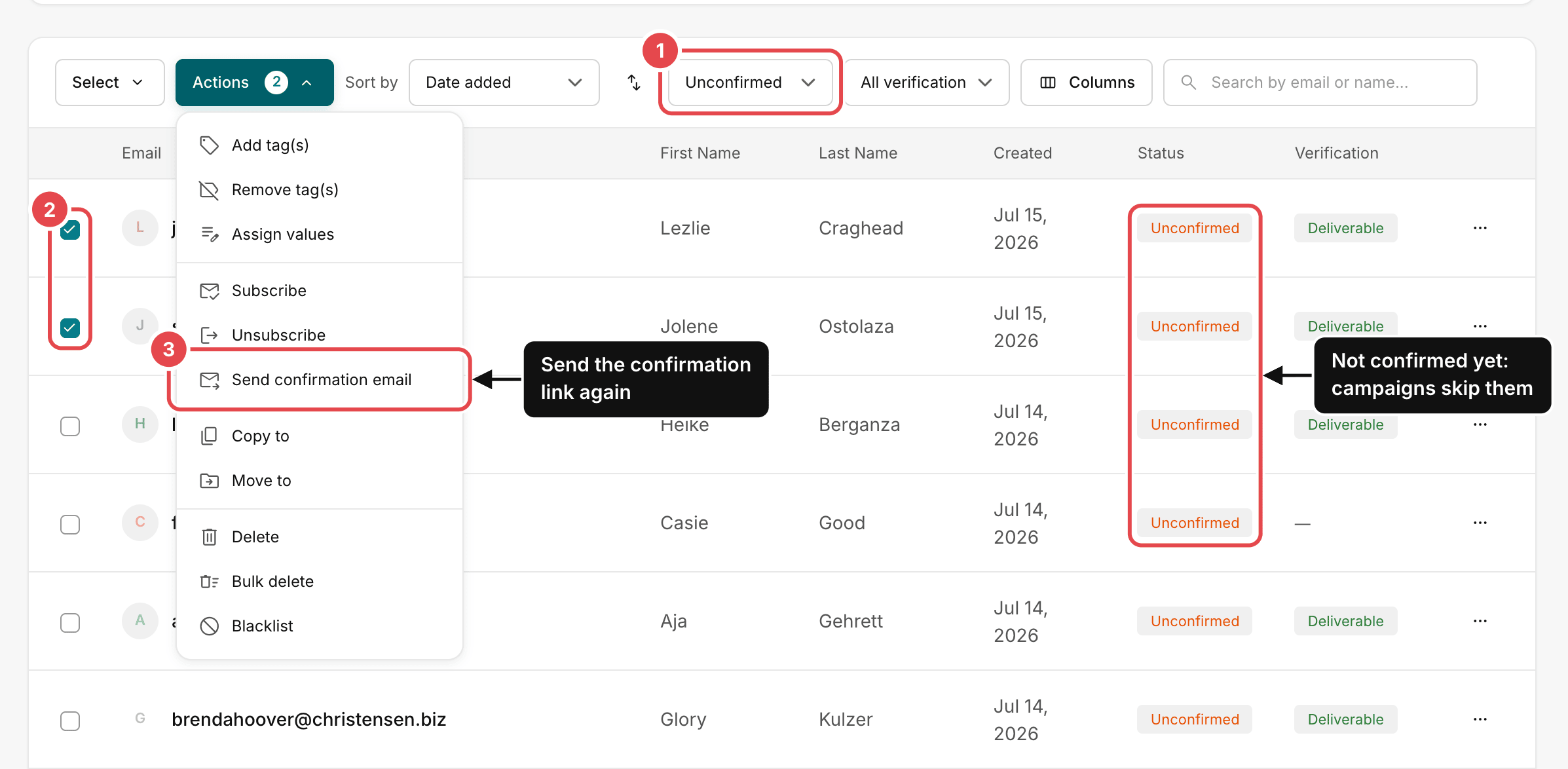
Send it once. Someone who has ignored two confirmation emails has given you their answer. Leave the
Subscribe item in the same menu alone for unconfirmed contacts. It marks them Subscribed without
their confirmation.
3. The signup form: say what they will get#
An AcelleMail signup form adds people to a list; that is its job. Submitting it is the clear,
affirmative action the law asks for, so you do not need an extra "I agree" box. What you need is the
promise next to the button, which makes the consent specific and informed:
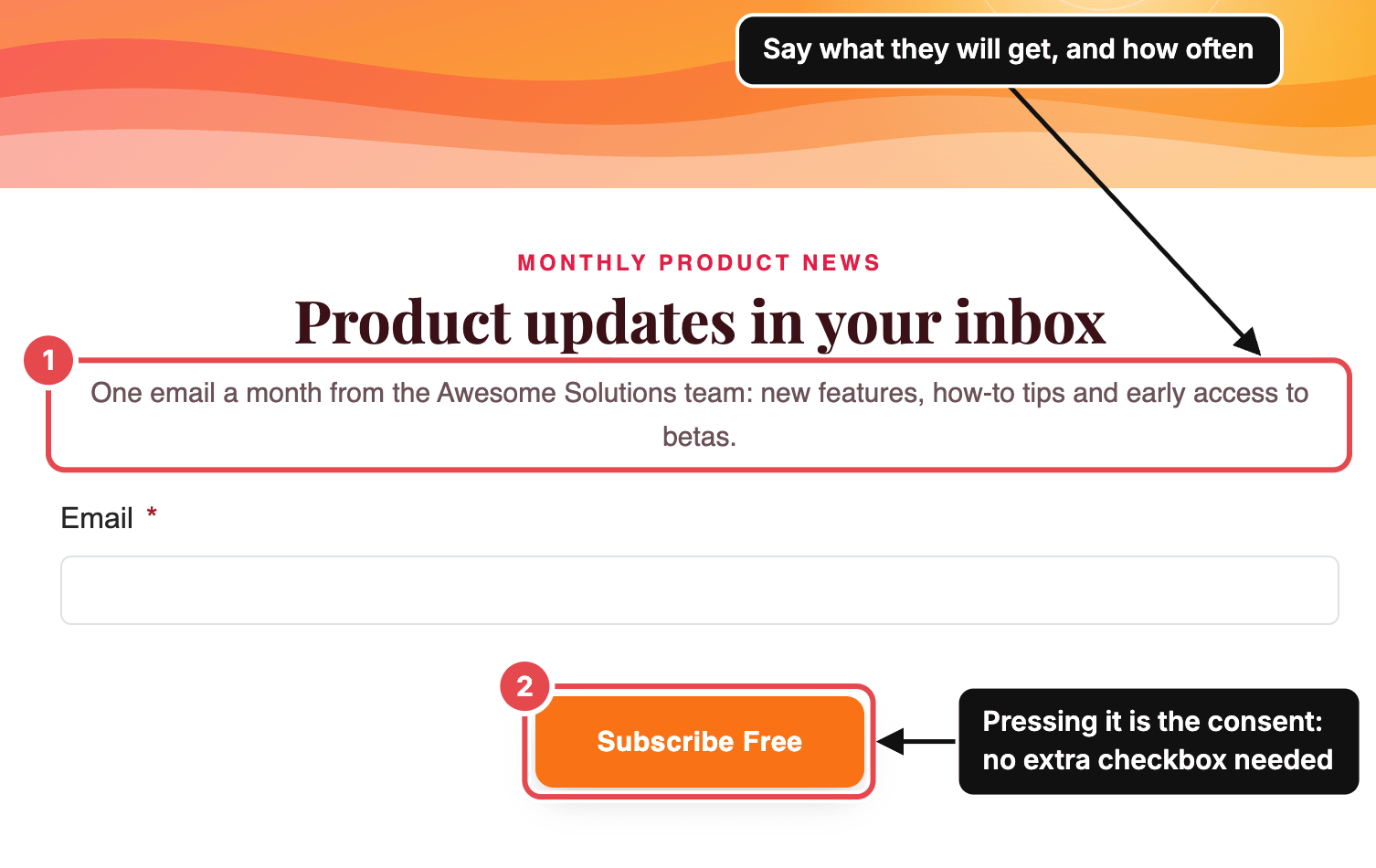
Write that line like a promise you intend to keep:
- What you will send: "new features and how-to tips", not "updates".
- How often: "one email a month".
- Who it comes from: your business or team name.
Three rules for checkboxes:
- Never tick a box in advance.
- Keep agreements apart from marketing. A required box for your terms or privacy policy (the Terms
of Service element in the form builder's Compliance group) asks people to accept your terms.
That is not the same as consenting to marketing.
- One list per kind of email. If you also want to send something different, partner offers for
example, give it its own list and signup form, so each list holds only the people who asked for it.
Mailing people in Canada? Under CASL, a request for consent must also give your mailing address plus
a phone number, email address or website, and say that consent can be withdrawn. Put it in the form's
small print.
4. Keeping proof of consent#
Under the GDPR you must be able to show that a person consented. The burden of proof is yours (Article
7(1)). The EDPB suggests keeping a record of how and when consent was obtained and of the information
shown at the time, and warns that "it would not be sufficient to merely refer to a correct configuration
of the respective website" (§108). Under CASL, too, whoever claims consent has to prove it (section 13).
For each contact, keep:
| Record |
Example |
What it shows |
| When they joined |
2026-09-30 18:26 |
When consent was given |
| How they joined |
a signup form, the API, an import, added by hand |
The route, and which contacts rely on your own records |
| Where from |
the IP address of the signup |
For a form signup, that it came from a real visit |
| That they confirmed |
the status Subscribed on a double opt-in list |
That someone with access to the inbox said yes |
| What they were shown |
the form's wording at the time |
What exactly they agreed to |
AcelleMail shows the first three on every contact, under the name at the top of the contact's page:
Created, Source and IP address.
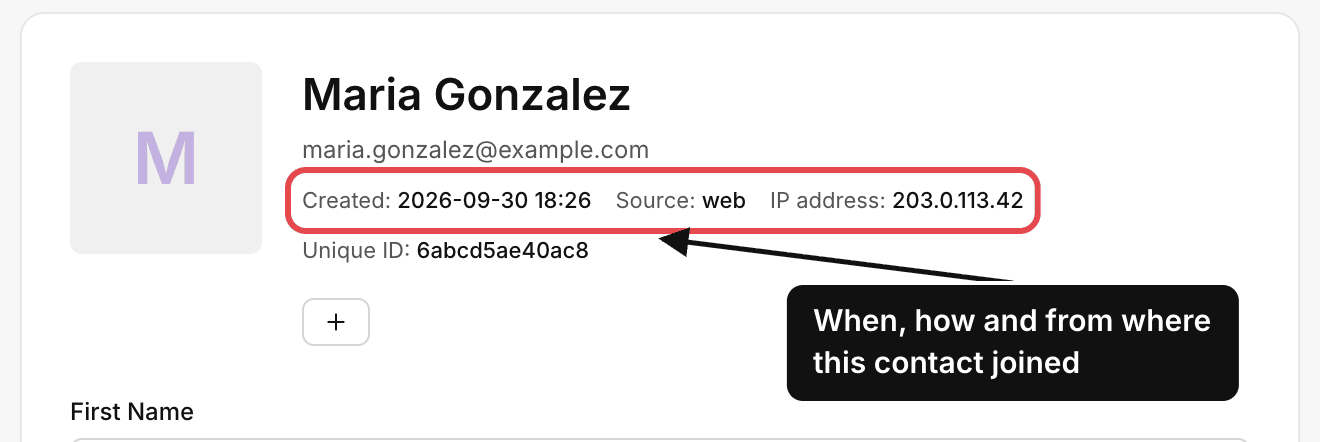
Source says how the contact arrived: web for the hosted signup page, embedded-form for a form on
your website, api for the API, added for someone added by hand, imported for a file import. For a
form signup, IP address is the visitor's; for contacts added by hand or through the API it is yours
or your server's. For imported contacts AcelleMail cannot know how you collected them, so the proof has
to come from your own records.
What AcelleMail cannot keep for you is the form's wording: when you change a signup form, save a dated
copy or screenshot of the old version. Keep the proof for as long as you email the person, and after
that only as long as you might need it for a legal claim (EDPB §107).
5. The rules in the United States, the EU and UK, and Canada#
The three best-known models side by side:
|
United States (CAN-SPAM) |
EU and UK (GDPR with ePrivacy / PECR) |
Canada (CASL) |
| Model |
Opt-out: no consent needed, but stop when asked |
Opt-in: consent needed to email individuals, apart from the soft opt-in |
Opt-in: express or implied consent needed |
| Business addresses |
Covered: the FTC says the law "makes no exception for business-to-business email" |
Varies by country. The UK lets you email company addresses without consent (not sole traders or ordinary partnerships), if you identify yourself and offer an opt-out |
Covered, apart from narrow exemptions in the regulations |
| In every message |
A clear note that it is an ad, your valid postal address, a working opt-out; no misleading From line or subject |
Who you are and a working way to opt out |
Your name, mailing address and one other way to reach you; an unsubscribe mechanism |
| Unsubscribe deadline |
10 business days; the opt-out must keep working for 30 days after you send |
No set number of days: once someone objects to direct marketing, you must stop (GDPR Article 21(3)) |
10 business days; the mechanism must stay valid for 60 days after you send |
| Maximum penalty |
Up to $53,088 per email (the FTC's figure at the time of writing, adjusted for inflation each year) |
GDPR: up to €20 million or 4% of worldwide annual turnover, whichever is higher; UK GDPR: £17.5 million or 4%. The email rules in ePrivacy and PECR carry their own penalties |
Up to CAD 10 million per violation for a business, CAD 1 million for an individual |
| Official source |
FTC compliance guide |
GDPR · ICO guidance |
CASL |
What decides which rules apply is where your recipients are, not only where you are: the GDPR covers you
when you offer goods or services to people in the EU (Article 3(2)), and CASL covers messages sent from
or opened on a computer in Canada.
If you mail more than one country, the practical approach is to meet the strictest model everywhere:
express consent (the person actively agreed), collected with double opt-in, and every unsubscribe
honoured at once. That meets the consent and unsubscribe rules of all three; each law's own list of what
every message must contain still applies. For the law-by-law details in AcelleMail, see GDPR Compliance
for Email Marketing with AcelleMail, CAN-SPAM
Compliance in AcelleMail and CASL Compliance in
AcelleMail.
Consent is only one part of the GDPR. What else it asks of a sender, from privacy notices to people's
rights and data processing agreements, is in GDPR for Email Marketing
Explained.
6. Making unsubscribing easy#
Consent can be withdrawn at any time, and the GDPR requires withdrawing to be "as easy" as giving it
(Article 7(3)). The EDPB's example: a festival that took consent with one click online but accepted
withdrawals only by phone, on weekdays during office hours, did not comply (§115).
The deadlines, and the tighter rule the largest mailbox providers apply:
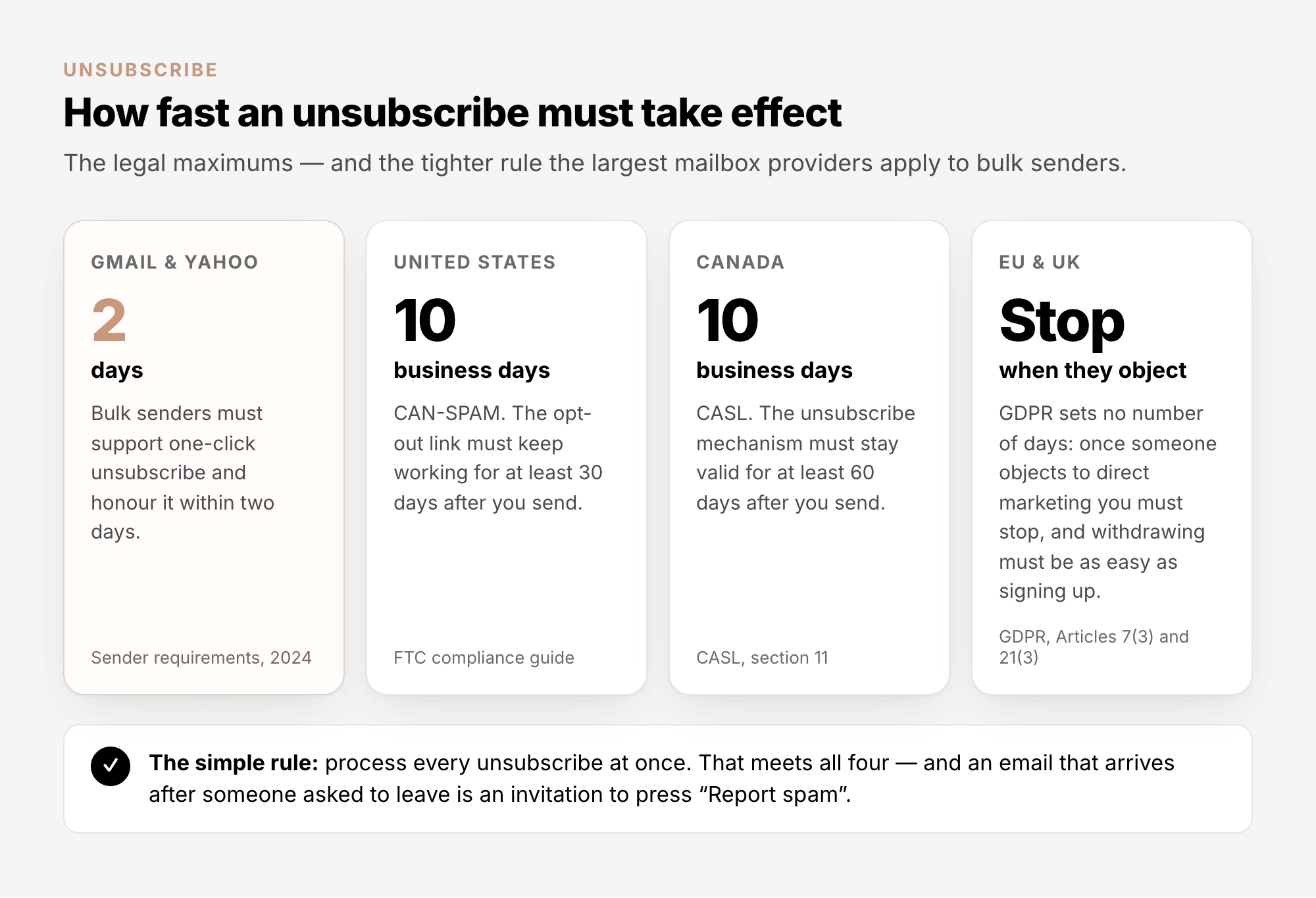
Since 2024, Gmail and Yahoo require bulk senders to support one-click unsubscribe, to show a
visible unsubscribe link, and to honour unsubscribes within two days. For Gmail, a bulk sender is anyone
sending about 5,000 or more messages a day to personal Gmail addresses. One-click unsubscribe works
through headers, hidden lines at the top of every email that mail apps read: they let Gmail or Apple
Mail show their own Unsubscribe button (RFC 8058). The same
rules limit spam complaints: Gmail asks senders to stay below 0.1% and never to reach 0.3%, and Yahoo
sets 0.3% (Google's Email sender guidelines, Yahoo's
Sender best practices). More in Email Deliverability
Explained.
In AcelleMail#
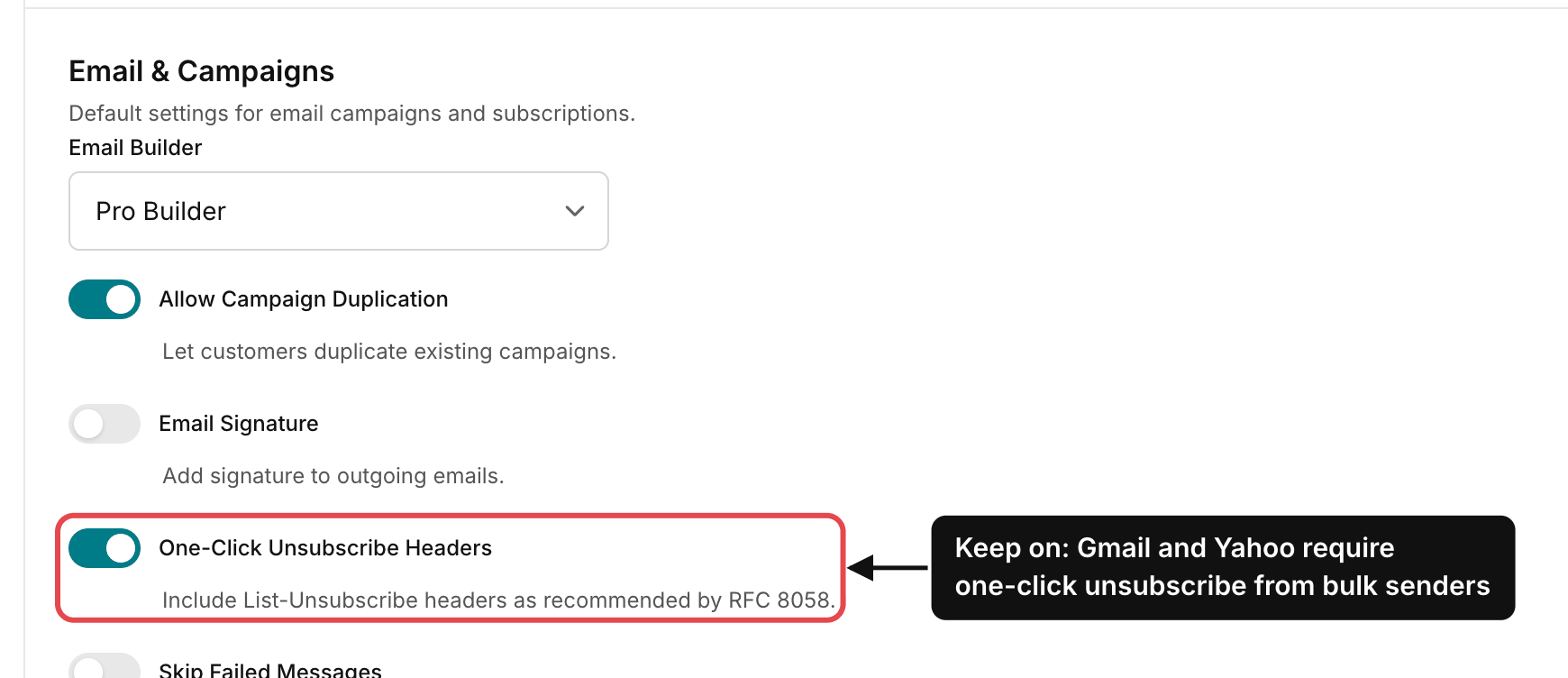
One-click unsubscribe. AcelleMail adds the List-Unsubscribe headers, with one-click support, to
every campaign email while One-Click Unsubscribe Headers is on. It is an admin setting under
Settings → General, section Email & Campaigns. Keep it on.
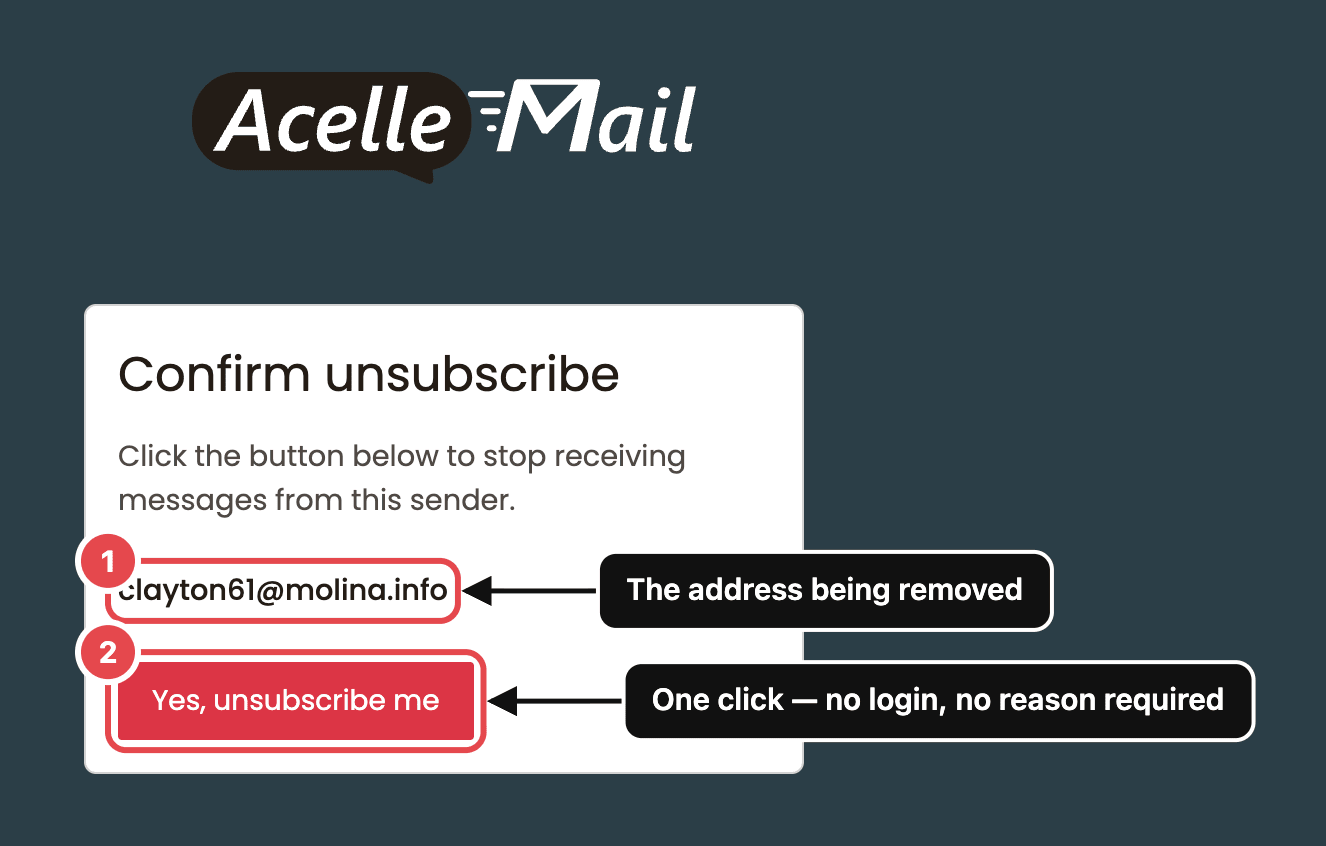
The unsubscribe link. The link in the email opens a short confirmation page: the address being
removed and one button, Yes, unsubscribe me. No login, no password, no reason required.
Offer a middle way. Some people want less email, not none. A preference page lets them choose; see
Subscriber Preferences & Frequency.
Keep the record. Do not delete people who unsubscribe: their Unsubscribed status is your record
that they said no. A deleted contact can come back with the next import.
7. How long consent lasts#
- GDPR: no fixed expiry. How long consent lasts "will depend on the context, the scope of the
original consent and the expectations of the data subject", and if what you send changes considerably,
you need to ask again. The EDPB recommends refreshing consent "at appropriate intervals" (§110–111).
- CASL: implied consent from a purchase or an inquiry runs out, two years after the purchase and six
months after the inquiry. Ask for express consent before then: under CASL, an email that asks for
consent is itself a commercial message, so it needs a valid consent to be sent.
- In practice: people who have not opened or clicked for a long time are the weakest part of your
consent. Ask them once whether they still want your email, and remove those who do not answer. See
Email List Quality Explained, section 6.
8. Common mistakes#
| What you see |
Why it is a problem |
What to do |
| A "Keep me updated" box ticked in advance at checkout |
Not a clear, affirmative action (EDPB §79) |
Leave it empty; mail only the people who tick it |
| A form that only says "Subscribe" |
The consent is neither specific nor informed |
Add one line: what they will get, how often, from whom |
| A list you bought or rented, or got from a partner or an event |
Consent does not pass to you, and the soft opt-in needs details you collected yourself |
Import only people who asked to hear from you. Do not email the others to ask: that email is itself marketing. The ICO has fined companies for exactly that, Flybe and Honda among them, and CASL treats it the same way |
| "I agree to the Terms and Privacy Policy" as the only box |
Accepting your terms is not consent to marketing |
Keep marketing consent separate: the button and the promise next to it |
| An unsubscribe link that asks people to log in |
Harder to leave than to join (GDPR Article 7(3)) |
One page, one button, as AcelleMail does by default |
| No record of how older contacts joined |
You cannot show that they consented (Article 7(1)) |
Keep Created, Source and IP address, and a dated copy of each form version |
Summary#
- Valid consent is freely given, specific, informed and unambiguous: a clear action by the person.
- Never tick a box in advance, never rely on a bought list, never hide consent in your terms.
- Put the promise (what, how often, from whom) next to the signup button.
- Use double opt-in on every public form: Lists → [your list] → Settings → Double opt-in.
- Keep proof: when, how and from where each contact joined, and what they were shown.
- Know your model: CAN-SPAM is opt-out, while the EU, UK and Canada are opt-in. Or meet the strictest
everywhere.
- Make leaving easy with one page and one button, honour it at once, and keep One-Click Unsubscribe
Headers on.
- Refresh consent over time; in Canada, implied consent from a purchase or an inquiry expires.
Terms used here are defined in the Email Marketing Glossary.
