The General Data Protection Regulation (GDPR) is the European Union's data protection law. It never
mentions newsletters, yet most of it touches a mailing list, because an email address is personal data
and everything you do with one counts as processing it.
This guide explains what the law asks of someone who sends marketing email, in the order you meet it:
before you collect an address, while you hold it, when its owner writes to you, and when something goes
wrong. It covers:
- Whether the GDPR applies to you
- Who is who: controller, processor and data subject
- Two laws, two questions: ePrivacy and the GDPR
- The seven principles
- A lawful basis for every use
- Telling people what you do
- People's rights and the one-month deadline
- Tracking opens and clicks
- Processors, transfers and security
- Records, breaches and fines
Where an idea has a place in AcelleMail, the guide shows the screen. It ends with the most common
mistakes and a one-screen summary.
Not legal advice. This guide explains the EU rules in general terms. National laws add detail,
above all for email marketing, and the official texts are linked throughout. For a decision that
matters, ask a lawyer or your data protection authority.
1. Does the GDPR apply to you?#
Citizenship has nothing to do with it. What counts is where you are and where the people on your list
are (GDPR, Article 3):
- You are established in the EU. The GDPR covers all the personal data you handle, wherever the
people live. The same rules apply in Iceland, Liechtenstein and Norway.
- You are outside the EU but offer goods or services to people in it, or track their behaviour
there. The GDPR covers their data, "irrespective of whether a payment of the data subject is
required". A free newsletter counts. The test is whether you plainly aim at people in the EU: selling
in euros, offering your goods in a language of an EU country that is not your own, or naming EU
customers all point that way. A website that can merely be reached from Europe does not.
A sender in that second group may also have to appoint a representative in the EU (Article 27), unless
its processing is occasional and low-risk.
The United Kingdom has its own, nearly identical law, the UK GDPR. This guide quotes the EU texts, and
the UK regulator (the ICO) where it explains a shared rule in plainer words.
Personal data is "any information relating to an identified or identifiable natural person" (Article
4(1)). On a mailing list that means the email address, the name, the IP address recorded at signup, and
the history of what that person opened and clicked. A work address with a name in it, such as
[email protected], is personal data too. A shared address such as [email protected] usually is
not.
2. Who is who: controller, processor and data subject#
The GDPR gives every party a role, and the role decides the duties:
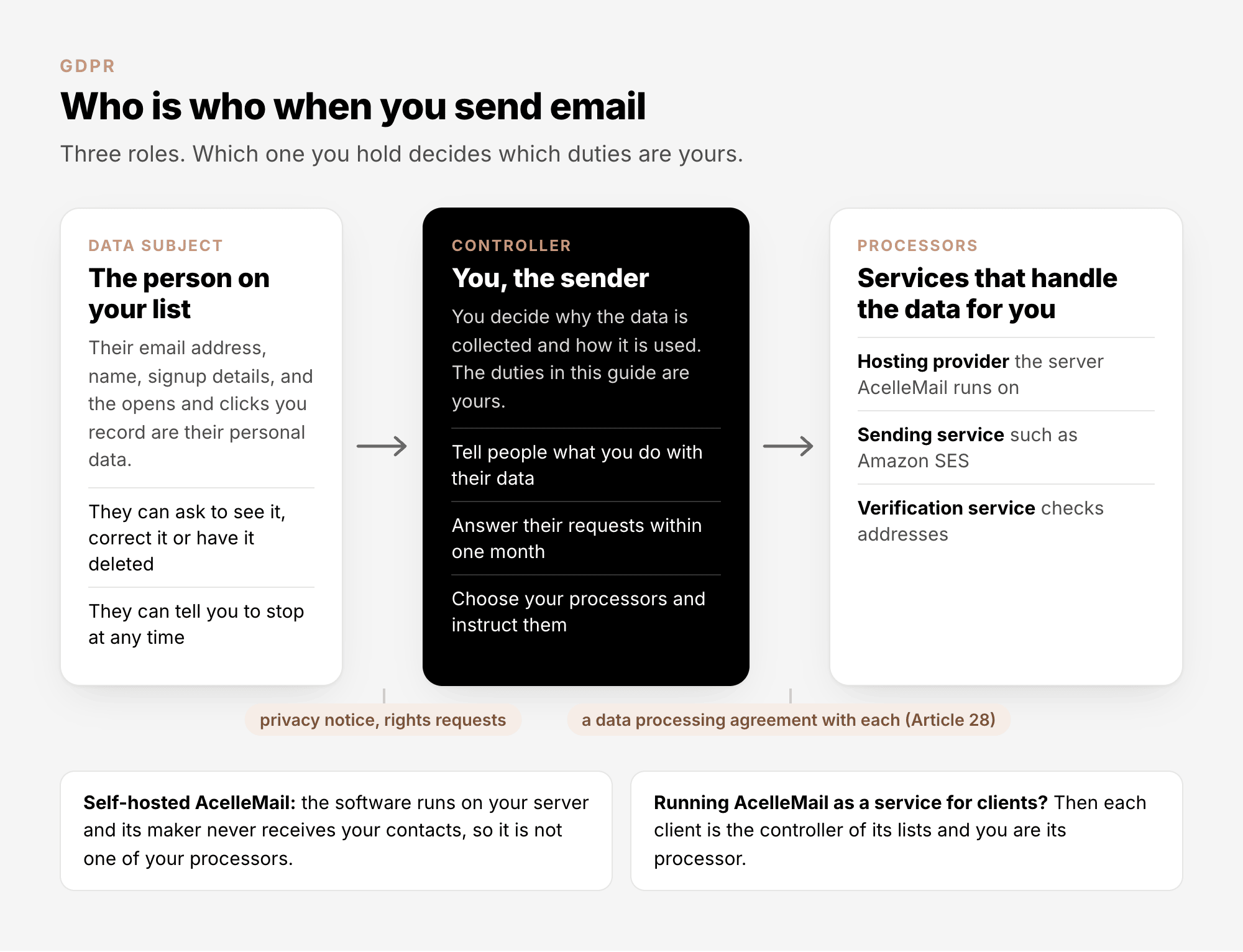
- The controller "determines the purposes and means of the processing" (Article 4(7)). If you decide
who goes on the list and what they are sent, that is you.
- A processor "processes personal data on behalf of the controller" (Article 4(8)). Your hosting
provider, your sending service and your email verification service are processors.
- The data subject is the person the data is about.
Two cases are worth spelling out. With self-hosted AcelleMail, the software runs on your own server and
its maker never receives your contacts, so the software vendor is not one of your processors. And if you
run AcelleMail as a service for other businesses, the roles shift: each client is the controller of its
own lists, and you are that client's processor.
3. Two laws, two questions: ePrivacy and the GDPR#
The GDPR does not decide whether you may send someone marketing email. An older law does, the ePrivacy
Directive, which every EU country has written into its
own legislation. You have to satisfy both:
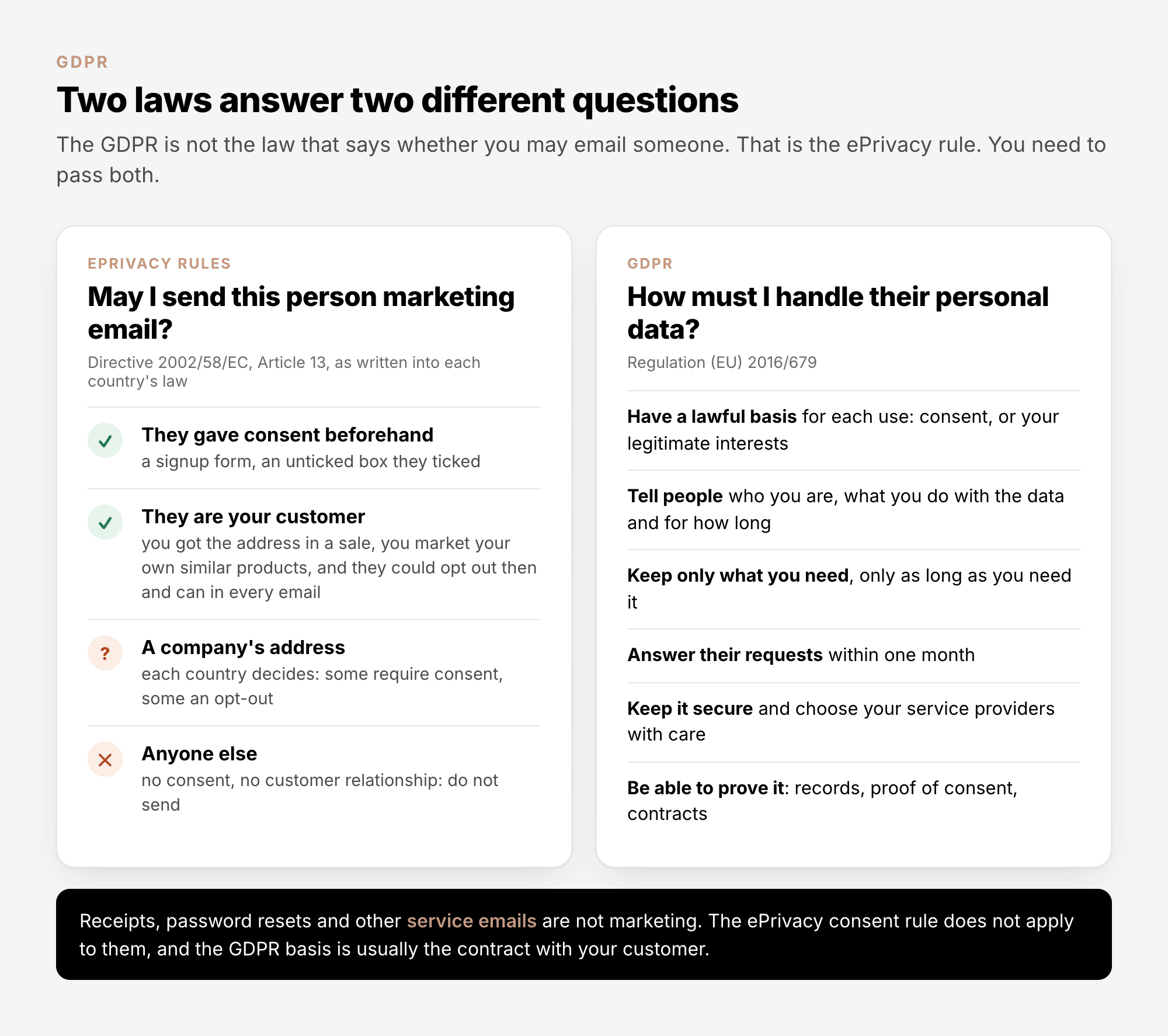
The ePrivacy rule is short. Marketing by email "may be allowed only in respect of subscribers or users
who have given their prior consent" (Article 13(1)). There is one exception, often called the soft
opt-in: a business that got an address from its own customer "in the context of the sale of a product or
a service" may use it "for direct marketing of its own similar products or services", as long as the
customer could refuse when the address was collected and can refuse in every message (Article 13(2)).
The consent rule protects individuals. How far company addresses are protected is left to each country
(Article 13(5)), so the rules for business-to-business email differ across Europe. Check the national
law of the country you mail to.
What counts as consent, and how to collect and prove it, is covered in Email Consent
Explained.
4. The seven principles#
Article 5 sets out seven principles. The rest of the GDPR is these seven ideas worked out in detail:
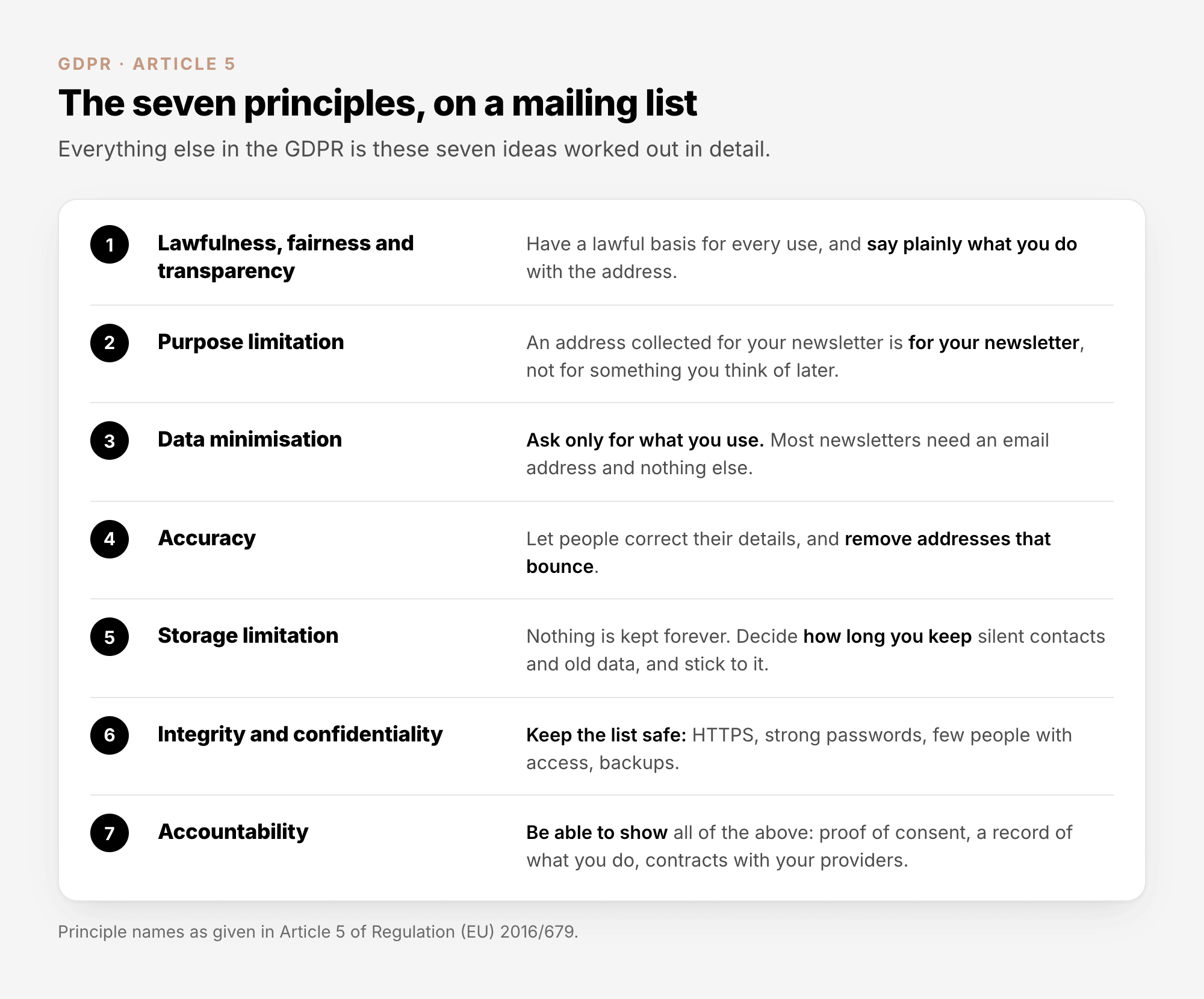
Three of them change what a sender does day to day:
- Data minimisation. Every field on a signup form is data you have to justify, protect, and hand
over when its owner asks. If you never use a phone number or a birthday, do not ask for one.
- Storage limitation. Decide how long you keep a contact who has gone silent, and what you keep of
someone who unsubscribed. "Forever" is not an answer the law accepts. The routine for removing silent
contacts is in Email List Quality Explained, section 6.
- Accountability. "The controller shall be responsible for, and be able to demonstrate compliance
with" the other six. Doing the right thing is half of it. The other half is being able to show it:
proof of consent, a record of what you do, and contracts with your providers (sections 9 and 10).
5. A lawful basis for every use#
"Processing shall be lawful only if and to the extent that at least one" of six legal grounds applies
(Article 6(1)). Three of them matter to a sender:
| Basis |
Fits |
What it asks of you |
| Consent, Article 6(1)(a) |
Newsletters and promotions to people who signed up |
Consent that meets the GDPR standard, proof that you have it, and a way out that is as easy as the way in |
| Legitimate interests, Article 6(1)(f) |
Marketing to your own customers under the soft opt-in, and to company addresses where national law allows it |
A check, kept on file, that your interest is not outweighed by theirs, and an immediate stop when they object |
| Contract, Article 6(1)(b) |
Receipts, delivery notices, password resets |
Only the data and the messages the contract needs, with no marketing folded in |
The GDPR itself says that "the processing of personal data for direct marketing purposes may be regarded
as carried out for a legitimate interest" (Recital 47). Read that with section 3 in mind. Legitimate
interests cannot stand in for a consent the ePrivacy rules demand. The ICO puts it bluntly for the UK,
where the ePrivacy rules are called PECR: "If PECR require consent, you must use consent as your lawful
basis as well"
(ICO).
Choose the basis before you collect anything, and name it in your privacy notice. You cannot change your
mind afterwards. The EU's data protection regulators, writing together as the European Data Protection
Board (EDPB), say a controller "cannot swap from consent to other lawful bases" when its consent turns
out to be flawed (Guidelines 05/2020 on
consent,
paragraph 123).
The difference between marketing and service email, and why you should keep the two apart, is in
Transactional vs Marketing Email.
6. Telling people what you do#
At the moment you collect an address, you owe its owner a set of facts (Article 13). For a mailing list,
a privacy notice needs to say:
- Who you are and how to reach you.
- What you will use the address for, and on which lawful basis.
- Who else receives the data: your sending service, your hosting provider, any other tool you copy
contacts into.
- Whether the data leaves the EU, and under which safeguard (section 9).
- How long you keep it, or how you decide.
- Their rights: to see, correct and delete their data, to object, and to withdraw consent at any time.
- That they can complain to a data protection authority.
The law asks for this "in a concise, transparent, intelligible and easily accessible form, using clear
and plain language" (Article 12(1)). In practice that is one honest line on the signup form, with a link
to the full notice next to the button.
One right has to be pointed out separately. The right to object to marketing must be "explicitly brought
to the attention of the data subject", at the latest in your first message (Article 21(4)). A clearly
worded unsubscribe link in every email does that job.
7. People's rights and the one-month deadline#
Anyone on your list can ask what you hold on them, have it corrected or deleted, or tell you to stop.
You must act "without undue delay and in any event within one month of receipt of the request" (Article
12(3)), and you may charge nothing unless a request is plainly excessive (Article 12(5)).
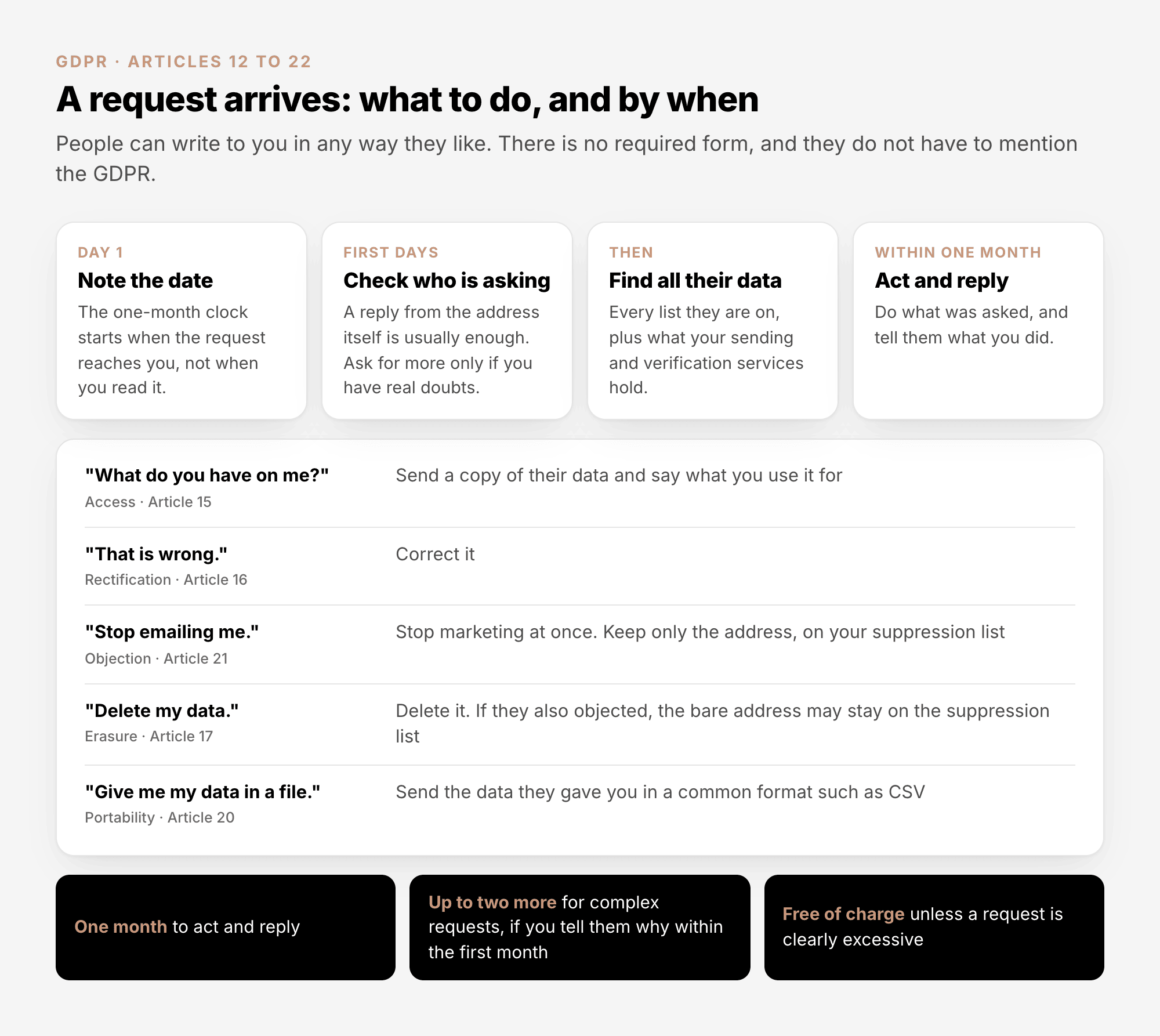
Two of these rights catch senders out.
The right to object is absolute. "Where the data subject objects to processing for direct marketing
purposes, the personal data shall no longer be processed for such purposes" (Article 21(3)). No reason
is needed and no exception applies. The ICO's wording: "This is an absolute right and there are no
exemptions or grounds for you to refuse"
(ICO).
Every unsubscribe click is such an objection, or a withdrawal of consent, so it has to take effect at
once.
Erasing someone is not the same as forgetting you must not email them. If you delete every trace of
a person who objected, nothing stops their address from coming back in your next import. Regulators
expect the opposite. In the ICO's words, "you should put their details onto a suppression or 'do not
contact' list, instead of deleting them", keeping "just enough information" to respect their choice
(ICO).
So when someone asks to be deleted, remove their data but keep the bare address on your suppression
list, and tell them you have done so.
In AcelleMail#
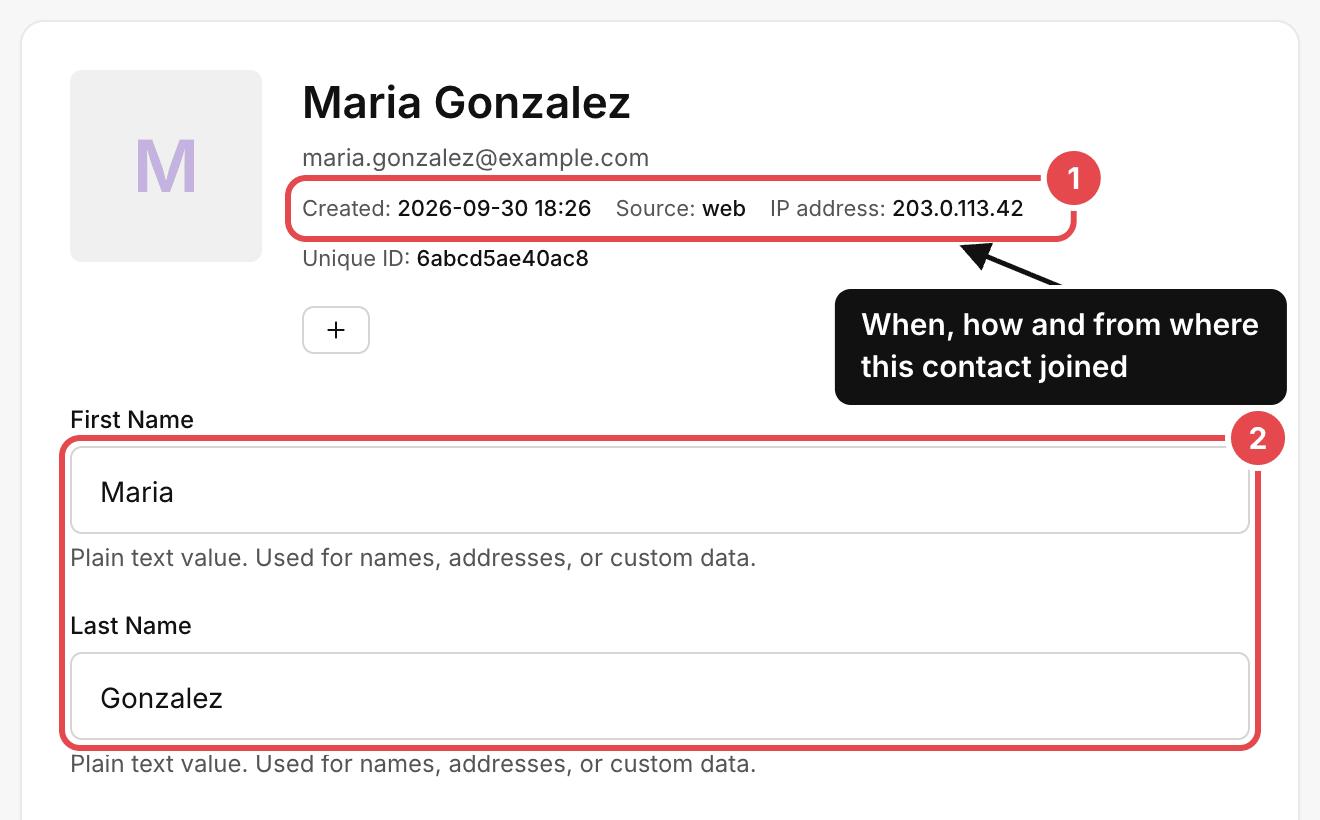
See and correct what you hold. Open Lists, open the list, go to Subscribers → View all, and
click the contact's email address. The contact's page shows how they joined (1) and every field you hold
(2). Change a field and click Save changes to correct it.
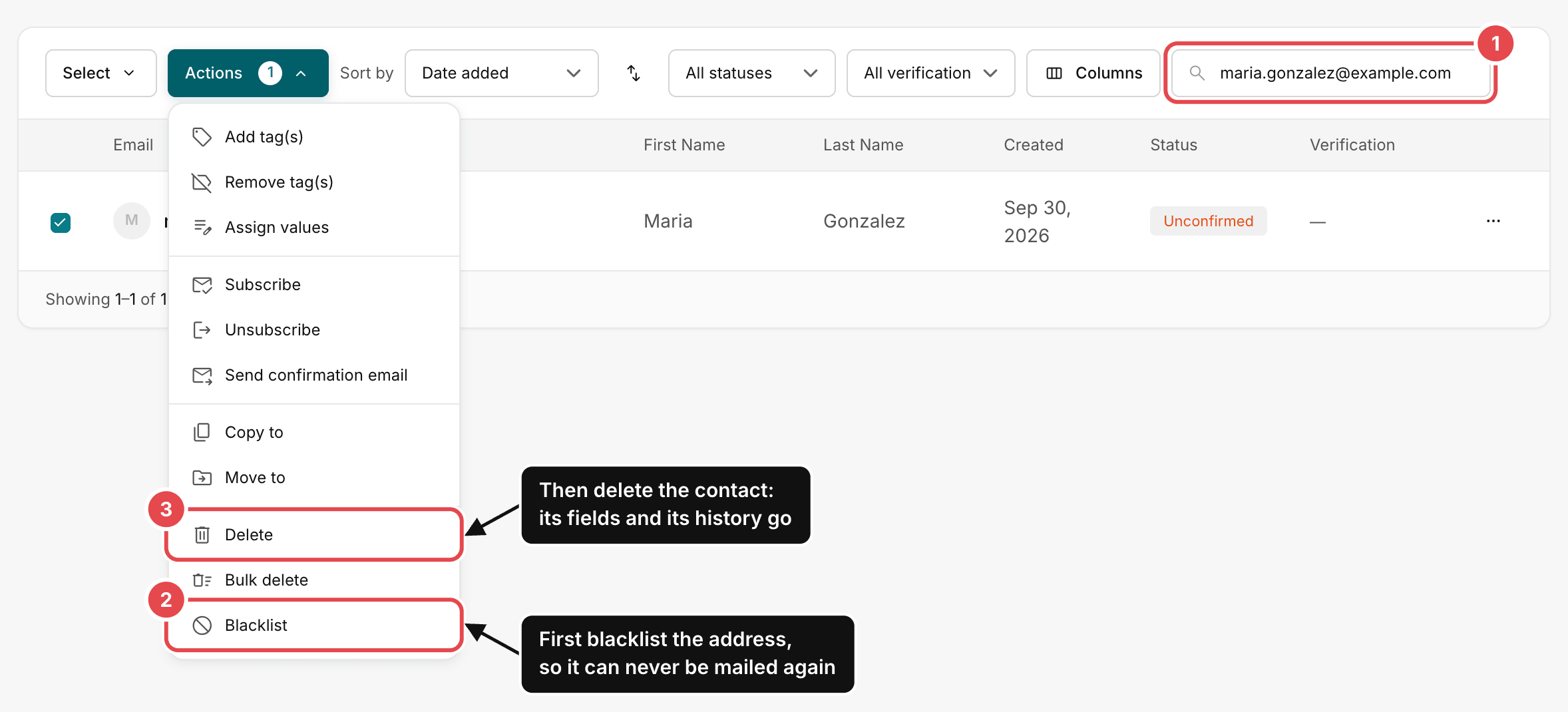
Erase a contact and keep the address suppressed. Do it in this order:
- In the list's Subscribers → View all, type the address into the search box (1) and tick the
contact.
- Open Actions and click Blacklist (2). The address goes onto your blacklist, the contact is
marked Blacklisted on all your lists, and your signup forms and imports can no longer bring it
back as an active contact. This runs in the background: reload the page until the contact's status
reads Blacklisted before you go on.
- Tick the contact again, open Actions and click Delete (3). The contact and its fields are
removed, along with its sending history, opens and clicks included. The address itself stays on your
blacklist, under Sending → Blacklist.
Repeat the search and the Delete step on every other list that holds the address. If your account
uses the Ads integration, do one thing before you delete: open the contact's page and click Purge from
ad audiences, which removes the address from every ad audience it was sent to.
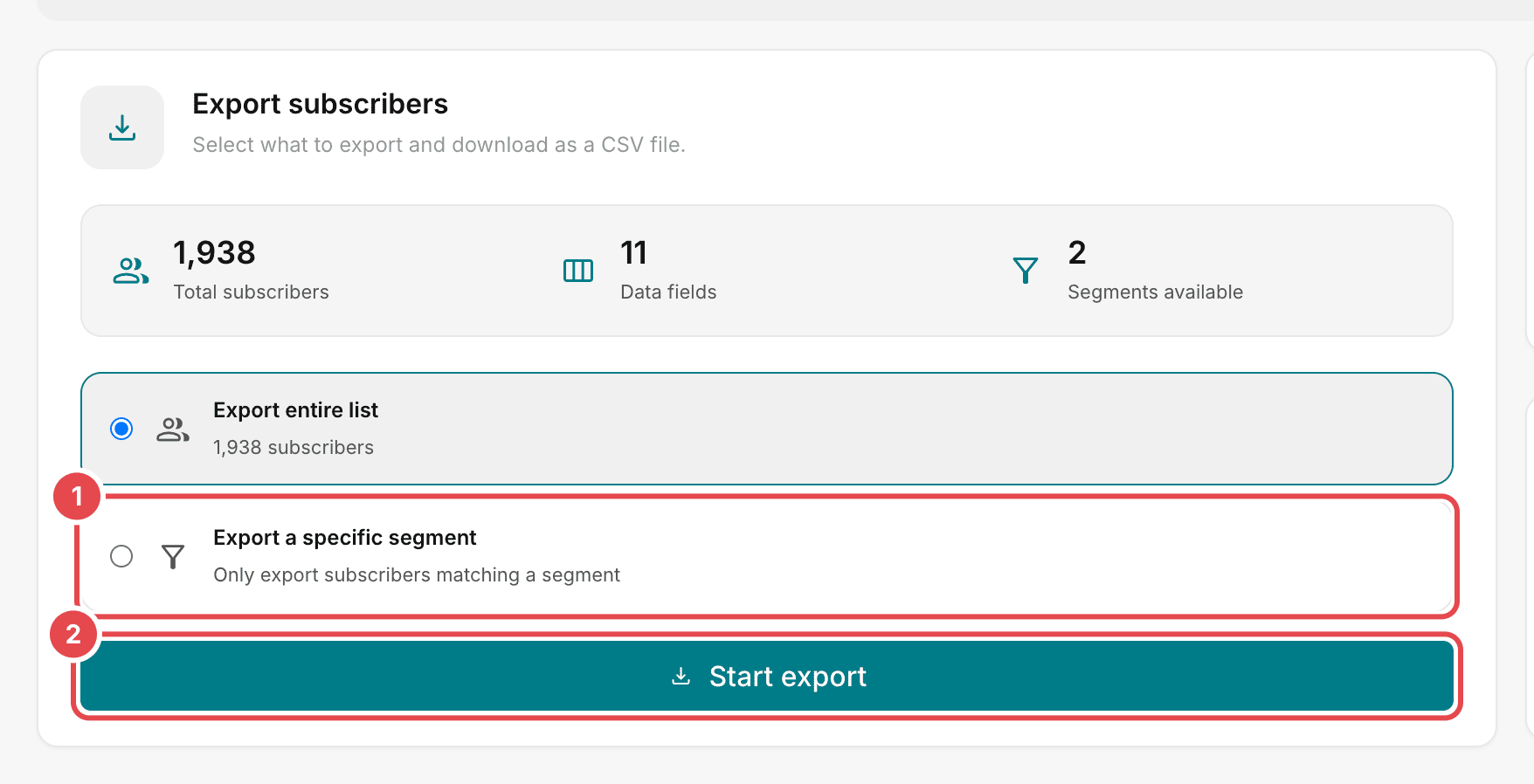
Hand over a copy. Open the list's Subscribers → Export. To export one person only, first make a
segment with a single condition, Email equal to their address (how to build a
segment). Then choose Export a specific segment
(1), click Start export (2) and download the CSV file.
The file holds the contact's field values, status and dates. It does not include tags, the signup
source, the IP address, or opens and clicks. When someone asks for everything you hold, add those from
the contact's page, where the Engagement card lists the campaigns and automations they were part of.
8. Tracking opens and clicks#
A record that a named person opened an email at a certain time, or clicked a certain link, is personal
data. Everything above applies to it: a lawful basis, a line in the privacy notice, a limit on how long
you keep it.
There is a second layer. The ePrivacy Directive also restricts storing information on a person's device,
or reading it from there, without consent (Article 5(3)), and the EDPB has said that this covers email
tracking. Its Guidelines
2/2023
describe the tracking pixel a sender adds "to detect when the receiver reads the email", and conclude
that for tracking pixels and tracking links alike "Article 5(3) ePD is applicable". How this is enforced
for email varies from one country to the next, so look up what your own regulator says.
What a careful sender does:
- Says in the signup form or the privacy notice that opens and clicks are measured, and why.
- Asks for consent to that measurement together with the subscription, where the regulator expects it.
- Sends without tracking when there is no need for it.
In AcelleMail, tracking is set per campaign. In the campaign's Setup step, open Advanced Settings
and untick Track opens, Track clicks, or both:
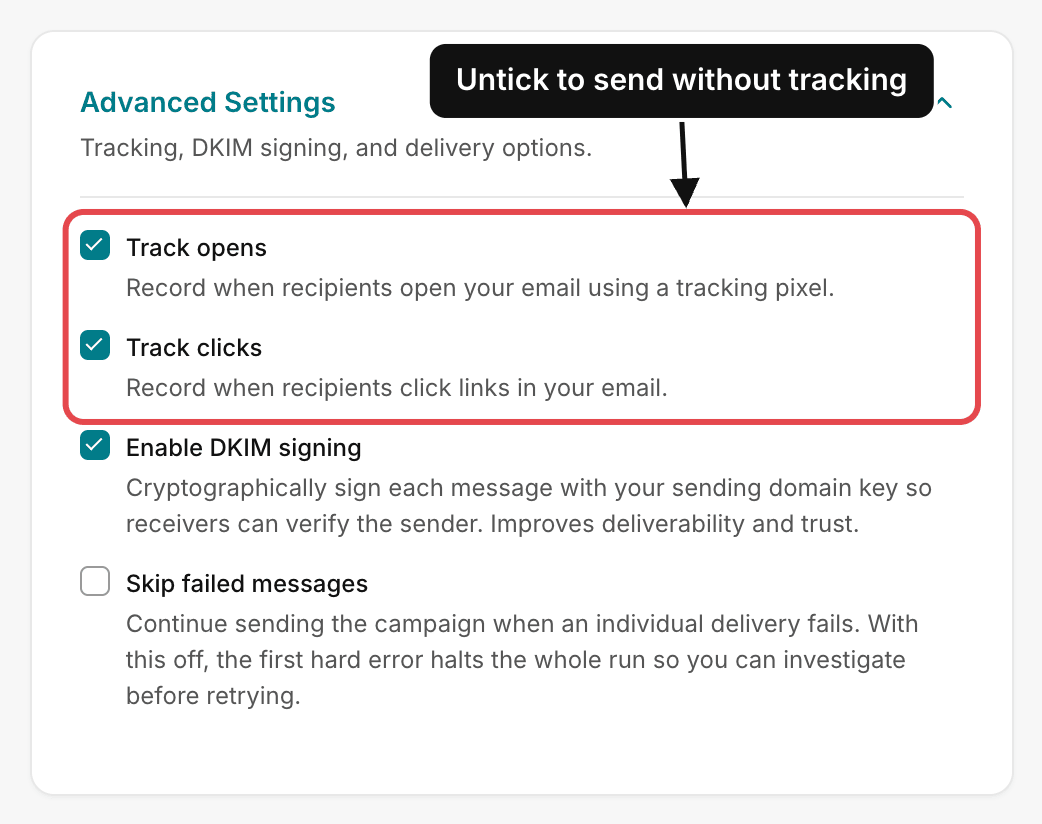
A campaign sent without tracking shows no opens or clicks in its report. What those numbers can and
cannot tell you is covered in Email Marketing Metrics
Explained.
9. Processors, transfers and security#
A contract with every processor. Processing by a processor "shall be governed by a contract" that
binds it to act only on your instructions, keep the data secure and delete or return it at the end
(Article 28(3)). Most services publish a data processing agreement, or DPA, that you accept online. List
your processors, accept each agreement, and keep a copy. For a typical AcelleMail setup the list is your
hosting provider, your sending service and your verification service, plus any tool you copy contacts
into.
Transfers outside the EU. Personal data may leave the EU and the wider European Economic Area only
under one of the routes in Chapter V. The two a sender meets:
- An adequacy decision. The European Commission has decided that the destination "ensures an
adequate level of protection" (Article 45). For the United States that covers only companies certified
under the EU-US Data Privacy Framework, adopted in July 2023. The framework has been challenged in
court, so check that it still stands and that your provider appears on the Data Privacy Framework
list.
- Standard contractual clauses. A contract text issued by the Commission (Article 46). It is usually
built into the provider's data processing agreement.
The GDPR does not require you to keep data inside the EU. But fewer transfers mean less paperwork, and
this is where self-hosting helps: with your AcelleMail server in an EU data centre and a sending service
that offers an EU region, most of your subscribers' data never leaves.
Security. You must apply "appropriate technical and organisational measures to ensure a level of
security appropriate to the risk" (Article 32). For a mailing list that comes down to a few habits:
- Serve AcelleMail over HTTPS, and keep it and its server up to date.
- Give accounts only to people who need one, and remove them when they leave.
- Back up the database, and protect the backups as carefully as the live data.
- Delete exported files once they have served their purpose. An old CSV in a downloads folder is an easy
way for a list to leak.
The server-side steps are in Securing Your AcelleMail
Install.
10. Records, breaches and fines#
Keep a record of what you do. Article 30 asks controllers to "maintain a record of processing
activities". Organisations with fewer than 250 employees are excused only if, among other things, their
processing is occasional, and a regular newsletter is not. One page is enough: why you hold the data,
whose data and which fields, who receives it, whether it leaves the EU, how long you keep it, and how
you protect it.
Report a breach within 72 hours. If subscriber data is lost, stolen or sent to the wrong people, you
must tell your data protection authority "without undue delay and, where feasible, not later than 72
hours after having become aware of it", unless the breach is unlikely to put anyone at risk (Article
33). When the risk to people is high, you must tell them as well (Article 34). A stolen laptop with an
exported list on it is a breach. So is a message sent from an ordinary mail program with the whole list
visible in the To line.
The fines. Breaking the principles, the consent rules, people's rights or the transfer rules can
cost "up to 20 000 000 EUR, or in the case of an undertaking, up to 4 % of the total worldwide annual
turnover of the preceding financial year, whichever is higher" (Article 83(5)). Failures on processor
contracts, records, security and breach reporting fall in a lower band of 10 million euros or 2%
(Article 83(4)). Regulators can also order you to stop processing. And any person who receives your
email can lodge a complaint with their authority, free of charge (Articles 77 and 57(3)). You can find
yours in the EDPB's list of members.
11. Common mistakes#
| What you see |
Why it is a problem |
What to do |
| "We rely on legitimate interests" for email to people who never signed up |
The ePrivacy rules ask for consent first, and legitimate interests cannot replace it |
Send only with consent, or within the soft opt-in for your own customers |
| Contacts deleted the moment they unsubscribe |
Nothing stops the address returning in the next import |
Keep the address suppressed: status Unsubscribed, or on your blacklist |
| A signup form that asks for a phone number and a birthday "just in case" |
Data minimisation: you may collect only what you use |
Ask for the email address, and add fields only when you use them |
| No agreement with the sending service |
Article 28 requires a contract with every processor |
Accept the provider's data processing agreement and keep a copy |
| A privacy notice that names no recipients and no retention period |
Article 13 lists both |
Add your processors, any transfers, and how long you keep contacts |
| A deletion request ignored because it came as a reply to a newsletter |
No form is required, and the one-month clock is already running |
Treat any message that asks as a request, and note the date |
| "It is B2B, so the GDPR does not apply" |
A named work address is personal data |
Apply the GDPR in full, and check the national email rule for company addresses |
| Old exports kept in inboxes and downloads folders |
Each copy is a breach waiting to happen |
Delete exports after use |
Summary#
- The GDPR applies if you are in the EU, or if you aim your offers at people who are.
- You are the controller. Your hosting, sending and verification services are your processors.
- Whether you may email someone is an ePrivacy question: prior consent, or the soft opt-in for your own
customers.
- How you handle their data is a GDPR question, and its seven principles run through everything else.
- Pick a lawful basis before you collect, and name it in your privacy notice.
- Tell people who you are, what you do with their data, who receives it and how long you keep it.
- Answer every request within one month. An objection to marketing takes effect at once.
- When you erase someone who objected, keep the bare address suppressed. In AcelleMail: Blacklist,
then Delete.
- Opens and clicks are personal data, and tracking them falls under the ePrivacy rules as well.
- Sign an agreement with every processor, know where your data travels, and keep the list secure.
- Keep a one-page record, and report a breach within 72 hours.
Terms used here are defined in the Email Marketing Glossary.
