A list is only worth the people on it who asked for your mail. Every other address costs you twice. It
brings nothing back, and it tells mailbox providers such as Gmail and Outlook.com that nobody looks
after your list, which affects where they file your mail for everyone else.
This guide covers:
- Where good lists come from
- Why you should never buy, rent or scrape a list
- How a good address goes bad
- Spam traps
- Addresses to handle with care
- The routine that keeps a list clean
- Keeping a list clean in AcelleMail
It ends with the most common mistakes and a one-screen summary.
1. Where good lists come from#
Good lists are built one signup at a time, and every good source passes the same test: the person
typed their own address because they wanted to hear from you.
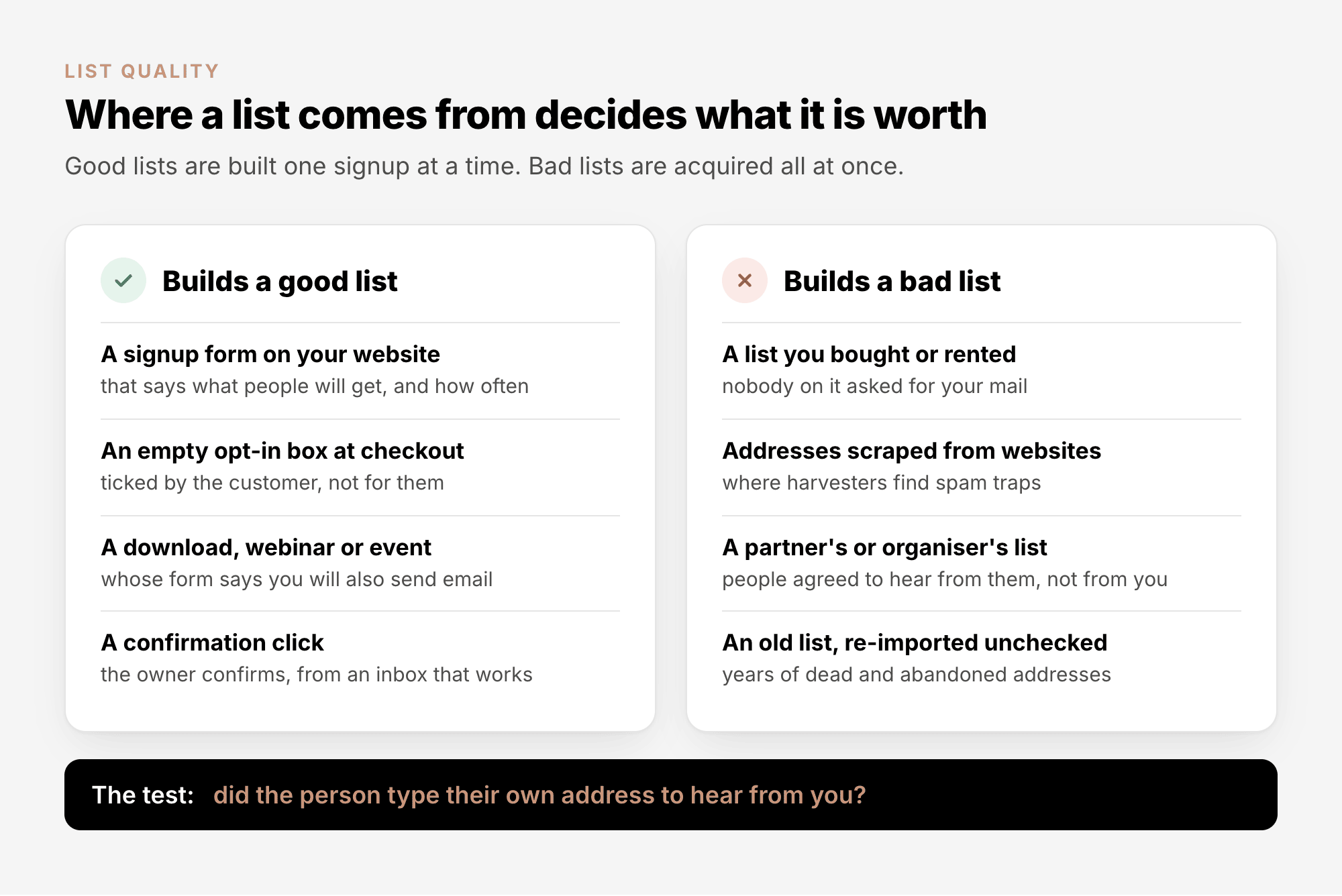
Some sources pass the test only on paper. M3AAWG, the industry's anti-abuse working group, names
incentivised signups, social-media signups, refer-a-friend forms and sweepstakes as higher-risk: they
"prioritize any email address over the right email address". If you collect addresses this way, confirm
each one with double opt-in (a confirmation email the person must click) before you send anything else.
Whatever the source, keep a record of how each person joined. In many countries the law asks you to
prove it. Email Consent Explained covers what counts
as consent and where AcelleMail records it.
2. Why you should never buy, rent or scrape a list#
A list you buy or rent, or scrape together from websites, fails in four ways at once.
Nobody on it asked for your mail, so people press "Report spam". Google's sender guidelines are
blunt: "Don't purchase email addresses from other companies." People who did not sign up "might mark
your messages as spam, and future messages to these recipients will be marked as spam." Yahoo's
guidelines say the same: "Don't purchase mailing lists".
It carries spam traps. Address harvesters, programs that copy addresses from web pages, pick up the
trap addresses planted there for exactly that purpose (section 4). M3AAWG: "Pristine trap hits may be a
strong indicator of the presence of purchased lists."
The consent is not yours. The UK regulator, the ICO, says consent on a bought list counts only if it
"named your organisation (not just 'trusted partners' or similar)". A published address is not an
invitation either: "Just because someone's contact details are publicly available, it doesn't mean
they've consented to your direct marketing." The rules in the US, the EU and Canada are compared in
Email Consent Explained.
"Verified" does not mean "wanted". A seller may promise the list has been checked. Verification only
tells you an address exists; Spamhaus, which runs some of the most widely used blocklists, points out
that it "does nothing to verify the permission of the recipient".
The same goes for a list from a trade show or a partner: those people agreed to hear from someone else.
To reach them, ask the organiser or partner to point their own audience to your signup form, and add
only the people who sign up.
3. How a good address goes bad#
Even a perfectly built list gets worse on its own. People change jobs, switch providers and stop
checking old inboxes; providers close accounts nobody uses.
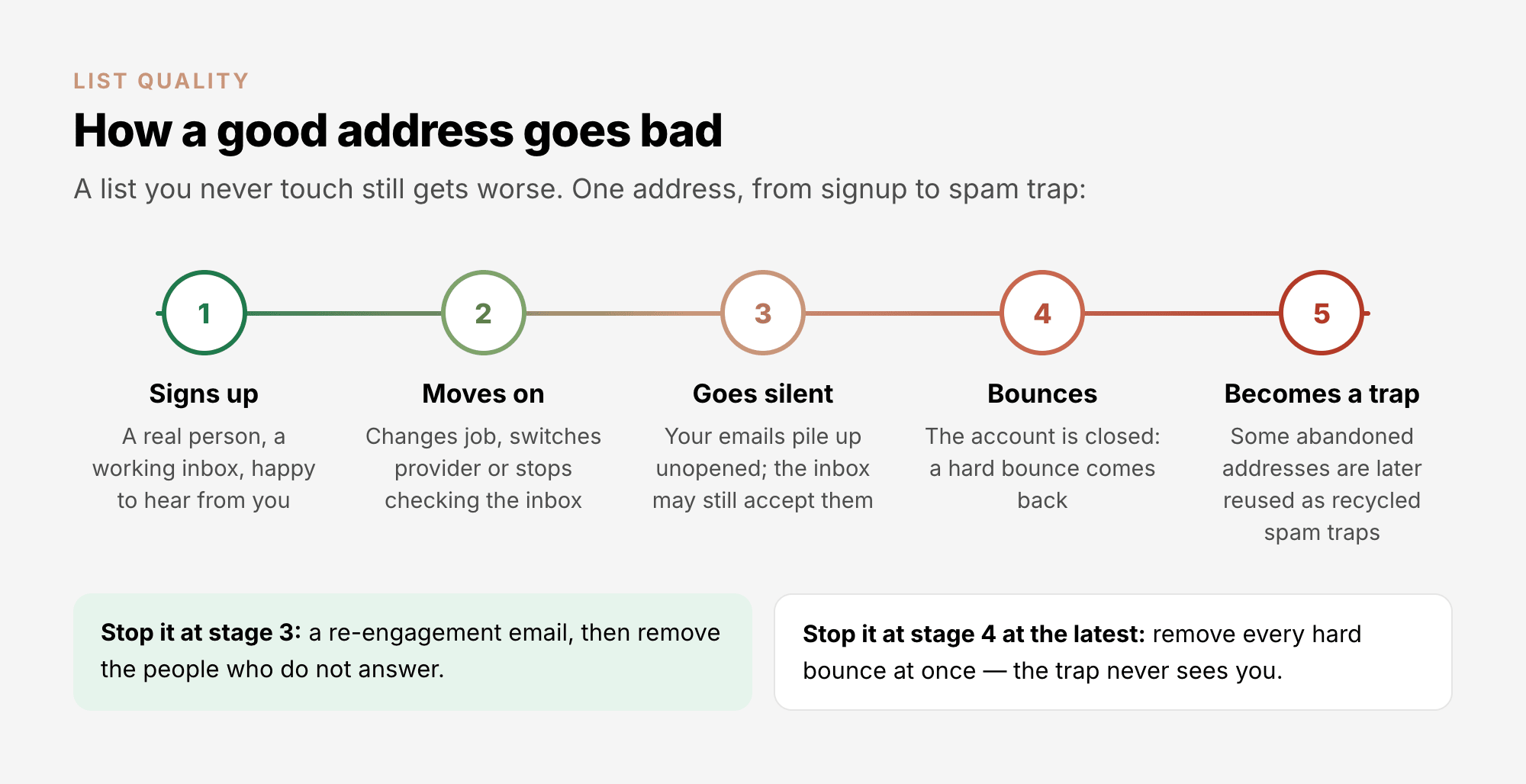
The last stage is the dangerous one. Spamhaus explains how providers turn abandoned addresses into
traps: mail to them is first "rejected with a hard bounce for a period of time, often 12 months or
more", then "the addresses are silently turned back on in the form of spamtraps". M3AAWG suggests at
least 12 months of inactivity before an address is reused this way.
Two things follow:
- Remove hard bounces straight away, and recycled traps never see you. An address bounces for months
before it becomes a trap.
- A list you have not mailed for a long time is the riskiest list you have. Its addresses may have
bounced all that time and come back as traps, and you never saw the bounces. M3AAWG calls for special
care whenever people get mail "who have not been sent to for an extended time". Spamhaus's remedy for
a neglected list is "list validation or a permission pass campaign to reconfirm opt-in status": verify
the list first (section 7), then ask the people on it once whether they still want your mail, and keep
only those who say yes.
4. Spam traps#
A spam trap is an email address no person reads, run by a mailbox provider or a blocklist operator to
catch senders with poor list habits. Nobody ever asked for mail at a trap address, so every message that
reaches one tells its operator something about how you collect and keep addresses. The operators never
reveal which addresses are traps.
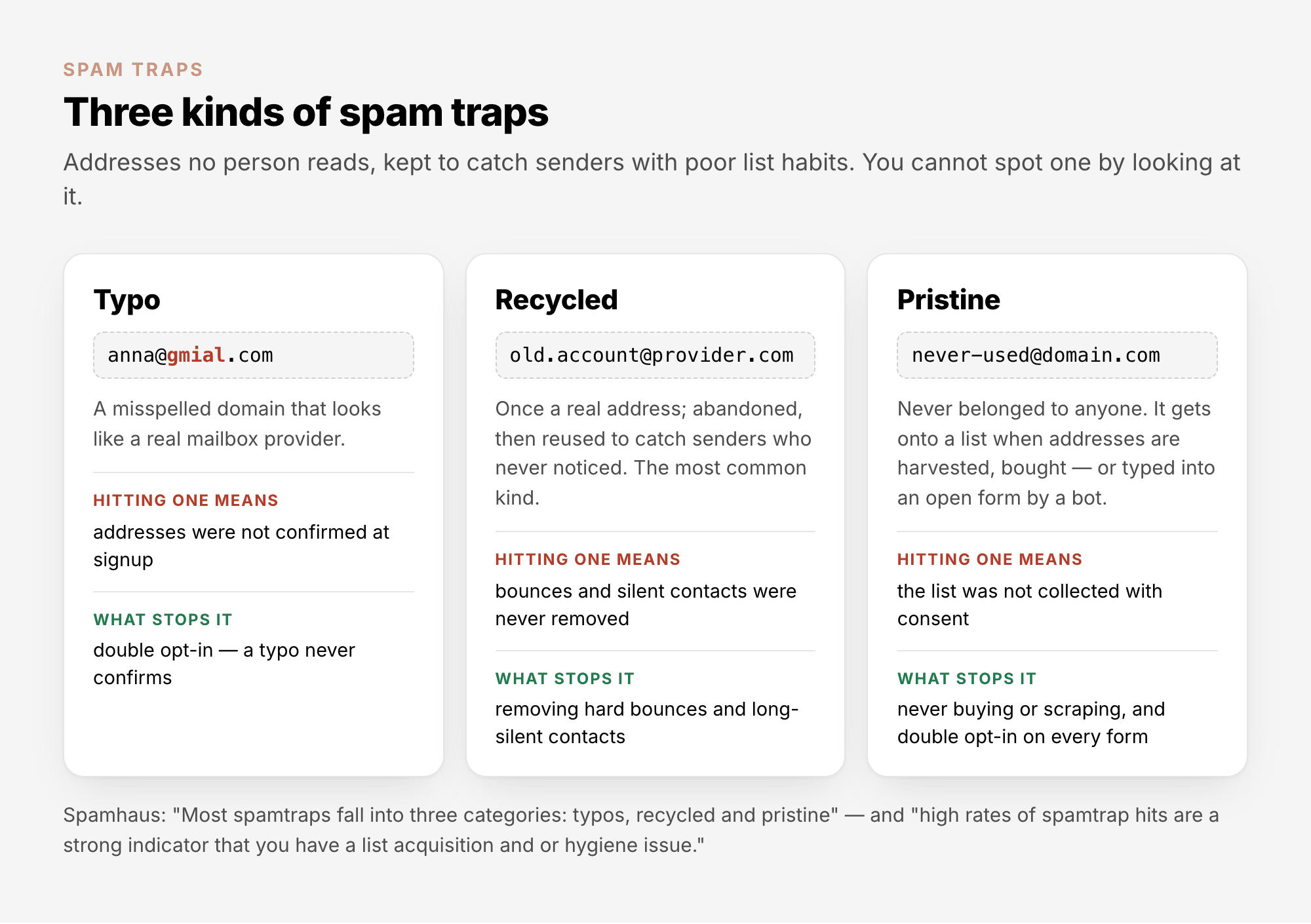
What happens when you hit traps depends on who runs them and how often you hit them. Trap data is "often
used and redistributed via DNS blacklists (DNSBLs) and other reputation systems" (M3AAWG), so the result
can be anything from more of your mail landing in spam to your sending IP address or domain being
listed. Once listed, your mail is refused by every provider that checks that list.
Don't go looking for the traps themselves. Spamhaus asks senders to "view spamtraps as proof of a data
collection or hygiene issue", because "attempting to locate and remove traps only treats the symptom". A
verification service cannot find them for you either: a recycled trap accepts mail like any working
address, and Spamhaus notes that verification "won't catch many typo traps". The fix is always at the
source: consent, double opt-in and the routine in section 6.
5. Addresses to handle with care#
Some addresses are real but still do not belong on a marketing list, or belong there only when someone
clearly asked:
| Kind |
Example |
Why it needs care |
What to do |
| Role address |
info@, sales@, support@ |
Reaches a team or a help desk, so no one person asked for your mail, and whoever reads it next may press "Report spam" |
Keep only if someone signed up with it and confirmed |
| Technical role address |
postmaster@, abuse@, hostmaster@ |
Mailboxes every domain is expected to have (RFC 2142), often published in domain registration records, so harvesters collect them. Spamhaus: they "should almost NEVER be on a marketing mailing list" |
Remove |
| Disposable address |
An address from a temporary-inbox service |
Made to be thrown away after one signup |
Remove. Many verification services mark these Risky |
| Typo |
[email protected] |
Never reaches the person, and some typo domains are traps |
Double opt-in stops them: a typo never confirms |
| Catch-all domain |
Any address at a company whose mail server accepts every name |
The server accepts every address, so a verification service cannot tell a real mailbox from an invented one |
Keep only if the person confirmed or clicked recently |
6. The routine that keeps a list clean#
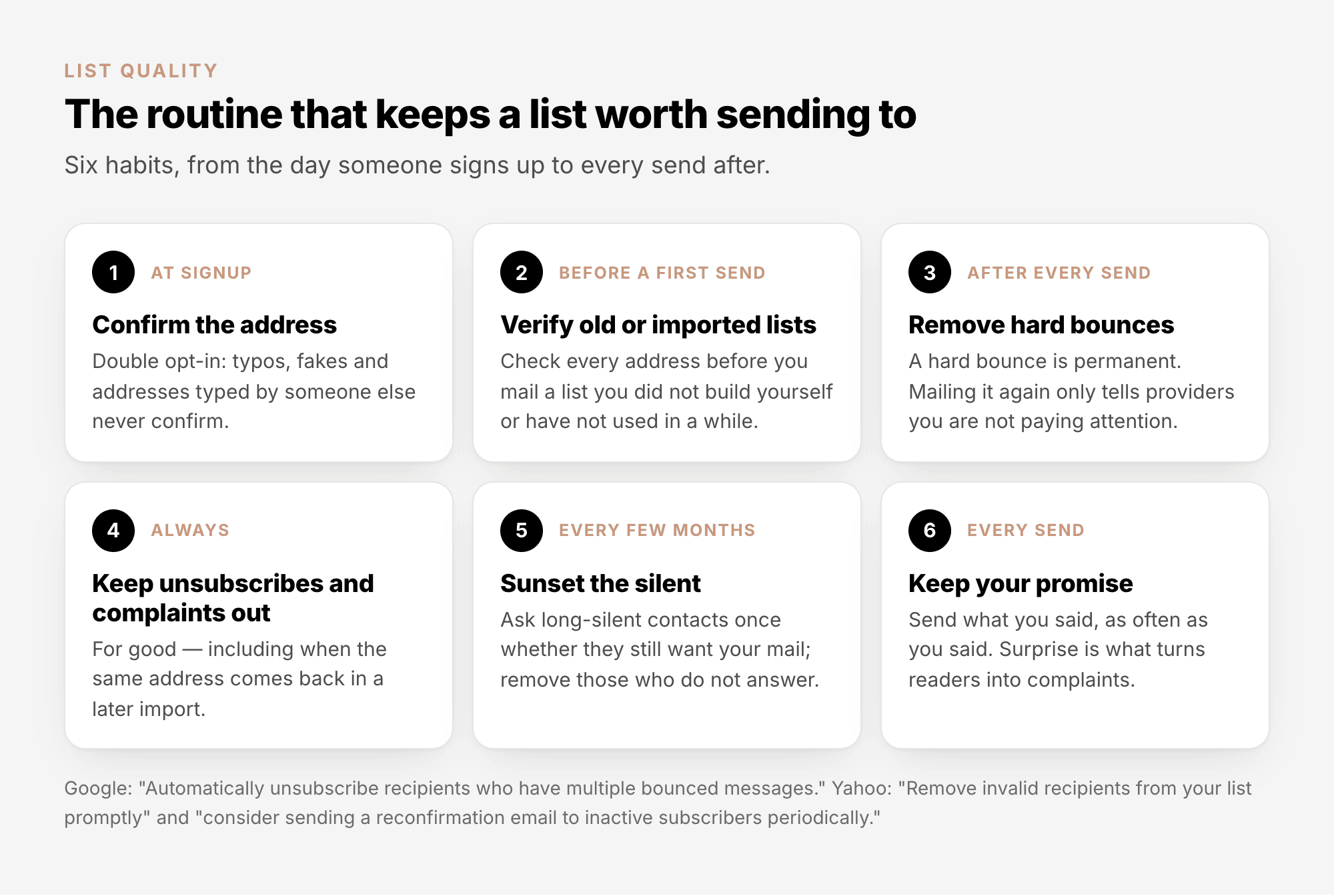
Mailbox providers ask for these habits in writing. Google's sender guidelines: "Confirm each recipient's
email address before subscribing them", "Periodically send messages to confirm that recipients want to
stay subscribed" and "Consider unsubscribing recipients who don't open or read your messages." Yahoo's:
"Monitor hard and soft bounces as well as inactive recipients."
How long is "silent"? There is no official number; it depends on how often you send. Six months
without a click is a long silence for a weekly newsletter, but only two emails for a quarterly one.
Judge by clicks as well as opens: Apple's Mail Privacy Protection "prevents senders from seeing if
you've opened the email message they sent you", so opens say little about people who read in Apple Mail.
Clicks still count: the protection "does not extend to links".
When you remove silent contacts, unsubscribe them rather than blacklist them: someone who went quiet may
want to sign up again one day.
7. Keeping a list clean in AcelleMail#
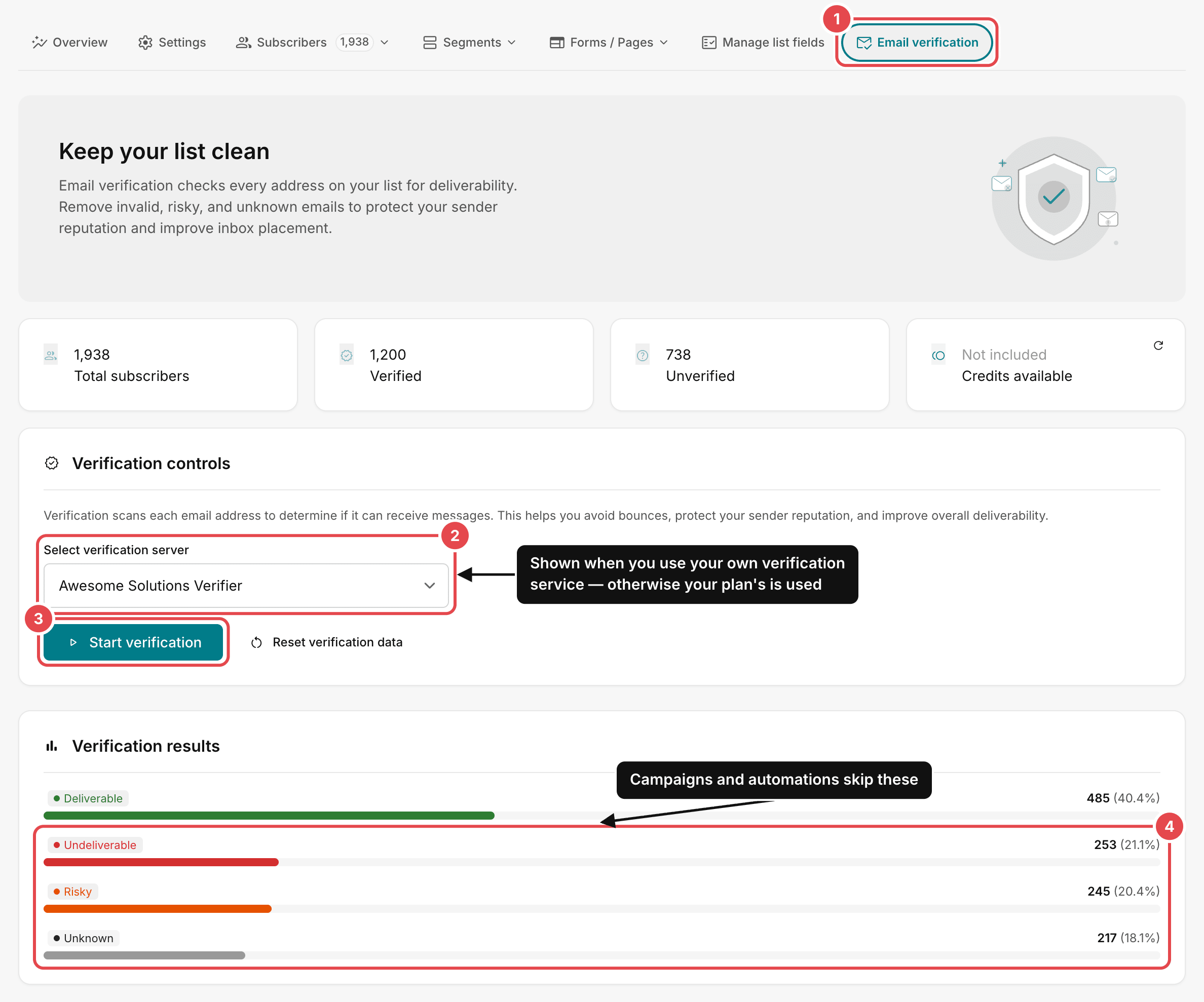
AcelleMail does part of the routine for you. Campaigns and automations go only to contacts whose status
is Subscribed. Once a list has been verified, they also skip every contact whose result is not
Deliverable; contacts that have not been checked yet still get mail.
Verify a list#
Verification asks a service whether each address has a working mailbox, without sending anything. Run it
before the first send to a list you did not build yourself, and on any list you have not mailed for a
while.
- Open Lists, open the list, and go to its Email verification tab (1).
- If your account uses its own verification service, choose it under Select verification server
(2). You connect that service under Sending → Email verification. If your plan provides the
service, this choice is not shown.
- Click Start verification (3). Checks use your plan's verification credits; the Credits
available card shows how many are left.
Start verification checks only the addresses that have not been checked yet, such as new signups and
new imports. To check the whole list again, for example before mailing it after a long break, click
Reset verification data first. That deletes the earlier results, so every address uses a credit
again.
When the check finishes, Verification results (4) sorts the list into four groups. The verification
service decides what goes where, so the same address can be Risky with one service and Deliverable with
another:
| Result |
What it means |
What AcelleMail does |
| Deliverable |
The service found a working mailbox |
Sends to it |
| Undeliverable |
No working mailbox: the address or its domain does not exist, or the account is closed |
Skips it — blacklist it to keep it out for good |
| Risky |
The address may accept mail, but the service flags a problem: a disposable or role address, a catch-all domain, a suspected trap |
Skips it |
| Unknown |
The service got no clear answer, for example because the receiving server did not respond |
Skips it |
A Deliverable result proves that a mailbox works, not that its owner asked for your mail. Verification
cleans a list; it cannot turn a bought list into a good one.
Blacklist the undeliverable#
Campaigns skip Undeliverable contacts only while they stay on the list with that result. Delete one, and
the next import of an old file brings it back as a new, unchecked contact, and AcelleMail mails
unchecked contacts. Blacklist them instead:
- Open the list's Subscribers → View all.
- Set the filters to Subscribed and Undeliverable (1).
- Choose Select → All subscribers (2).
- Open Actions, click Blacklist (3) and confirm.
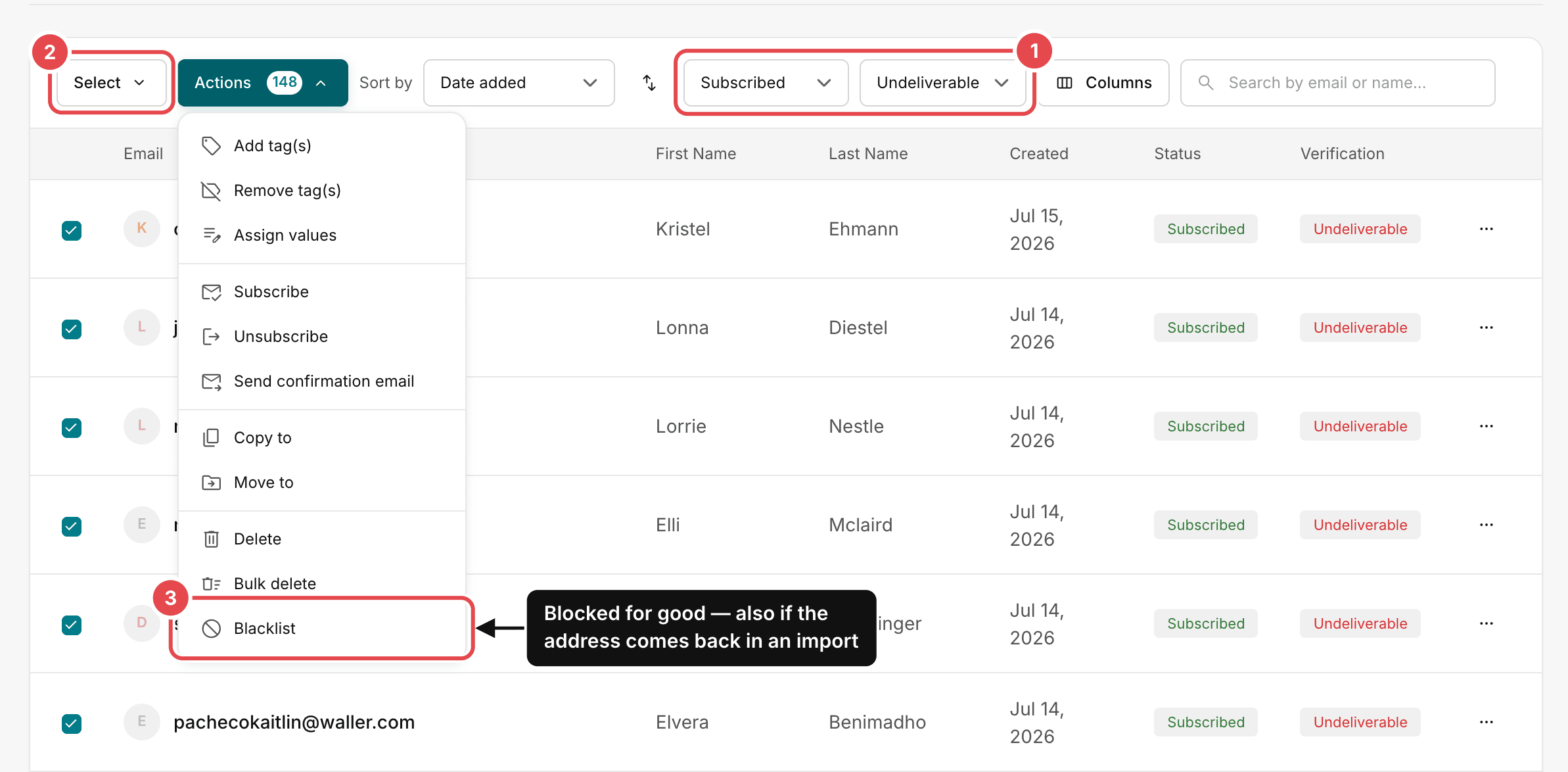
The message that follows says how many contacts are being moved. If that is fewer than you selected, run
the action again: with the Subscribed filter on, only the contacts still left are shown.
A blacklisted address is marked Blacklisted on all your lists, marked again whenever it arrives in
an import, and refused by your signup forms. Your blacklist is under Sending → Blacklist.
Bounces, complaints and unsubscribes#
These are handled as they arrive, as long as bounces and complaints can reach AcelleMail. Section 6 of
Email Deliverability Explained shows how that is set up.
- Hard bounces mark the contact Blacklisted on all your lists, automatically.
- Soft bounces are left alone, because the next attempt may work. If the same address soft-bounces
send after send, blacklist it yourself: Google advises senders to "automatically unsubscribe
recipients who have multiple bounced messages". Each campaign lists its bounces under Sending logs →
Bounce log; Hard Bounce vs Soft Bounce explains the
codes.
- Complaints reported by a sending service such as Amazon SES mark the contact Spam reported,
and campaigns skip it. Complaints read by a feedback loop handler (a mailbox your administrator sets
up to receive complaint reports) are only logged, under Sending logs → Feedback log. Find each
address in the list's subscribers and blacklist it yourself.
- Unsubscribes take effect at once: the contact is marked Unsubscribed and gets no more
campaigns.
8. Common mistakes#
| What you see |
Why it is a problem |
What to do |
| A bought, rented or scraped list |
Nobody asked for your mail, and it carries pristine traps |
Build your own list; ask partners to promote your signup form |
| A long-neglected list mailed in one go |
Some addresses may have become recycled traps meanwhile |
Verify it, then send a permission pass and keep those who confirm |
| Undeliverable contacts deleted |
An import of an old file brings them back unchecked, and AcelleMail mails unchecked contacts |
Blacklist them instead |
| "Deliverable" treated as permission |
Verification proves a mailbox works, not that its owner asked |
Consent and double opt-in; verification only cleans |
| Hunting for spam traps |
Owners never reveal them, and removing one treats the symptom |
Fix how addresses are collected and kept |
| Role addresses imported from a directory |
Nobody in particular asked, and the next reader may report you |
Keep only role addresses someone signed up with and confirmed |
| Soft bounces ignored for months |
An address that soft-bounces every time is usually abandoned, like a full mailbox nobody empties |
Blacklist addresses that soft-bounce send after send |
Summary#
- A good list is built one signup at a time: the person typed their own address to hear from you.
- Never buy, rent or scrape a list. Nobody on it asked, it carries spam traps, and its consent is not
yours.
- Lists decay on their own. Remove hard bounces at once, and never mail a long-neglected list without
cleaning it first.
- Spam traps show how you collect and keep addresses. Don't hunt them; fix the source.
- Handle role, disposable, typo and catch-all addresses with care.
- Confirm at signup, verify old and imported lists, remove bounces, keep unsubscribes and complaints
out, and sunset silent contacts.
- In AcelleMail, verify from the list's Email verification tab. Campaigns and automations then skip
Undeliverable, Risky and Unknown contacts. Blacklist the undeliverable ones instead of deleting them.
Terms used here are defined in the Email Marketing Glossary.
