

Mail apps can now write their own short version of your email. A reader may see a summary in the message list, above a thread (a conversation of several emails), or in a priority view. They may also get an answer through search or voice.
As of November 2026, these features are reaching more accounts, although each has its own limits. In October and November 2026, Google began bringing summaries, AI Inbox and Gmail Live to more Workspace users, while Microsoft began retiring Copilot's Prioritize feature in Outlook. Sections 2 and 4 give the dates and link to each announcement.
This guide explains where summaries appear, who sees them, and what senders can control. It uses the providers' own pages and examples from Brightside Coffee, an invented shop selling coffee beans and grinders.
This guide covers:
- Four places inbox AI can show your email
- Gmail: summaries, AI Inbox, search and voice
- Apple Mail: summaries in place of the first lines
- Outlook: Copilot summaries on request
- Yahoo Mail: summaries and Catch up
- What the AI reads and leaves out
- What you can and cannot control
- What changes in your reports
- Checking your emails in AcelleMail
It ends with the most common mistakes and a one-screen summary.
1. Four places inbox AI can show your email
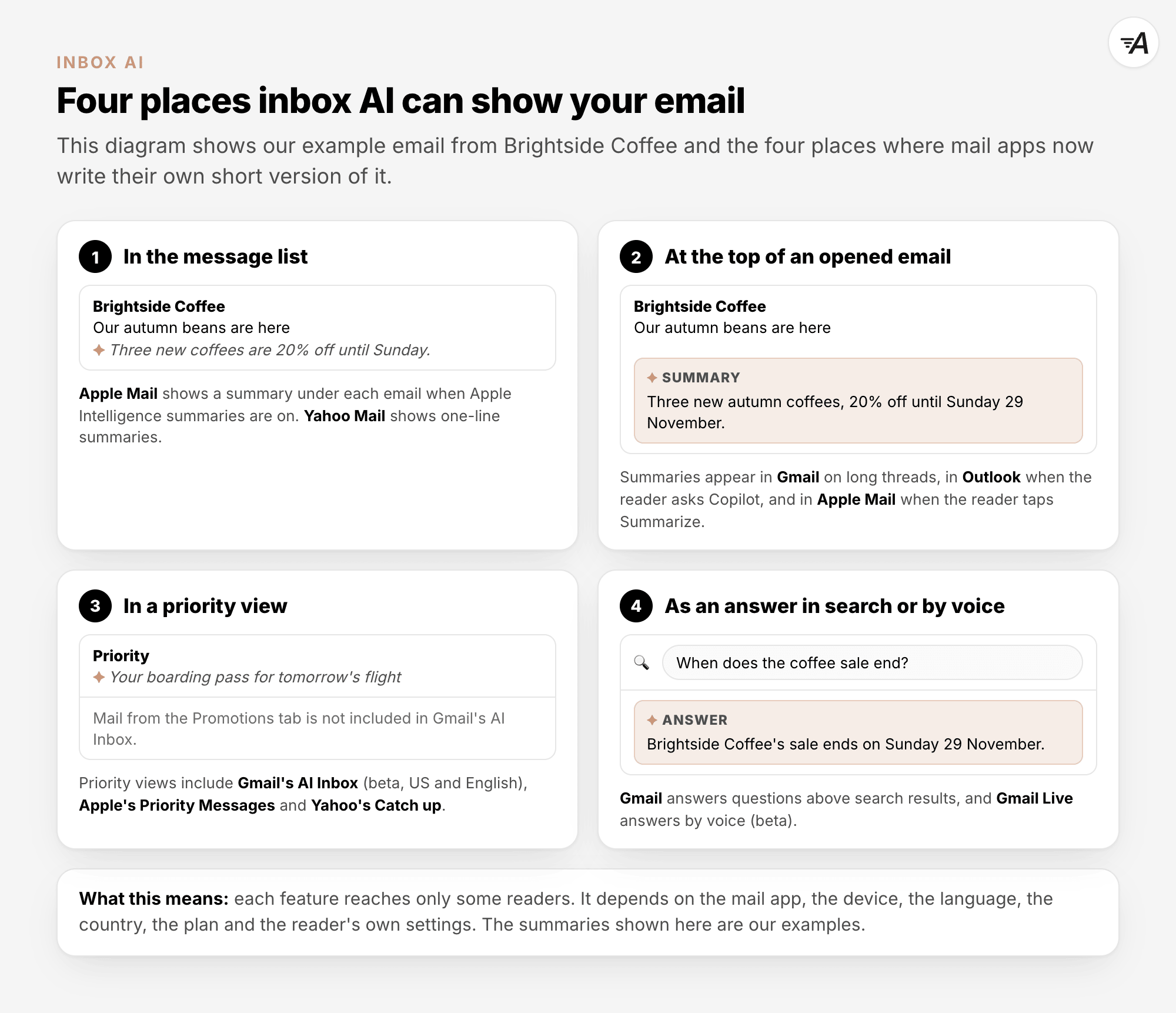
The providers describe four main places where readers may see an AI version of an email:
- A summary appears in the message list before the reader opens the email. Apple Mail and Yahoo describe this kind of preview.
- The reader sees a summary above an opened email or thread. Gmail, Apple Mail and Outlook describe versions of this feature.
- A priority view brings selected messages or topics together. Examples include Gmail AI Inbox, Yahoo Catch up and Apple Priority Messages. Apple's Priority Messages appear at the top of the inbox.
- An answer uses information from emails found through search or a voice request. Gmail describes both kinds of answer.
These features have different purposes, and the rules about availability vary. A reader who has one feature may not have another, even within the same app. Google says: "Access to Gemini features in Gmail varies based on account type." Its feature table also lists the languages and regions where each feature is available. Gmail Help
For Brightside Coffee, this means a customer may see the offer in several short versions. The shop cannot assume that every customer sees the same wording.
The diagram groups these four places by where the reader sees the AI version.
2. Gmail: summaries, AI Inbox, search and voice
Gmail conversation summaries appear at the top of an open thread. Google's feature table says Gmail can summarise long conversations "when you open a thread". Its help page describes only a summary that the reader asks for, with "Summarize this email" at the top of the thread. Google's pages do not say when a summary appears without a request. Gmail Help, Gmail feature availability
Google announced in January 2026: "AI Overview conversation summaries are rolling out today for everyone at no cost." That rollout began in the US and in English. Some Workspace accounts are still getting summaries. On 10 November 2026, Google began a gradual rollout to more Workspace users aged 18 and older. Its help page says the feature "is available to all Gmail users globally", and Google's pages do not explain the difference. The November announcement says these features are on by default and can be turned off. That describes the setting. It does not mean every thread shows a summary without a request. Google, January 2026, Google Workspace Updates
Supported languages for conversation summaries include English, French, German, Italian, Japanese, Korean, Portuguese and Spanish. Readers must turn on "Smart features in Gmail, Chat, and Meet" and "Smart features in Google Workspace". Smart feature settings are off by default in the European Economic Area, Japan, Switzerland and the UK. Some readers therefore see no summaries until they turn on those settings. Gmail feature availability, Smart features and controls
AI Inbox is a beta feature available only in the US and in English. It began rolling out to paid Google Workspace users on 12 October 2026. Readers open it from the left panel, while their usual inbox stays available. It has two sections, "Suggested to-dos" and "Topics to catch up on". Google Workspace Updates, Gmail Help on AI Inbox
Google says AI Inbox shows information only from messages in the Primary tab, not from Social or Promotions. So a Brightside Coffee email in Promotions will not appear in AI Inbox. To pick out the reader's most important contacts, AI Inbox uses signals such as the people they email most, their contacts list and relationships it works out from message content. AI Inbox limits, Google's explanation
The related guide Inbox Categories Explained explains how those categories work.
AI Overviews in Gmail search are available with paid plans in eight languages. They are not available to personal accounts in the EEA, Japan, Switzerland and the UK. Google says the feature is still rolling out gradually, so some eligible readers may not have it yet. AI Overviews build an answer from relevant emails and may use several messages. Google says this "eliminates the need to review individual messages". Gmail Help on search
Gmail Live is a beta voice feature in the Gmail app for Android and iPhone. It works only in English. Its October 2026 rollout covered paid Workspace users in the US with US English as their language. Readers can ask questions naturally and hear answers based on emails in their inbox. Gmail Help on Gmail Live, Google Workspace Updates
Gmail also has a separate feature called "summary cards". These cards cover orders, events, travel, bills and promotions at the top of the inbox. Google says missing details in an email can leave a card with limited information. These cards should not be confused with Gemini's conversation summaries. Gmail Help on summary cards
3. Apple Mail: summaries in place of the first lines
Apple Mail can show a short summary under an email in the message list. Apple's iOS 27 guide says: "A short summary automatically appears under each email in your inbox." Apple's iPhone User Guide
Apple's iOS 26 guide explains that these summaries replace the email's first lines. Section 2 of Email Subject Lines Explained covers what this means for the preview line. Readers can turn off "Summarize Message Previews" in their Mail settings. Apple's iOS 26 guide, Apple's reader controls
Readers can also tap an email and then tap "Summarize" to see a summary at the top of the screen. Apple adds: "If the message is part of an email thread, the contents of the thread are summarized." With Apple Priority Messages, time-sensitive emails appear at the top of the Primary category or in List View. Apple's examples include a same-day dinner invitation or boarding pass. Apple's Mail guide, Priority Messages, Apple's examples
Notification summaries are a separate Apple feature. They shorten long or stacked notifications and appear in italics, so a reader may also see a shortened version in a notification. Apple's notification summary guide, Apple's notification guidance
These features are part of Apple Intelligence. Apple lists Mail summaries and Priority Messages for supported iPhone, iPad, Mac and Apple Vision Pro models. On iPhone, that means an iPhone 15 Pro, 15 Pro Max or iPhone 16 or later. As of 8 November 2026, Apple lists 16 languages, and availability varies by region. These features do not currently work on supported devices bought in China mainland. Apple's Mail guide, Apple's availability guidance
Apple says many tasks run on the device, while more complex requests can use Private Cloud Compute. It does not say which option Mail summaries use. Apple also warns: "Apple Intelligence uses generative models and outputs may vary. Check important information for accuracy." Apple's privacy guidance, Apple Support
4. Outlook: Copilot summaries on request
Outlook's Copilot summaries are available on request with certain Microsoft 365 subscriptions. Microsoft 365 Personal and Family include Copilot, but only the subscription owner gets it in a Family plan. With a work account, readers can use Copilot in two ways. One is a Copilot licence added to the account's Microsoft 365 plan. The other is their own Microsoft 365 Personal, Family, Premium or Pro subscription. We found no free option for Outlook.com accounts. Microsoft Support
On a computer, the reader selects "Summary by Copilot" or "Summarize" at the top of the thread. Copilot scans the conversation for key points and puts its summary at the top of the email. The summary may include numbered citations that link to the emails they refer to. In Outlook for iOS and Android, the reader selects the Copilot icon, and the summary appears under the email. Microsoft's Copilot FAQ, Microsoft's summary guide
The new Outlook can also summarise attached PDF, PowerPoint or Word files. Microsoft advises readers to review content created by AI and check that it is correct. Microsoft's summary guide, Microsoft's Copilot FAQ
Outlook's Prioritize feature worked differently. Its documentation describes replacing the first line in the message list with a short summary. Readers had to give it at least one high priority instruction to get started. Microsoft's Prioritize guide
In October 2026, Microsoft told administrators through its Message Center that it is retiring Copilot's Prioritize feature in Outlook. The notice says: "We will begin this change on October 26, 2026, and expect to complete by end of March 2027." That retirement is under way. We link to an archived copy on a site that Microsoft does not run.
So do not assume that Outlook rewrites every reader's preview line.
5. Yahoo Mail: summaries and Catch up
Yahoo describes message summaries in New Yahoo Mail and AI features in its iOS app. It explains: "AI-powered message summaries in New Yahoo Mail give you a rundown of a message with just the important info." Readers control message summaries with the "Message summaries" toggle. Yahoo Help
Yahoo's launch announcement describes one-line summaries that preview what a message says and the actions it proposes. Its iOS help lists details such as event dates and times, travel confirmations, billing details and verification codes. These examples help explain what information a summary may keep. Yahoo's announcement, Yahoo's iOS help
Yahoo's Catch up feature offers an AI summary with "Keep" and "Delete" options, and readers can choose either without opening the message. Yahoo launched the new iOS app experience in the US in November 2024. We found no statement about availability in other countries. Yahoo Help on Catch up, Yahoo's launch announcement
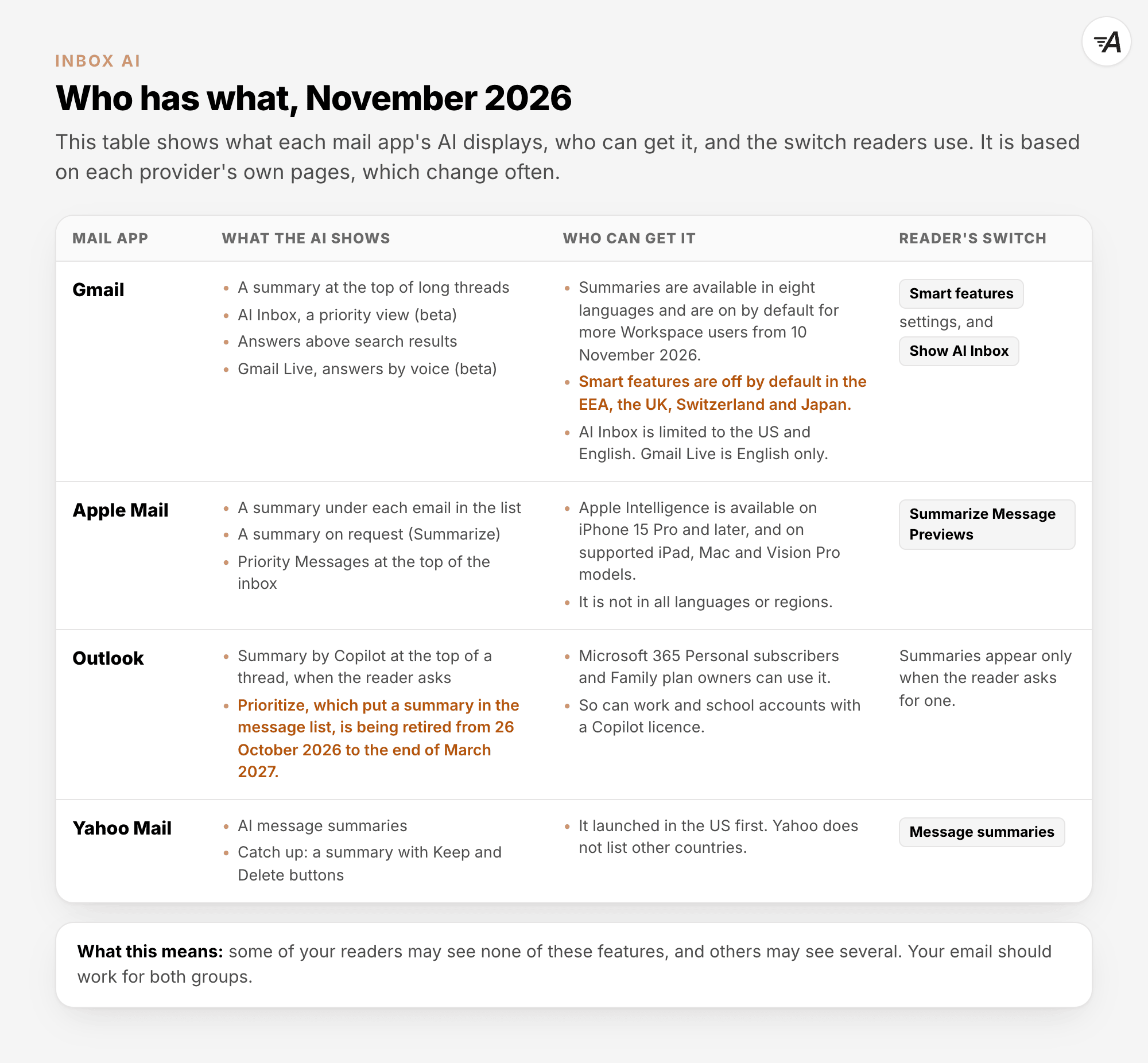
The table below compares the four providers as of November 2026.
6. What the AI reads and leaves out
A summary picks out some information, so it may leave out something the reader needs. A Brightside Coffee customer might read a summary of the offer and still need the email to check its conditions.
Gmail lists attachments, delegated inboxes (inboxes that someone else has permission to manage) and encrypted emails as things AI Inbox does not support. It also filters out spam and messages the reader archives, deletes, mutes or snoozes. These limits apply to AI Inbox and should not be treated as rules for every Gmail feature. Gmail Help
Google says it uses machine learning models, which it calls content classifiers, to find and ignore malicious instructions hidden in emails. These instructions are aimed at the AI, for example telling it to leak a reader's data. When Gemini summarises content with malicious links, Google says it can remove suspicious links from the answer. Google Security Blog
Google warns: "Gemini features may suggest inaccurate or inappropriate information." Apple and Microsoft also advise readers to check the results. Gmail Help
We found no provider page that says whether these features read text inside images or what happens when an email contains only images.
Readers can also control these features. Gmail uses smart-feature settings, Apple offers "Summarize Message Previews", and Yahoo offers "Message summaries". In Outlook, the reader requests a thread summary.
7. What you can and cannot control
At Google, Apple, Microsoft and Yahoo, we found no code or header a sender can add to an email to switch off a summary or set its wording.
Gmail also supports Schema.org markup, code a sender adds to label key details in an email. It has a different purpose. Google explains: "Gmail uses Schema.org markup to highlight the most important information within an email and allows users to act on it." This guidance does not show how to set the wording of an AI summary. Google for Developers
Hidden content can also hurt delivery. Google says: "Don’t use HTML and CSS to hide content in your messages. Hiding content might cause messages to be marked as spam." The same goes for instructions written for the AI. As section 6 explains, Google says Gemini is built to ignore malicious instructions hidden in emails. Google's sender guidelines, Google Security Blog
Google's sender guidelines say message headers and content should be accurate and not misleading. They also warn against subject lines that begin with "Re:" or "Fwd:" unless the messages are actual replies or forwards. Making a promotion look like a conversation is not a supported way to influence summaries. Google's sender guidelines
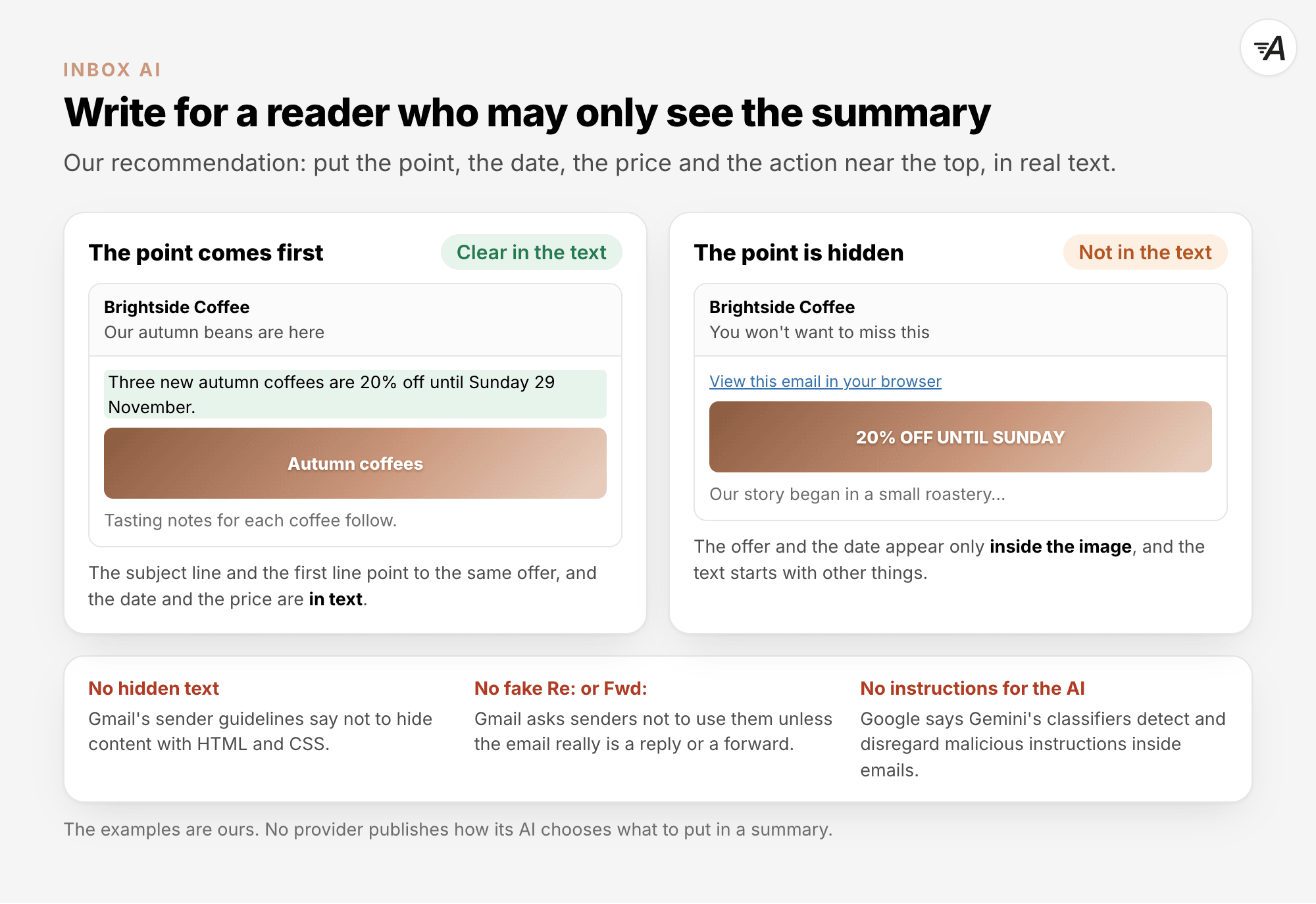
We recommend putting the main point, date, price and action in real text near the top. Keep the subject line, the preheader (the preview text after the subject) and the first lines consistent. Write enough that a short summary can still tell the reader what they need to know.
For Brightside Coffee, this could mean explaining which beans are on offer and when the offer ends. The next line could tell readers how to order. Yahoo's list of details, such as dates and billing details, supports writing these facts plainly. Even when you state these facts clearly, you cannot guarantee how a summary is worded. Yahoo Help
The illustration shows how we recommend writing an email that a reader may only see as a summary.
8. What changes in your reports
No provider tells senders whether an AI summary was shown, so your campaign reports cannot answer that question.
Readers can complete some inbox actions without opening an individual email. In Gmail AI Inbox, "Mark all as read" also marks the affected emails as read in the normal inbox. Being marked as read is an inbox status, and it does not tell you whether your report recorded an open. Yahoo Catch up lets readers keep or delete an email without opening it. Gmail search answers may remove the need to check individual emails. Gmail AI Inbox, Yahoo Catch up, Gmail search
None of this shows whether creating a summary counts as a tracked open. The providers do not document this connection or publish figures showing the effects on opens and clicks.
Apple Mail Privacy Protection adds another limit, as Apple explains: "It also prevents senders from seeing if you’ve opened the email message they sent you." This protection does not cover links or email attachments. Apple Support
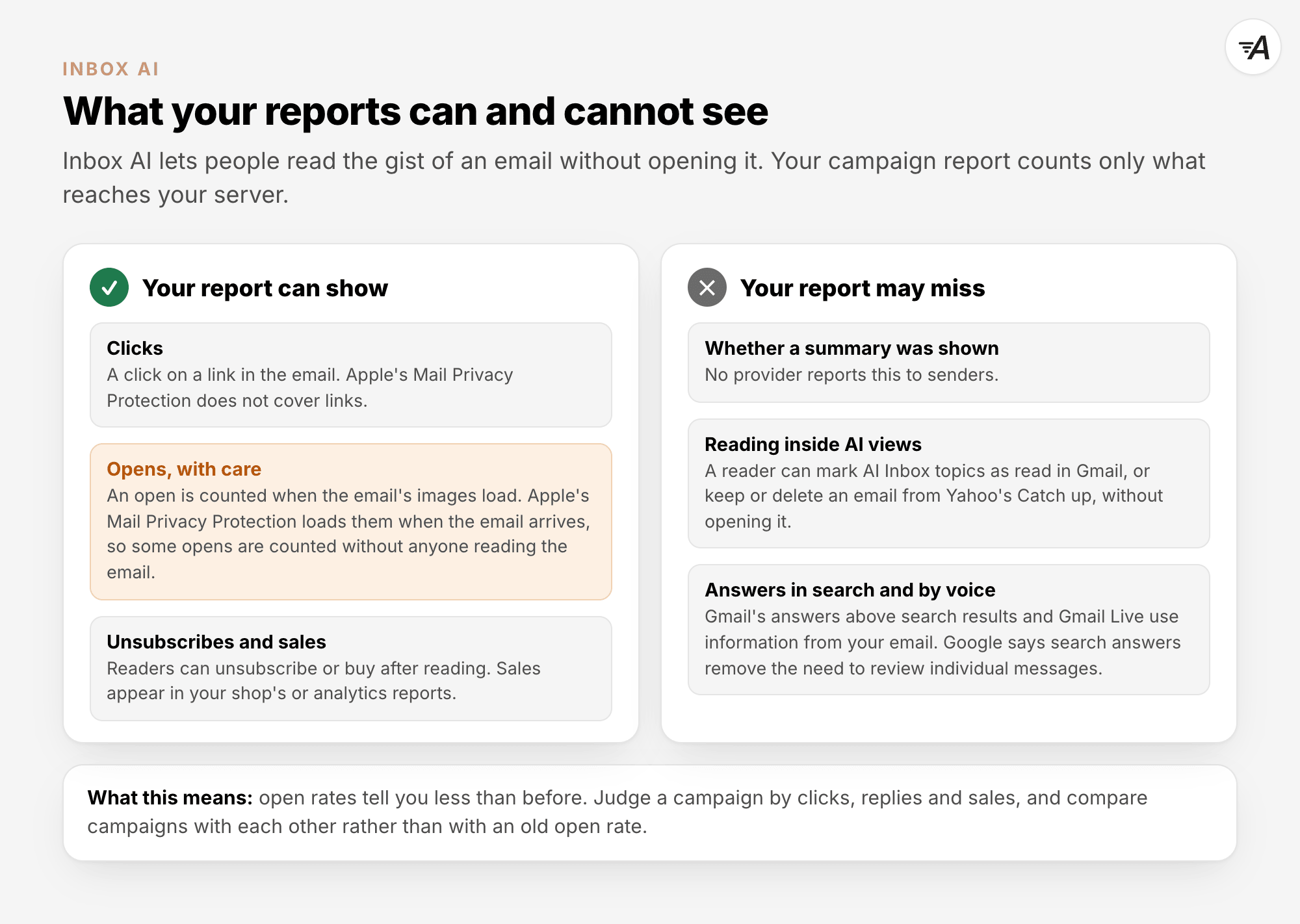
Opens do not tell you whether a reader saw a summary or understood the email. Clicks remain the clearer signal, although they do not show whether a summary appeared. Email Marketing Metrics Explained and Email Tracking and Privacy Explained explain how to interpret these reports.
The diagram shows what your reports can record and what they cannot tell you about summaries.
9. Checking your emails in AcelleMail
Use your own accounts to check how your message appears. A test in one account cannot show what every contact will see.
In AcelleMail
For an HTML campaign, the Preheader text card appears on the Template step after you choose a template. It sets the preview text, although a mail app may show an AI summary in its place. Inbox preview shows the sender, subject and preheader together, as explained in Email Subject Lines Explained. AcelleMail adds the preheader as hidden text at the top of the email. Hidden preheaders are common practice, but Google's warning about hidden content, quoted in section 7, makes no exception for them. If you prefer to avoid hidden text, leave Preheader text empty, and AcelleMail adds nothing. Then make the first visible line do the preheader's job. Section 2 of that guide explains this in more detail.
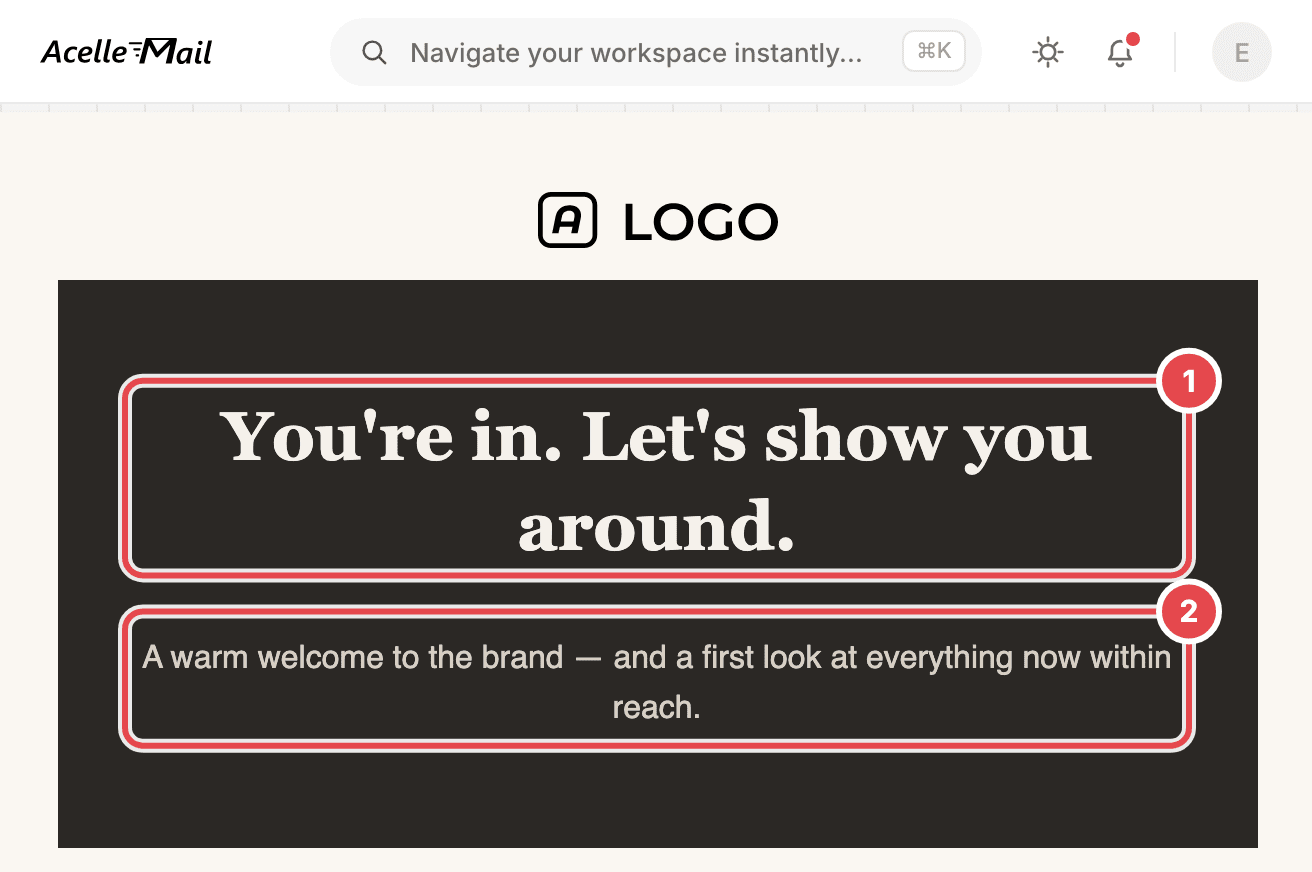
The headline and first paragraph are ordinary text you edit on the email builder canvas. For Brightside Coffee, check that these lines describe the same offer as the subject and preheader.
The screenshot shows the headline (1) and the first paragraph (2) at the top of the email.
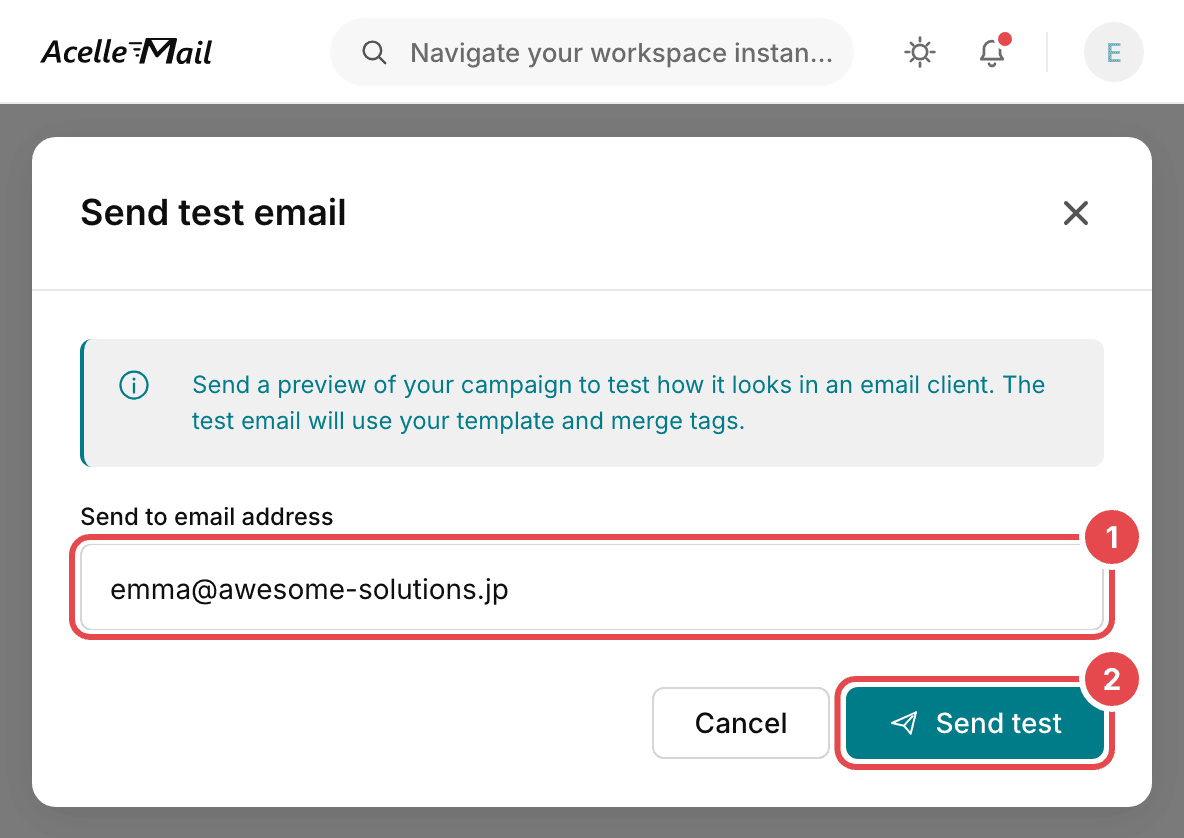
On the campaign's Confirm step, choose Send test email. Enter an address in Send to email address and choose Send test. Open the test in your own Gmail, Apple Mail or Outlook account. If your account has a summary feature, look for the summary or ask for one. Gmail's feature table describes its summaries for long conversations, so a single test email may not get one.
The dialog below shows Send to email address (1) and Send test (2).
Check whether the summary describes the offer, date and action accurately. If it leaves out an essential detail, consider moving that detail earlier in the visible text. Send another test after editing, and remember that the results apply to the accounts you tested.
10. Common mistakes
| What you see | Why it is a problem | What to do |
|---|---|---|
| You add hidden text or instructions for the AI. | Hidden content can break Gmail's rules, and malicious instructions may be ignored. | Make sure the important information is visible in the email. |
| You expect every contact to see summaries. | Availability depends on the reader's app, device, language, country, plan and settings. | Write your email so it works with and without a summary. |
| Your promotion does not appear in Gmail AI Inbox. | AI Inbox shows information only from messages in the Primary tab. | Check the normal inbox and the email's category. |
| Your subject starts with a false "Re:". | Gmail warns against this unless the message is an actual reply. | Describe the offer accurately in the subject. |
| Important information appears only in an image or near the bottom. | Image handling is not documented, and summaries may leave out details. | Put important information in text near the top of the email. |
| You judge the campaign only by opens. | Opens do not show whether a summary appeared or what the reader understood. | Review clicks as well and consider privacy limits. |
| You look for a header that disables summaries. | The cited guidance does not describe a way for senders to disable summaries. | Improve the visible message and test it. |
| You assume Outlook replaces every preview line. | Thread summaries appear on request, and Prioritize is being retired. | Check which feature the reader is using. |
Summary
- As of November 2026, inbox AI appears in message lists, opened threads, priority views and Gmail search or voice answers.
- Each feature has its own rules about who can use it, and reader settings also affect what appears. Your contacts may see different versions of the same email.
- As of November 2026, Gmail AI Inbox shows information only from Primary, and Outlook's Prioritize feature is being retired.
- Google, Apple and Microsoft warn that AI can make mistakes. A short summary may also leave out details a reader needs.
- The cited guidance does not describe a switch that lets senders set or disable summaries. Hidden instructions are not a reliable way to influence them.
- We recommend putting essential facts near the top in visible text. Keep the subject, preheader and opening consistent.
- Use AcelleMail's Send test email to check accounts you can access. Each result applies to the account you tested.
- Opens and clicks do not show whether a summary appeared. Clicks remain the clearer signal of reader activity.
Terms used here are defined in the Email Marketing Glossary.
0 comments
No comments yet — be the first to share a tip or question.