Most email tools record opens and clicks for individual contacts. An open is recorded when an email
loads a small image from the sender's server. A click is recorded when a link passes through the
sender's server before reaching the page.
In April 2026, three data protection regulators published guidance on email tracking pixels: France's
CNIL, Italy's
Garante and the UK's
ICO.
This guide explains what tracking records and why the numbers do not match real readers. It also
explains when consent is needed and what to change in AcelleMail.
This guide covers:
- What an open and a click record
- Why opens and clicks do not match real readers
- Two permissions: sending and tracking
- France: the CNIL recommendation
- Italy and the rest of the EU
- The United Kingdom
- Outside Europe
- Asking for consent and honouring a no
- Tracking in AcelleMail
It ends with the most common mistakes and a one-screen summary.
Not legal advice. This guide describes the rules in general terms and links to the official texts. It reflects texts published up to 12 October 2026.
1. What an open and a click record#
An open pixel is a small image included in an email. The
ICO
describes it this way: "Tracking pixels are small pieces of code, usually an image file, embedded into a
piece of content like a website or an email."
When an email app loads the image, it makes a request to the sender's server. The image address
identifies the email, so the sender can connect the request to a contact.
The request can also reveal an IP address and details about the app and system. Mozilla's Thunderbird
guidance explains that remote content
can reveal when a message is viewed. It can also reveal a rough location from the IP address.
A tracked link first takes the reader to the sender's tracking server. That server records the click and
sends the reader to the intended page. The European Data Protection
Board
(EDPB), where the EU's data protection regulators work together, explains: "Tracking links can function
in the same way, but the identifier is appended to the website address."
A UTM tag works differently. It is a label added to a link for website analytics. A tag such as
utm_campaign=spring_sale is the same for every contact who receives the email. It tells your analytics
which campaign sent the visitor, not which person clicked.
That difference does not answer every privacy question. The
ICO
says: "The key consideration for compliance is the purpose the techniques are used for."
A plain-text email has no images, so it cannot contain an open pixel.
In AcelleMail#
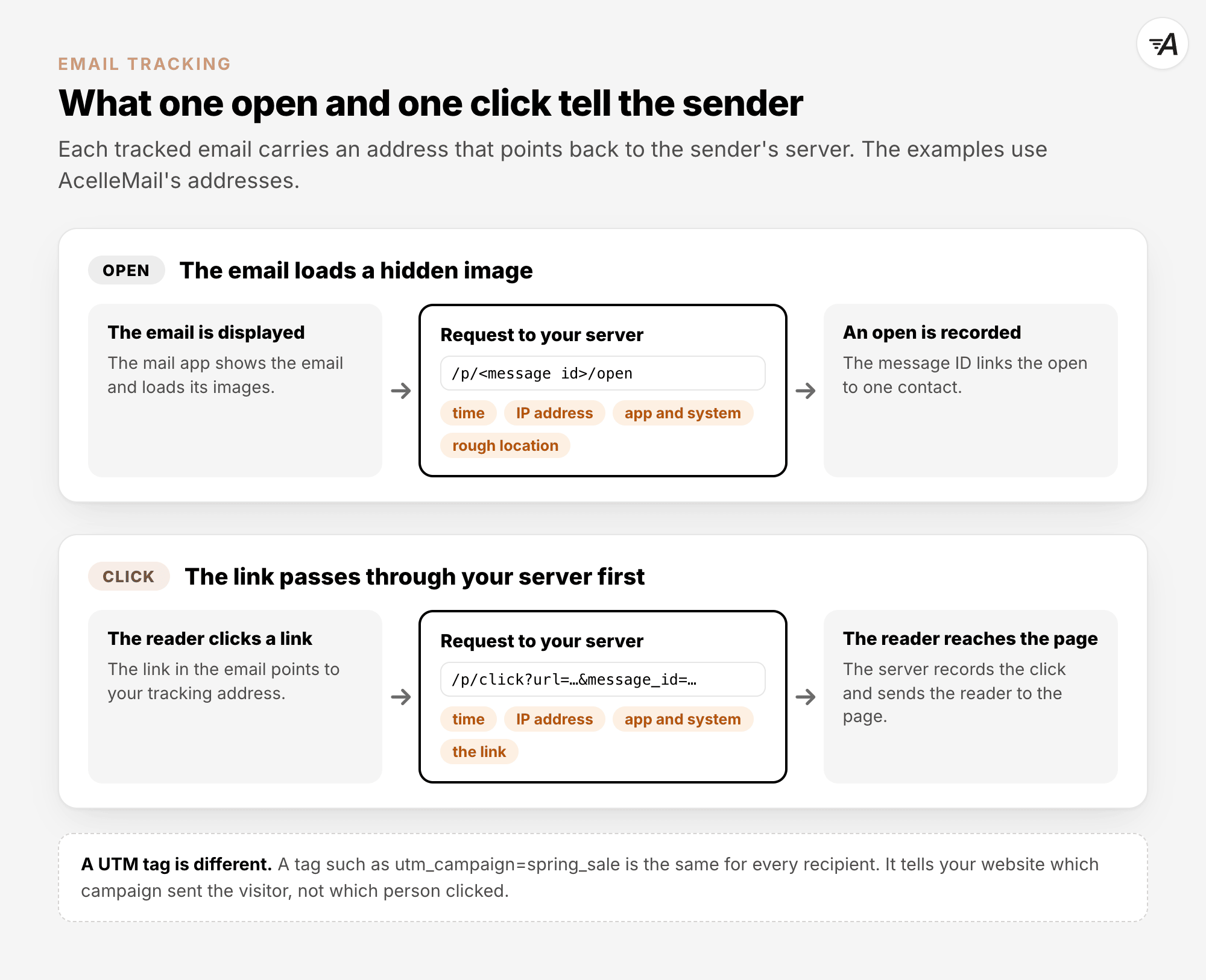
AcelleMail adds a hidden image at the end of each tracked HTML email. Its address follows this format:
/p/<message id>/open.
Tracked links are changed to /p/click?url=<target>&message_id=<message id>. If AcelleMail records a
click and has no open for that email yet, it records an open too. For each open or click, AcelleMail
stores the time, IP address and full user agent. The user agent describes the app and system. AcelleMail
also looks up a rough location from the IP address on your own server.
The diagram shows the requests that record an open and a click.
2. Why opens and clicks do not match real readers#
An image request does not always mean that someone read an email. A link request does not always mean
that someone chose to click the link.
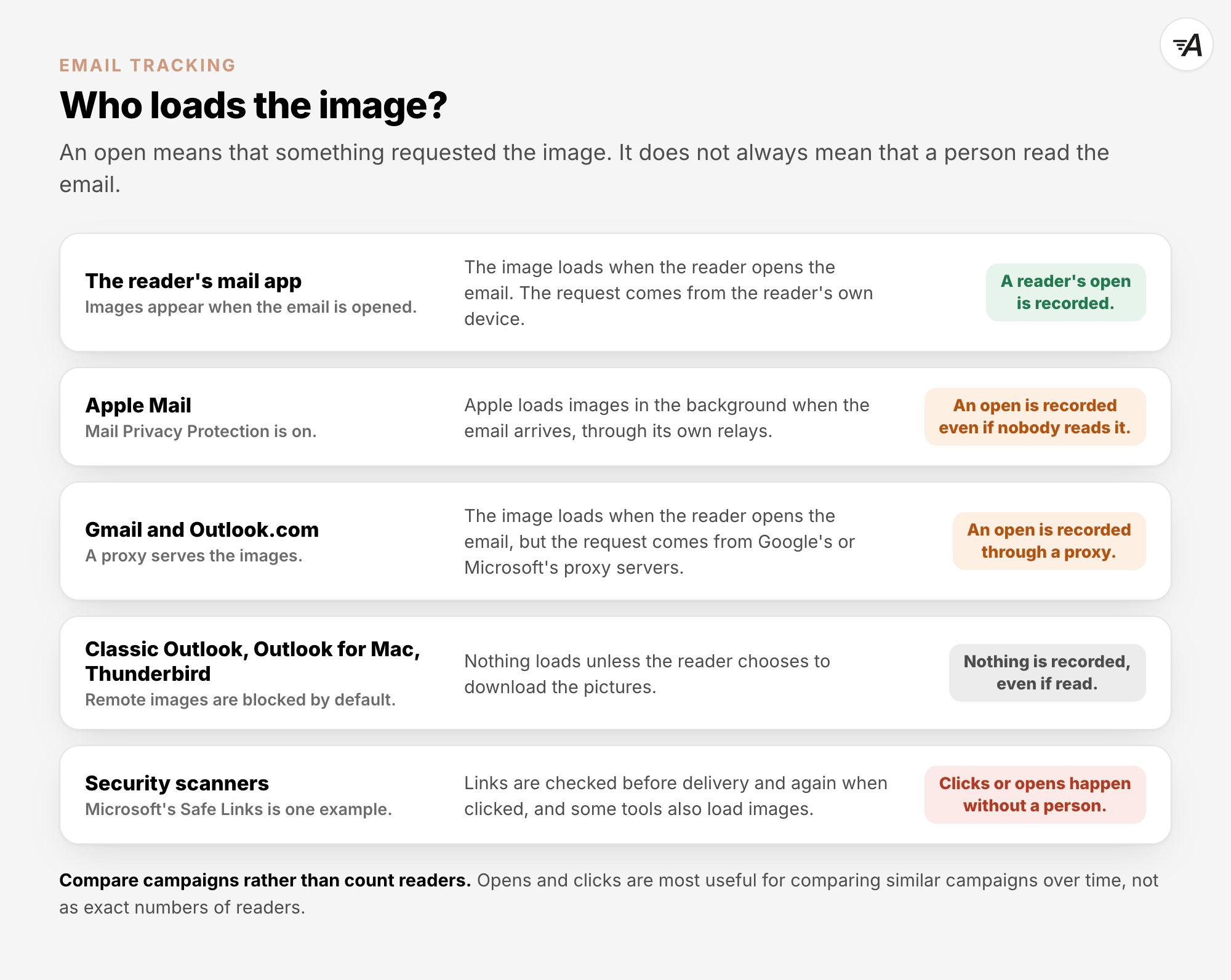
Apple Mail's Mail Privacy Protection can download images before the reader opens the email. On a Mac,
the setting is called Protect Mail Activity.
Apple says: "remote content
is privately downloaded in the background when you receive a message (instead of when you view it)".
This can record an open without anyone reading the email. The sender also sees an IP address that is not
the reader's. People choose whether to turn on the feature. Apple does not say how many people turn it
on.
The protection does not cover everything. Apple's iPhone
guide says: "Mail
Privacy Protection does not extend to links or email attachments such as PDF or other files."
Gmail serves email images through Google's proxy
servers
when the reader opens the email. A proxy server fetches the image on the reader's behalf. The open is
still recorded, but the request comes from Google rather than from the reader's device. Gmail
Help says: "Senders can’t use image loading to get
information about your computer or location."
Outlook.com also
uses an image proxy. However, classic Outlook on
Windows,
Outlook for
Mac
and Thunderbird block remote images
by default. Someone can read an email without recording an open unless they choose to load its images.
Proton Mail loads remote images on its servers
when the email arrives, rather than when it is opened.
Security tools can also make requests. Microsoft Defender's Safe
Links scans links before the
email is delivered. Microsoft's email-marketing
documentation
explains that security services and privacy features can open emails and follow links automatically.
The numbers are still useful for comparing similar campaigns over time. Microsoft's own advice is to use
opens and clicks for these comparisons, not as exact counts of readers.
Google's email sender guidelines say: "Google doesn't
track open rates." They also say: "Low open rates aren't necessarily an accurate indicator of
deliverability or spam classification issues."
The diagram sums up who loads the image in each case.
In AcelleMail#
AcelleMail records every request to its pixel as an open. It has no filter for opens caused by automated
requests, including requests from privacy services or security scanners.
Because a click also creates an open, a scanner that follows a link can add both. Clicks on the
unsubscribe link and the view-in-browser link count as clicks.
Email Marketing Metrics Explained explains how to read
campaign results.
3. Two permissions: sending and tracking#
In the EU, permission to send marketing email and permission to track it involve different rules.
Article 13 of the EU's ePrivacy
Directive sets the rules
for marketing email. It generally requires consent, with one exception for existing customers called the
"soft opt-in". A business may email its customers about its own similar products or services without
asking first. The customer must have been able to refuse when they gave their address, and every email
must offer a way to opt out.
Article 5(3) of the same directive sets the rules for storing information on a person's device or
accessing information stored there. It generally requires consent after the person has received clear
information. It has two narrow exemptions. One covers storage or access needed only to carry a
communication over a network. The other covers what is strictly necessary to provide a service the
person explicitly asked for.
The consent wording dates from 2009. The 2026 guidance explains how it applies to email pixels. It does
not create this rule.
The EDPB's technical
guidance
applies Article 5(3) to email pixels and tracking links. It says delivering them to a device counts as
storing information, at least through the mail app's cache. The guidance does not decide which
exemptions apply. National regulators address those questions.
Consent must meet the standard of the
GDPR, the EU's data protection
law. It must be freely given, specific, informed and unambiguous. In Planet49, decided on 1 October
2019, the EU Court of Justice
rejected pre-ticked boxes. It also confirmed that the device rule protects information whether or not it
is personal data.
The CNIL
recommendation
states: "The consent regime for tracking pixels is independent of that applicable to the sending of the
email in question".
The
ICO
enforces the UK's Privacy and Electronic Communications Regulations (PECR). It says: "The electronic
mail marketing rules in PECR apply to the email itself, not to the tracking pixels."
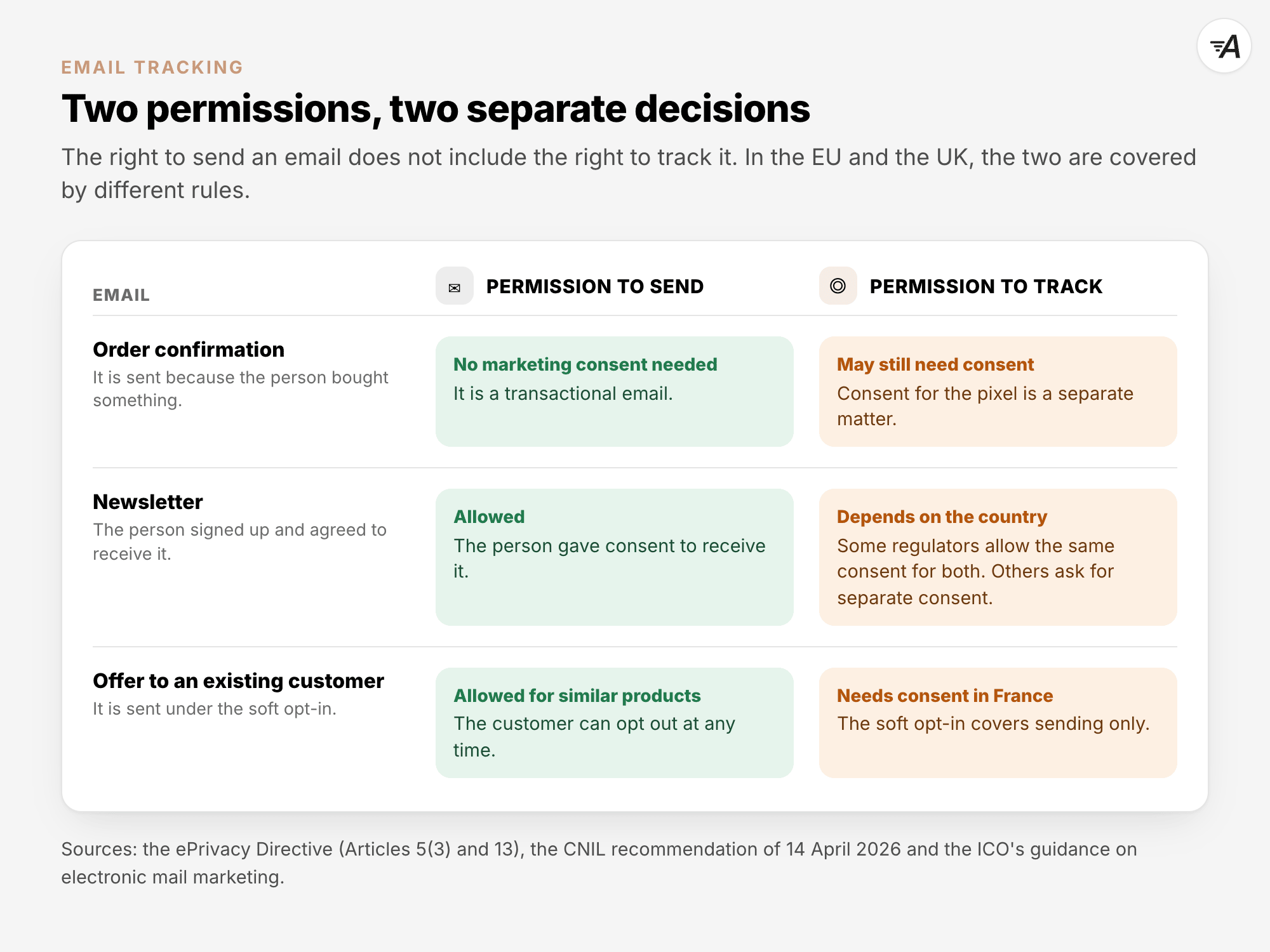
The CNIL gives examples of how this works. An order confirmation can be sent without marketing consent,
but its pixel may still need consent. The same applies to a promotion sent to existing customers under
the soft opt-in.
A newsletter may be sent if the person signed up for it. Whether it may also be tracked depends on the
country.
The diagram separates these two decisions.
For more background, see GDPR for Email Marketing
Explained and Email Consent
Explained.
4. France: the CNIL recommendation#
The CNIL adopted Deliberation No. 2026-042 on 12 March 2026. It was published in the Journal officiel
on 14 April 2026. The CNIL provides an
English courtesy
translation,
but the French version takes priority. A French
Q&A followed on 22 July 2026.
The recommendation is guidance, not a new law. It says that it "is neither regulatory nor exhaustive".
The binding rules are Article 82 of the French Data Protection Act and the GDPR. The CNIL said it would
check whether these rules were being followed during inspections.
Under the recommendation, pixels generally need consent before use unless an exemption applies. Consent
is needed to measure campaign performance, personalise content and create profiles. Consent is also
needed for pixels that detect fraud or bots. Securing a login is treated differently, as the next list
shows.
The recommendation describes two exemptions, each for one narrow purpose:
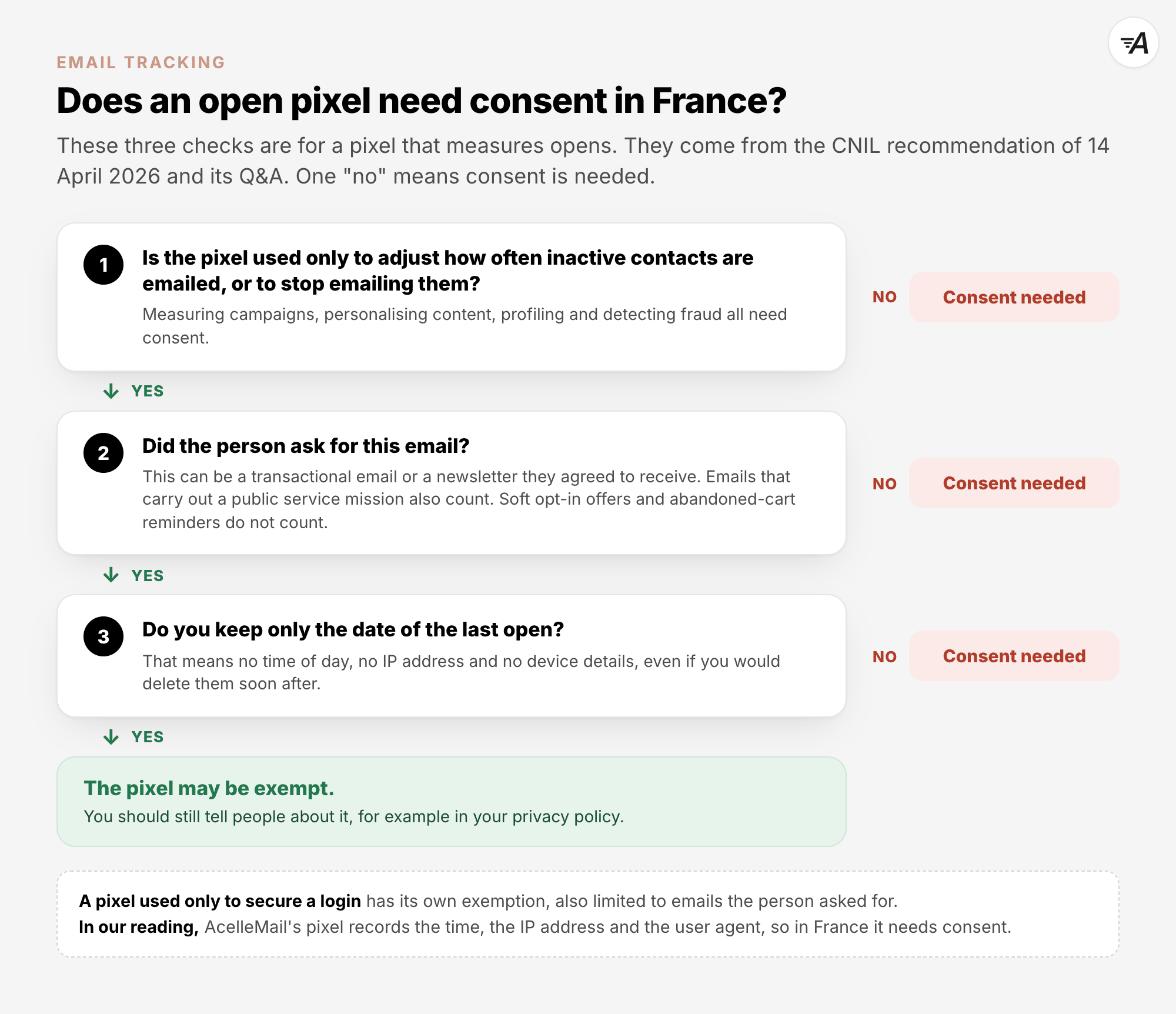
- A pixel used only to secure a login, for example to check that the email with a login code is opened
on a device known to belong to the user.
- A pixel used only to measure opens for deliverability, which means helping your emails reach the
inbox. Its use must be limited to what is strictly needed to adjust how often inactive contacts are
emailed, or to stop emailing them.
Both exemptions apply only to emails the recipient requested, or emails relating to a service they
requested. These include transactional emails and emails the person agreed to receive. Emails sent to
carry out a public service mission also fall within their scope.
For the deliverability exemption, the CNIL says that, in principle, only the date of the last known open
should be kept. This means keeping the day, without the time.
The Q&A explains several
limits. There is no separate exemption for an overall open rate. Article 82 applies even when
information is not personal data. This means anonymising the information does not settle the question.
Collecting an IP address, user agent or opening time means the deliverability exemption no longer
applies. This remains true if that information is anonymised or deleted soon afterwards.
Marketing sent under the soft opt-in is not treated as requested email for this exemption.
Abandoned-cart reminders cannot use this exemption either.
When consent is needed, the CNIL recommends asking for it separately for each purpose. One consent may
cover marketing emails and their pixels only when the purposes are related. The CNIL's example is
marketing that is clearly presented as personalised, with pixels that help to personalise the content or
adjust how often emails are sent.
The recommendation applies to every kind of sender and recipient, including customers, potential
customers and employees. The CNIL says it can act against senders based in France, elsewhere in the EU
or outside it, when French law applies. For a sender outside the EU, that includes tracking people in
France.
The recommendation does not directly cover click tracking. The Q&A says Article 82 and the GDPR still
apply. The purpose determines how the tracking is assessed. In our reading, tracking each person's
clicks to measure campaign performance raises the same consent question as open tracking. This is our
interpretation, not the regulator's.
For addresses collected before 14 April 2026, the transition period allowed tracking to continue if
recipients were given a notice. The usual notice period ended on 14 July 2026. That date has passed, so
the full rules apply to old addresses too, unless a justified short extension was documented.
The diagram applies these checks to a pixel that measures opens.
In AcelleMail#
In our reading, AcelleMail's pixel does not fit France's deliverability exemption because it records the
time, IP address and user agent. It therefore needs consent in France.
5. Italy and the rest of the EU#
Italy's Garante adopted its
guidelines on 17 April
2026. They were published in the Gazzetta Ufficiale on 29 April 2026.
The compliance deadline is 29 October
2026. Checks are also
included in the Garante's inspection plan for August to December
2026.
In ordinary cases, the Garante says email pixels need consent before they are used. It lists examples of
pixels that may not need consent:
- One shared pixel can count an overall open rate, with IP address and client data anonymised.
- Pixels can support login security.
- Pixels can accompany service messages that the sender is legally required to send.
Measuring each person's opens to see how campaigns perform needs consent. Consent is also needed to
change how often emails are sent or to stop sending them based on how interested a person seems. This
differs from France's exemption for inactivity, which applies only in very limited cases.
Italy allows a single consent for marketing emails and their pixels if the request is worded neutrally,
without pressure. People must still be able to stop the tracking while continuing to receive the emails.
Refusing tracking must not limit the service in any way.
The guidelines do not explain whether they apply outside Italy. We suggest planning to follow them if
you send from Italy or to people in Italy.
In Germany, the BfDI says
newsletter consent does not cover counting pixels. People who refuse tracking must receive the
newsletter without pixels. That page concerns newsletters sent by public bodies. Private companies are
mostly supervised by state authorities.
On 20 December 2022, Denmark's
Datatilsynet
strongly criticised a state fund for using newsletter pixels without valid consent or information. There
was no fine.
In June 2023, Spain's AEPD fined Mailtrack 100,000
euros under the GDPR for open tracking using pixels.
The fine concerned the tool provider, not a newsletter sender.
Elsewhere in the EU, Article 5(3) applies through national law. Check your national regulator.
The November 2025 Digital Omnibus proposal would move these rules into the GDPR. As of 12 October 2026,
it remains a proposal. The European Parliament's
file says "Awaiting
committee decision".
6. The United Kingdom#
The
ICO
says PECR regulation 6 applies to email pixels when they store or access information on a device.
Regulation 22 covers the marketing email itself.
The ICO's email
guidance
says: "If the email includes tracking pixels, you must comply with the rules on storage and access
technologies."
These rules also apply to business recipients. The ICO's business-to-business
guidance
says: "The rules on cookies and similar technologies apply to all types of subscriber."
The general
rule
is: "You must obtain prior consent to the UK GDPR standard for their use, unless an exception applies."
Since 5 February 2026, the Data (Use and Access) Act 2025 has allowed an exception for statistical
purposes. PECR Schedule A1 sets five
conditions:
- You provide an online service.
- The only purpose is to collect statistics about how people use the service to help improve it.
- You share data only with those helping to improve the service.
- You provide clear information.
- People have an easy, free way to object.
The ICO reads this
narrowly:
"It is not for identifying, tracking or monitoring people or groups of people who use your service."
The ICO has not said whether this exception covers email opens or clicks. In our reading, it does not
cover using each person's opens and clicks to build segments, trigger automations or choose who gets a
resend.
When someone withdraws consent, the ICO
says:
"You must interpret a withdrawal of consent as a request for erasure".
Since 5 February 2026, the ICO can impose PECR
fines
of up to £17.5 million or 4% of global turnover. We found no ICO action aimed at email pixels as of 12
October 2026. Its published tracking priorities cover websites, online advertising and apps, not email.
The table compares the guidance described above.
| Topic |
France |
Italy |
United Kingdom |
| The rule that applies |
Article 82 of the French Data Protection Act applies, with the CNIL recommendation of 14 April 2026. |
Article 122 of the Privacy Code applies, with Garante guidelines of 17 April 2026. |
PECR regulation 6 applies, with ICO guidance of 29 April 2026. |
| Tracking each person's opens for marketing |
Consent is needed. |
Consent is needed. |
Consent is needed unless an exception applies. No exception has been confirmed for email. |
| An overall open rate |
There is no separate exemption. |
One shared, anonymised pixel may be exempt. |
The guidance does not address this for email. |
| Removing inactive contacts based on opens |
This is exempt only under strict limits. |
Consent is needed. |
The guidance does not address this. |
| Click tracking |
The recommendation does not directly cover it. Article 82 still applies. |
The guidelines do not address it. |
The assessment depends on the purpose. |
| One consent for marketing and tracking |
This is possible only for related purposes, such as personalised marketing. |
One neutrally worded consent is allowed if people can stop only the tracking. |
The guidance does not address this for email. |
| The key date |
The usual notice period for old addresses ended on 14 July 2026. |
The compliance deadline is 29 October 2026. |
Final guidance was published on 29 April 2026. |
7. Outside Europe#
In the United States, the FTC's CAN-SPAM compliance
guide covers
email content and unsubscribing. CAN-SPAM does not address tracking.
California's CCPA definition of a unique
identifier
includes "beacons, pixel tags". Businesses above the CCPA's thresholds must give notice at or before
they collect information.
In Arizona, class actions that challenged email pixels under a phone-records law failed. In Smith v.
Target, decided on 13 November
2025,
the Court of Appeals ruled that the law covers records of communication services, "not marketing metrics
collected by retailers about email engagement".
Canada's CASL rule on installing computer
programs does not mention email pixels.
This guide does not cover other countries' privacy laws. Check with your local regulator.
8. Asking for consent and honouring a no#
The steps below follow the GDPR's rules on consent. Where advice comes from one regulator, we name it.
At sign-up, the CNIL recommends asking for tracking consent at the same time as the email
address. Our
advice is to give tracking its own choice, without a pre-ticked box, because some regulators expect a
separate consent. The CNIL also recommends the following:
- Refusing is as easy as accepting.
- The form names the email address the choice applies to.
- The form explains that tracking covers every device the person uses to read those emails.
- The form gives a short summary of the purpose, with a link to more detail.
Our example wording is: Yes, you may record when I open your emails and which links I click, to measure
how your emails perform. Name every purpose you use the data for. If you also use opens and clicks to
decide who receives which email, say that too.
For an existing list, send an email without tracking. Link to a page where the person confirms consent
by taking an action, such as pressing a button. The CNIL recommends this because some mail apps load
links automatically. A click on its own should therefore not count as consent.
If the person does nothing, treat it as a no. The
CNIL says:
"the recipient’s inactivity must be analysed as an expression of a refusal to consent to the use of
tracking pixels."
Record each refusal, so that you do not ask the same person again too soon. The CNIL calls a pause of 6
months good practice.
Keep evidence of each person's consent and how it was given. GDPR Article
7(1) requires you to be able to
show that the person gave consent.
It must be easy to withdraw consent. GDPR Article
7(3) says: "It shall be as easy
to withdraw as to give consent."
The CNIL recommends a link to withdraw consent in every email footer. Italy's
Garante suggests a footer
link or icon that stops only tracking.
After a person refuses or withdraws consent, stop tracking future emails. You also need to consider
older emails. The CNIL's Q&A
says requests from pixels linked to withdrawn consent must be ignored. In the UK, the ICO treats
withdrawal as a request to delete data.
Several features that rely on opens stop working for contacts whose emails are not tracked. These
include resending to non-openers, A/B tests judged on opens,
automations that branch on opens, and list cleaning based on opens.
Our advice is to use other signals, such as replies, purchases or sign-ins. Unsubscribes and bounces
also help guide sending decisions. For inactive contacts, consider sending less often or asking whether
they still want your emails.
9. Tracking in AcelleMail#
AcelleMail can send tracked and untracked emails. It has no per-contact tracking switch, so you organise
the split yourself, as described below. Two limits matter before you start:
- AcelleMail keeps each person's current answer, but not when or how they gave it. The part on keeping
evidence below explains what you can do.
- The split affects future emails only. Emails a person received while tracking was on keep recording
their opens and clicks, and AcelleMail cannot ignore those requests for one person. In our reading,
that falls short of what the CNIL's Q&A asks after a withdrawal.
What AcelleMail records and where to switch it off#
For each recorded open or click, AcelleMail stores the time, the IP address and the full user agent. It
looks up an approximate location from the IP address on your own server, without an outside service.
It has no filter for machine opens, no consent record and no retention setting. Opens and clicks remain
until you delete the contact or the campaign.
On a campaign's Setup step, find Advanced Settings. Both Track opens and Track clicks
are ticked by default.
Untick Track opens and AcelleMail adds no open-tracking pixel, but a click still creates an open
while Track clicks is on. Untick Track clicks and links are left as they are. With both switches
off, an HTML email still loads a small transparent image from your AcelleMail server. This image has the
same address for every recipient, so AcelleMail does not record it as an open.
The screenshot marks Track opens (1), Track clicks (2) and UTM tracking (3).
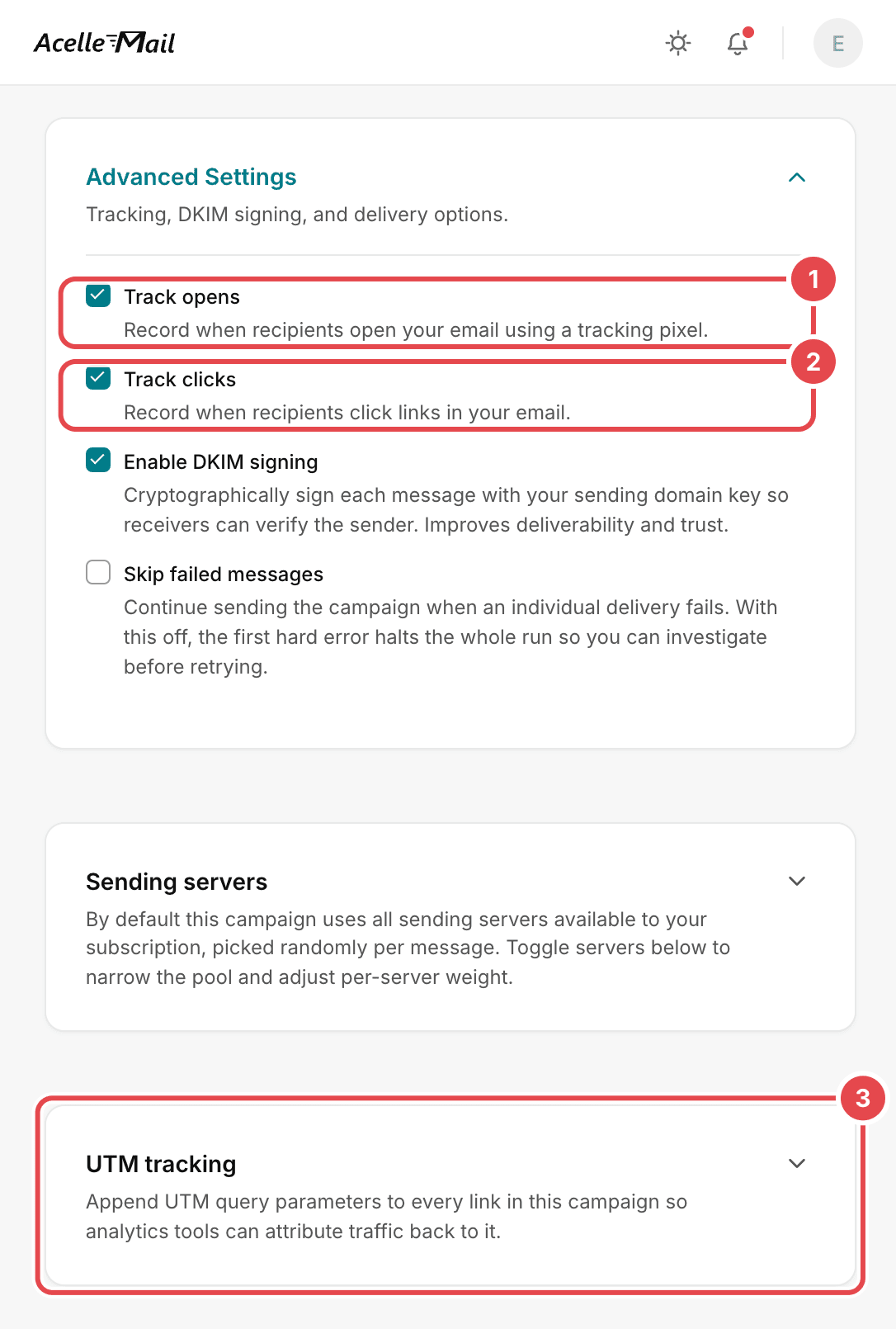
The UTM tracking card works independently through Enable UTM tracking. Its tags are the same for
every recipient. They stay on links when Track clicks is off, so website analytics can still
identify the campaign.
Each automation Send email node has separate Track opens and Track clicks switches. Find
them under Tracking & delivery on its Setup tab. Both are on by default.
A/B test campaigns have no tracking switch and always use a whole list. Do not use them for contacts who
did not agree to tracking.
The list's double opt-in confirmation, welcome and goodbye emails contain no tracking pixel or tracked
links.
Track only the people who agreed#
First, record each person's answer:
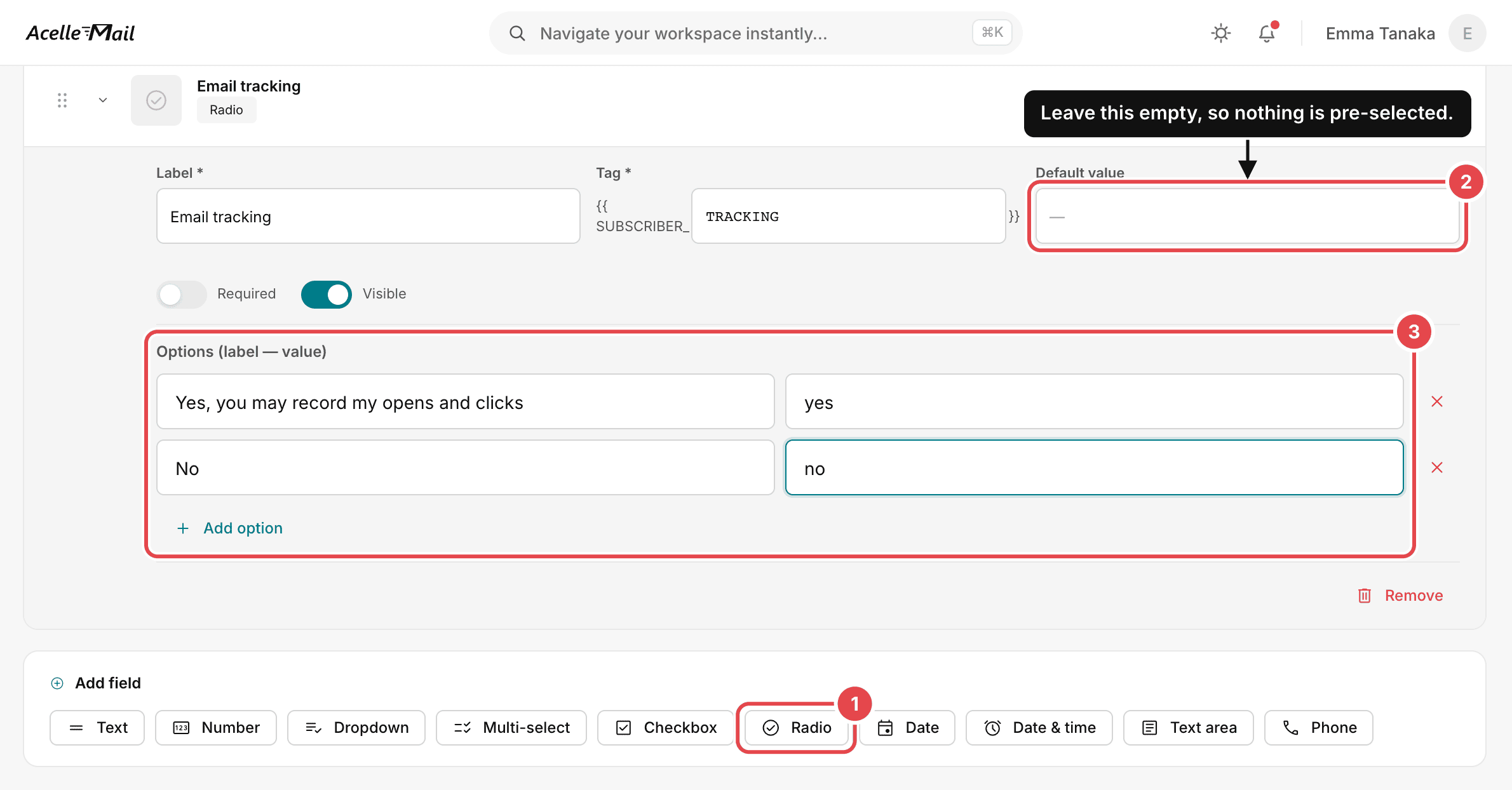
- Open Manage list fields on your list. Under Add field, choose Radio. Give it a label such
as "Email tracking". Under Options (label — value), add Yes, you may record my opens and clicks
with the value
yes, and "No" with the value no. Leave Default value empty, so that nothing is
pre-selected, and keep Visible on. Click Save fields. Use Radio, not Checkbox,
because the update-profile page does not keep a ticked checkbox.
- The hosted sign-up and update-profile pages show the new field. Under Forms / Pages, add a short
summary of the purpose, with a link to your privacy policy, to the Public signup page and the
Update form. If your website uses an embedded form, copy its code again. The code you pasted
earlier does not contain the field.
- Put the Update profile URL merge tag in your email footer. People can then change their answer.
To ask an existing list, send an untracked campaign with the same link. Opening the link is not
consent. The person has to choose Yes and save the form.
The screenshot marks Radio (1), the empty Default value (2) and Options (label — value) (3).
Then send each campaign as two campaigns with the same content, one tracked and one untracked:
- Create a segment with the condition set to your field, equal,
yes.
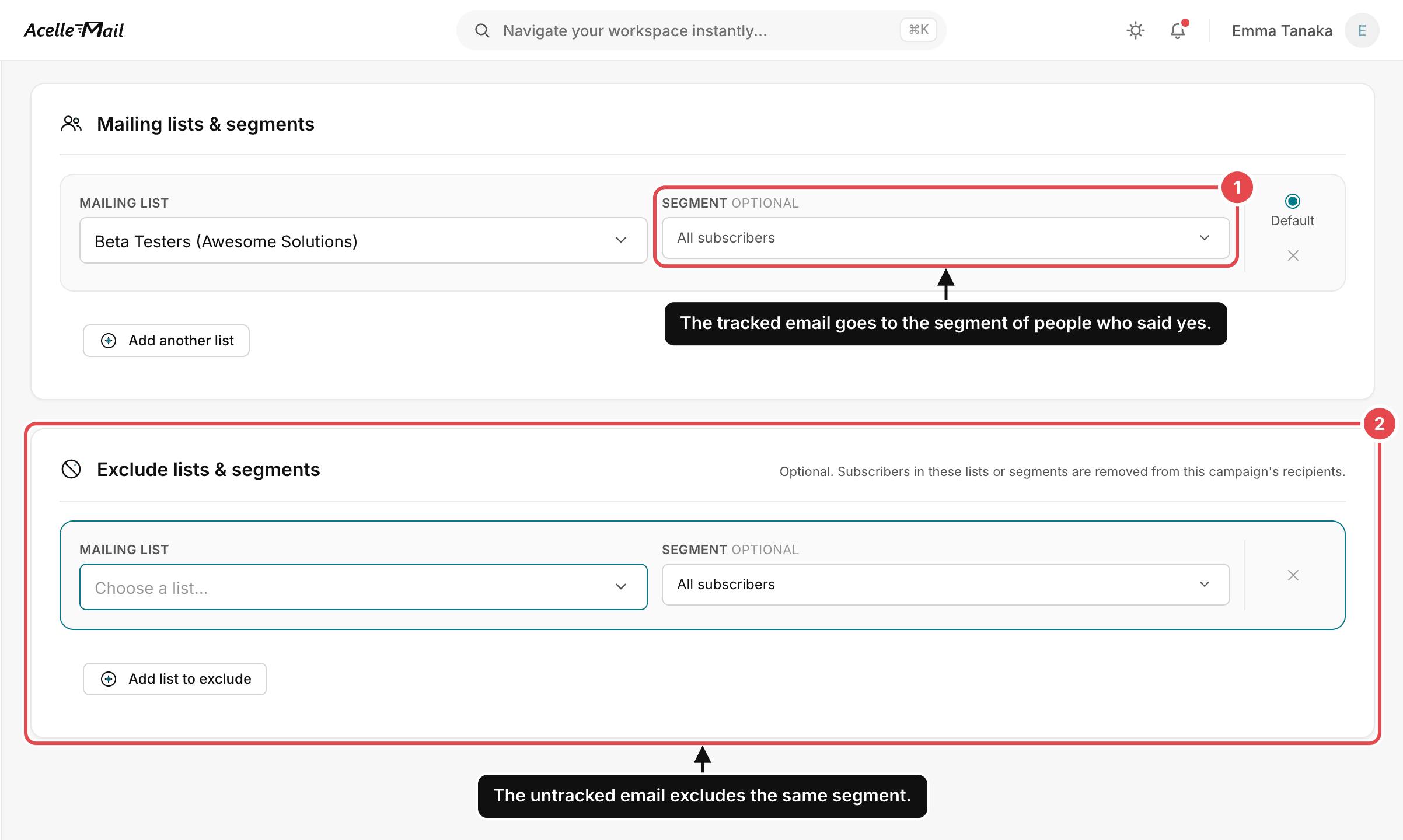
- For the tracked campaign, choose the list on Recipients. Under Segment (optional), choose
that segment. Leave Track opens and Track clicks on.
- Make the untracked campaign with Replicate, in the tracked campaign's menu on the campaigns page.
The copy keeps the content and the tracking settings.
- On the copy's Recipients step, choose the same list and All subscribers. Under Exclude
lists & segments, add the same list with the same segment. Use the exclusion rather than a second
segment with not equal
yes, which would leave out people who never answered.
- On the copy's Setup step, untick Track opens and Track clicks. Then send both campaigns
at the same time.
- In automations, add a CONDITION node before each email. Set it to Subscriber field, pick your
tracking field, choose is and type
yes. On the YES branch, add a Send email node with
tracking on. On the NO branch, add a second Send email node with Track opens and Track
clicks off.
The screenshot marks Segment (optional) (1) and Exclude lists & segments (2).
What to expect in your reports#
An untracked campaign's report looks like a campaign nobody opened. It shows 0.00% and the Room to
grow banner. Only the campaign details show that tracking was off.
Segments based on "last opened" treat every untracked contact as inactive. Do not use open-based
cleaning on those contacts.
Keeping evidence of consent#
AcelleMail keeps only each person's current answer. It does not record when or how they gave it, so on
its own it cannot show that a person agreed. If you collect answers through your own website or another
tool that logs each submission, keep that log. Also keep the wording of your consent request and the
date you started using it.
For a dated snapshot of everyone's answers, open Subscribers on your list and choose Export. The
CSV file shows each answer on the day you export it, but not when it was given.
When someone changes their answer to no#
From the next send, the person gets the untracked email. Emails they received while tracking was on keep
reporting their opens and clicks, and this continues after they unsubscribe. Changing the field does not
stop it, and AcelleMail cannot ignore old pixels for one person.
Deleting the contact stops it, but it also deletes their history and removes them from the list.
Deleting the campaign stops it for everyone who received that campaign.
10. Common mistakes#
| What you see |
Why it is a problem |
What to do |
| You assume the rules do not apply because you are not in France. |
The CNIL says French law can reach senders outside the EU who track people in France. Other EU countries apply the same Article 5(3), and the UK has its own rules. |
Check the rules for the countries your contacts live in. |
| You anonymise the IP address and treat the pixel as exempt. |
In France, the deliverability exemption does not apply if you collect the IP address, user agent or time. This remains true even if you anonymise the information later. |
Ask for consent, or switch tracking off. |
| You treat newsletter consent as consent to tracking. |
Germany's federal commissioner says it is not, in guidance for public bodies. Italy allows one neutrally worded consent only if people can stop tracking separately. |
Ask for tracking consent separately. |
| You untick Track opens and think nobody is tracked. |
Track clicks may still be on, and a click also creates an open. Older emails also continue to report activity. |
Switch off both settings and take older emails into account. |
| You treat a click as proof that a person read the email. |
Security scanners follow links. Clicks on the unsubscribe and view-in-browser links are counted too. |
Compare clicks across similar email campaigns rather than treating one click as proof. |
| You ask for consent in a tracked campaign, or treat a link click as consent. |
The request would track people before they agree. Some mail apps load links automatically. |
Send an untracked email linking to a page with a confirmation button. |
| You rely on the UK statistics exception for email tracking. |
The ICO interprets the exception narrowly and has not applied it to email tracking. |
In our reading, treat campaign tracking for each person as needing consent. |
| You remove contacts who have not opened emails without checking the rules. |
France allows this only under strict limits. Italy requires consent to track each person's inactivity. |
Use other signals for contacts who are not tracked. |
Summary#
- An open is usually a request for a hidden image, and a click is a request that passes through a
tracking server. In AcelleMail, a click also creates an open. Neither proves that a person read the
email.
- Privacy services and security scanners can create requests. Blocked images can also hide the fact
that someone read the email.
- Permission to send and permission to track are separate decisions. A newsletter subscription does not
automatically mean someone has agreed to tracking.
- France, Italy and the UK apply different exemptions. In our reading, AcelleMail's pixel does not meet
France's deliverability exemption.
- Ask people to make a clear choice about tracking and keep evidence of their choice. For existing
lists, use an untracked request and a confirmation button.
- AcelleMail enables Track opens and Track clicks by default. Campaign-wide UTM tracking
can remain enabled without per-person click tracking.
- Use a Radio field and manually divide contacts into tracked and untracked groups. People who have
never answered belong in the untracked group.
- Changing the field does not stop tracking from older emails. AcelleMail has no per-person way to
ignore those requests.
Terms used here are defined in the Email Marketing Glossary.
