A spam filter decides which incoming emails are unwanted. It does not read your email in the way a
person does. It checks who is sending the email, how the message is built, which links it contains and
how readers responded to similar emails in the past. It then decides whether to accept the email and
where to put it.
Many senders worry most about "spam words". Large mailbox providers describe their filters differently.
They focus mainly on the sender and on how their own users respond to emails. Each filter also uses its
own scoring system, so a message can pass one filter and fail another.
The sections below explain each layer of filtering in the order it happens. They also cover what you can
check before you send.
This guide covers:
- Where filtering happens
- Blocklists
- Authentication and reverse DNS
- Content scores: how a rule-based filter adds up points
- What about spam words?
- Readers train the filter
- Checking before you send
It ends with the most common mistakes and a one-screen summary.
1. Where filtering happens#
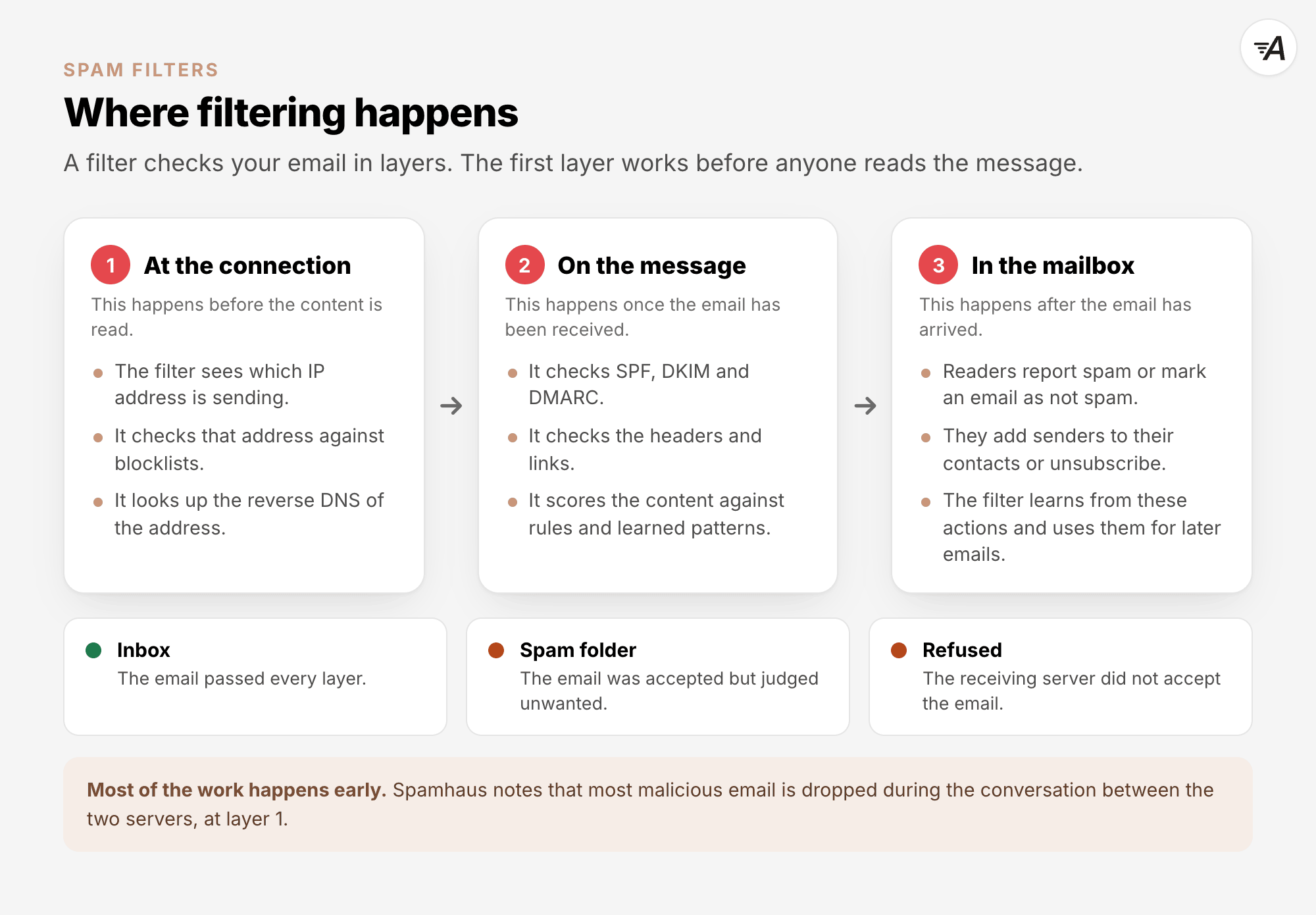
Filtering happens in layers, and each layer checks something different.
- At the connection. Before the receiving server reads the message, it knows which IP address is
connecting. It can check that address against blocklists and look up its reverse DNS.
Spamhaus notes that "The majority of
malicious email is dropped at the SMTP transaction", which is the conversation between the two
servers.
- On the message. The filter checks whether the message actually comes from the domain it names,
using SPF, DKIM and DMARC. It also checks the headers, links and content.
- In the mailbox. The filter can learn from how readers respond to emails.
Gmail explains: "As you report more spam,
Gmail identifies similar emails as spam more efficiently."
Large mailbox providers, such as Gmail, Outlook.com and Yahoo, run their own filtering systems.
Companies that run their own mail servers can use an open-source filter such as Apache
SpamAssassin. These systems work differently. Google, for example,
uses machine learning together with rules. When it announced a new layer in 2019,
Google
wrote: "These new protections complement existing ML and rules-based protections".
2. Blocklists#
A blocklist contains IP addresses or domains that its operator considers risky for email, for example
because they sent spam or should not send email directly. Most blocklists are published in DNS, so a
receiving server can check an address in a fraction of a second. The standard for these lists, RFC
5782, says: "A DNSxL is a zone in the DNS". DNSxL is its name
for both blocklists and allowlists.
To check an IP address, the receiving server reverses it and queries the list. RFC 5782 gives an
example. To look up the address 192.0.2.99 on a list called bad.example.com, the server asks for the
name 99.2.0.192.bad.example.com. If the list returns an answer, the address is listed, apart from the
error codes described in section 7. If the name does not exist, it is not.
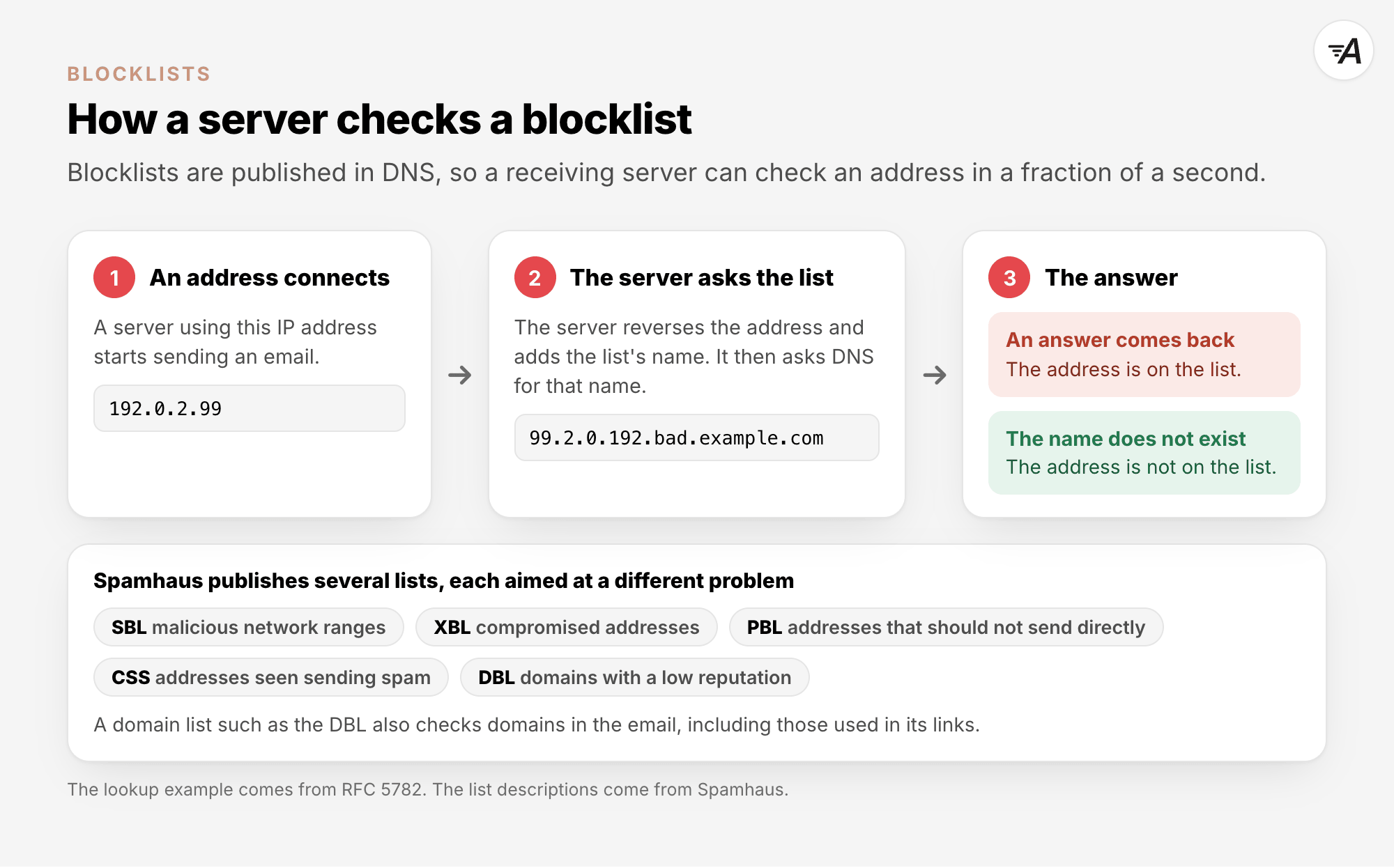
Spamhaus, one of the best-known operators, publishes several
lists. Each list targets a different problem:
| List |
What it contains |
| Spamhaus Blocklist (SBL) |
Network ranges that Spamhaus considers malicious |
| Exploits Blocklist (XBL) |
Compromised IP addresses, for example hijacked devices |
| Policy Blocklist (PBL) |
IP ranges that should not send email directly, such as home connections |
| Combined Spam Sources (CSS) |
IP addresses seen sending spam |
| Domain Blocklist (DBL) |
Domains with a low reputation |
Spamhaus ZEN combines the IP lists, so a server can check all of them with one query. A domain list such
as the DBL checks domains, including those found in a message's links. A link to a domain with a bad
reputation can therefore hurt an email from a sender with a good reputation.
How you get off a list depends on the list. Spamhaus handles removals from the XBL on its checker site,
check.spamhaus.org. An address is listed again if the problem behind the listing is not fixed. For the
SBL, Spamhaus contacts the network or hosting company. Its SBL
page says that "only these companies can deal
with SBL removals."
If you send through a sending service, the IP addresses being checked usually belong to the service, as
Email Sending Explained describes. The service needs to fix any
listing, so report it to them. If you run your own server, check its address yourself.
In AcelleMail#
The Blacklist under Sending is not a public blocklist. It is your own suppression list. Its page
says: "Blacklisted email addresses are permanently blocked from receiving any campaigns." AcelleMail
adds an address there when the address hard-bounces, and you can add addresses yourself.
3. Authentication and reverse DNS#
SPF, DKIM and DMARC each help a filter check that a message actually comes from the domain it names.
When Gmail cannot check the sender, it can show a warning above the message: "Gmail can't confirm who
sent you the email." This text appears on the Gmail Help
page about spam.
Large providers also expect valid reverse DNS for the sending IP address.
Yahoo asks every sender to "Have a valid forward and
reverse DNS record for your sending IPs", and Google asks for the same.
In a rule-based filter, passing authentication earns very few points. In SpamAssassin's default scores,
a valid DKIM signature (the rule DKIM_VALID) is worth -0.1, and a passing SPF check (SPF_PASS) is worth
-0.001. Authentication mainly protects you from being treated as a forgery. Large providers also require
it. Email Deliverability Explained covers the three
records, and How to Set Up SPF, DKIM, and DMARC
Records explains how to set them up.
4. Content scores: how a rule-based filter adds up points#
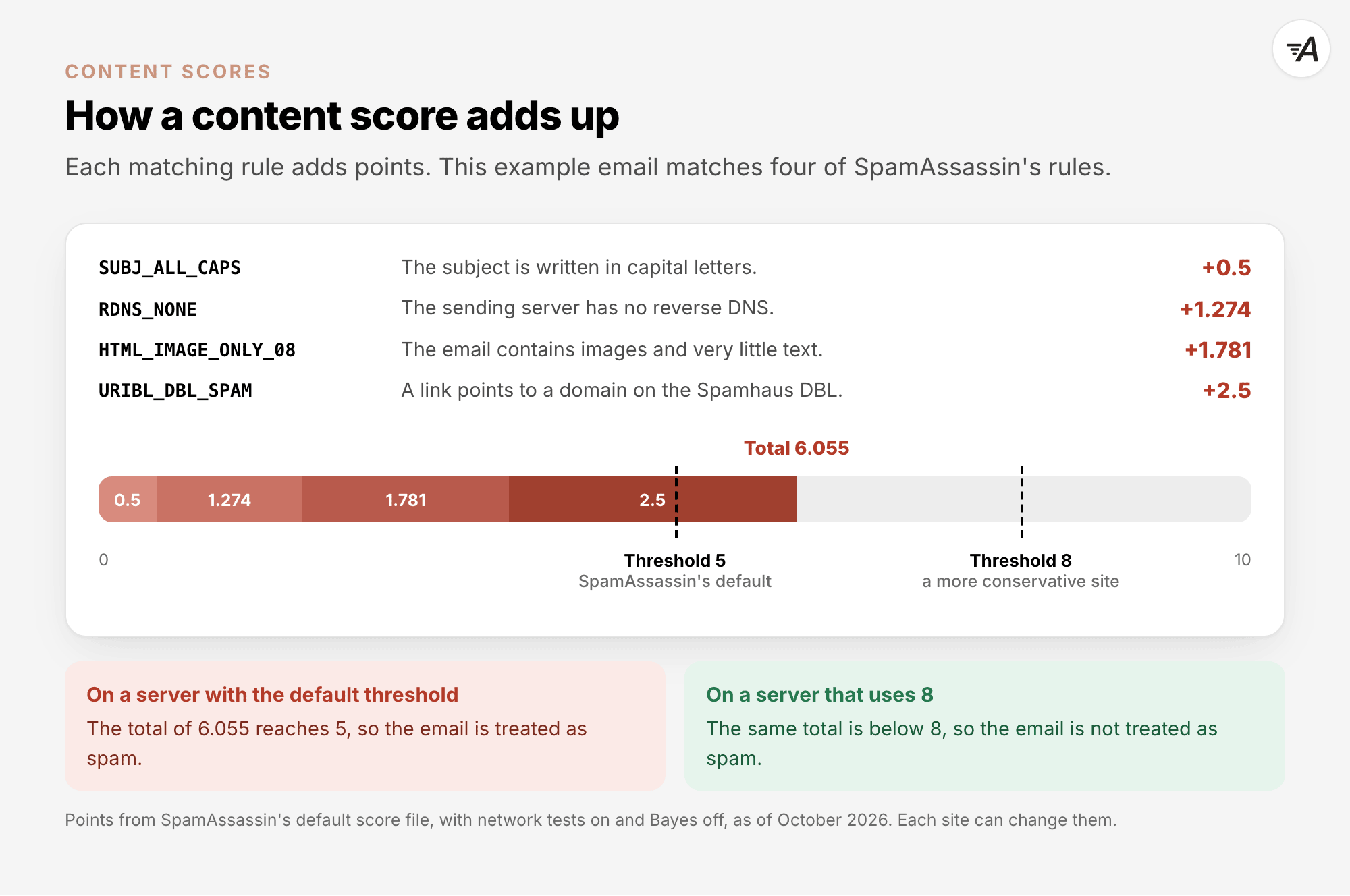
A rule-based filter such as SpamAssassin runs many tests on the headers and body of a message. Each test
that matches adds points. A test with a negative score removes points instead. If the total reaches a
threshold, the filter treats the message as spam.
SpamAssassin's own configuration
reference sets the default
threshold at 5. It describes the setting this way: "Set the score required before a mail is considered
spam." The same page calls 5.0 "quite aggressive" and suggests that an ISP might set a more conservative
value, "like 8.0 or 10.0". This means the same score can count as spam on one server and pass on
another.
The points for each rule come from SpamAssassin's default score
file. Many rules have four scores
because the points depend on whether the server also runs network tests, such as blocklist lookups, and
a learning filter, which is explained below. The following examples use network tests with the learning
filter turned off:
| Rule |
What it means |
Points |
| SUBJ_ALL_CAPS |
The subject is written in capital letters |
0.5 |
| MISSING_HEADERS |
The message has no To header |
1.207 |
| RDNS_NONE |
The sending server has no reverse DNS |
1.274 |
| HTML_IMAGE_ONLY_08 |
The HTML has images and only 400 to 800 bytes of text |
1.781 |
| URIBL_DBL_SPAM |
A link points to a domain on the Spamhaus DBL |
2.5 |
| RCVD_IN_PBL |
The message came directly from an address on the Spamhaus PBL |
3.558 |
These are SpamAssassin's defaults as of October 2026. Each site can change them.
The learning filter, called Bayes, learns from emails that a site has already marked as spam or not
spam. When it is on and almost certain that a message is spam (BAYES_99), it adds 3.5 points. When it is
almost certain that a message is not spam (BAYES_00), it removes 1.9 points. Bayes learns from each
site's own mail, so the same content can score differently from one site to another and from one week to
the next.
5. What about spam words?#
Words can add points in a rule-based filter. SpamAssassin has rules for phrases often found in spam. A
few of these phrases carry at least as many points as a link to a domain on the Spamhaus DBL. With
network tests on and the learning filter off, a greeting of "Dear Friend" adds 2.604 points
(DEAR_FRIEND), and "100% guaranteed" adds 2.699 (GUARANTEED_100_PERCENT). A footer that tells people how
"to be removed from" your mailings adds 2.992 (EXCUSE_REMOVE). Each of these rules checks for a whole
phrase, not a single word. Many other phrase rules add 0.1 points or nothing.
Large mailbox providers do not publish lists of spam words. Their filters check the content too, but the
signals that Google names in section 6 are about senders and readers, not words.
Content still matters in other ways:
- An empty message looks suspicious. Gmail explains: "To check whether email addresses are valid,
spammers often send emails with no content in the body or subject."
- An email made mostly of images, with little text, scores higher in SpamAssassin, and readers see
little when images are not shown.
- Links are checked, because domain blocklists such as the DBL also cover the domains in links.
Write clearly for people who asked for your email, and make the subject line match the message. Leave
out common spam phrases, keep real text next to your images, and link to domains you trust. You do not
need to rewrite good copy just to avoid single words.
6. Readers train the filter#
Google describes its filters in a post from May 2022, Understanding Gmail's spam
filters:
"These filters look at a variety of signals, including characteristics of the IP address,
domains/subdomains, whether bulk senders are authenticated, and user input. User feedback, such as when
a user marks a certain email as spam or signals they want a sender’s emails in their inbox, is key to
this filtering process, and our filters learn from user actions."
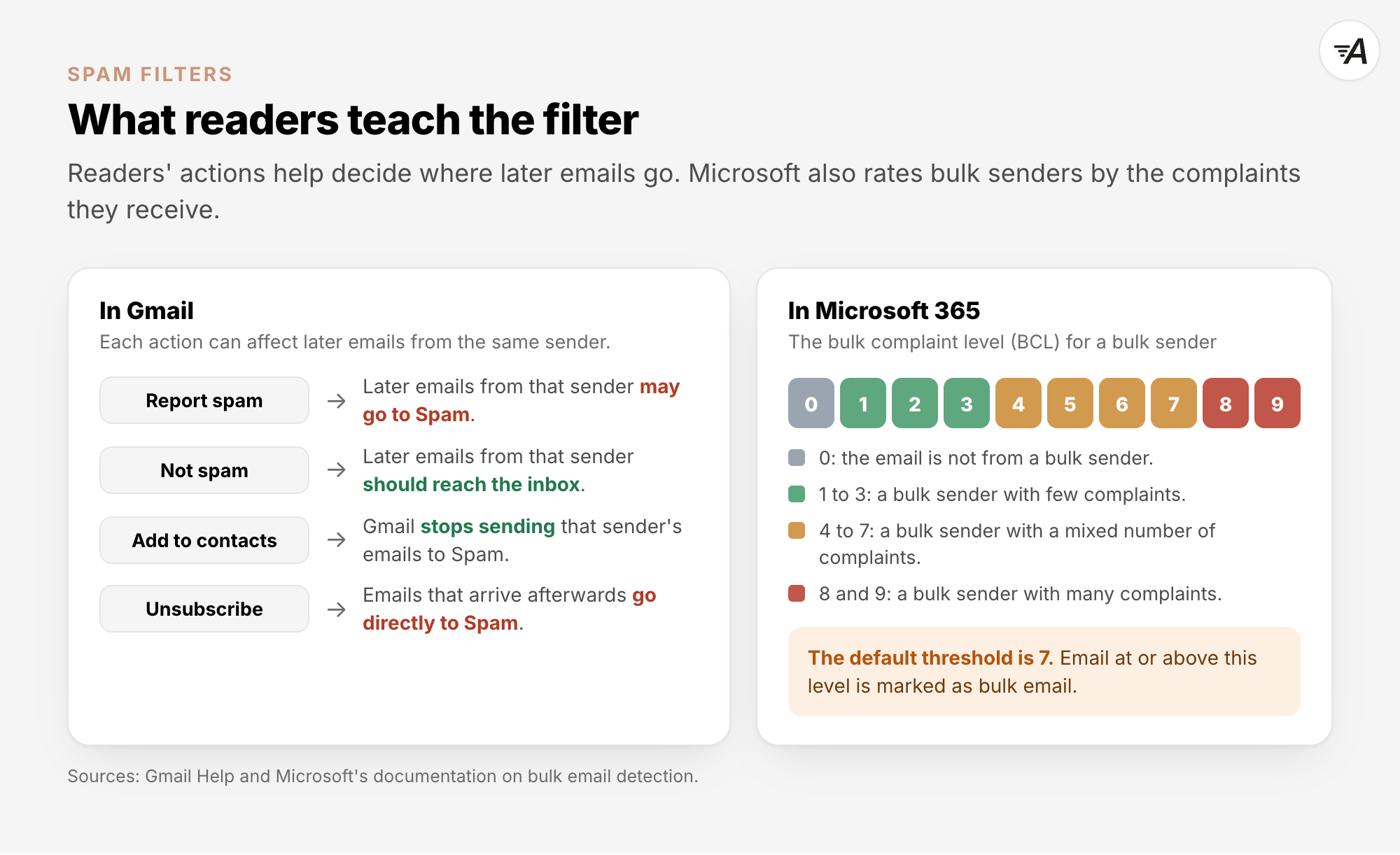
In Gmail, readers teach the filter in several ways:
- Report spam moves the message to Spam. Later emails from the same sender may go there too.
- Not spam moves the message back to the inbox. Later emails from that sender should reach the
inbox.
- Adding the sender to contacts also stops Gmail from sending their messages to Spam.
- Unsubscribing counts too. Gmail says: "If someone sends an email after you unsubscribe, their
emails go directly to Spam."
Honour unsubscribes immediately. Yahoo asks bulk senders
to "Honor unsubscribes within 2 days" and to keep their spam rate below 0.3%.
Microsoft gives bulk email its own number, the bulk complaint level (BCL). This number reflects how many
complaints a bulk sender generates. Its
documentation
describes the scale as follows:
| BCL |
What it means |
| 0 |
The message is not from a bulk sender. |
| 1, 2, 3 |
The message is from a bulk sender that generates few complaints. |
| 4, 5, 6, 7 |
The message is from a bulk sender that generates a mixed number of complaints. |
| 8, 9 |
The message is from a bulk sender that generates a high number of complaints. |
The default threshold in Microsoft's anti-spam policies is 7. It is 6 in the Standard preset and 5 in
the Strict preset. A message that meets or exceeds the threshold is marked as bulk email. Microsoft
still adds an older value, the spam confidence level (SCL), to each message. However, its SCL
page
says that this value "no longer holds the same meaning in cloud organizations". The SCL does not decide
where a message goes.
These reactions also build or damage your sender reputation, explained in Sender Reputation
Explained. Yahoo's guidance for senders says: "The best way
to ensure your messages are delivered is to send timely and relevant email to an active and engaged
audience."
7. Checking before you send#
A content score tells you how one rule-based filter reads your message. It cannot see your sending IP
address, so it cannot check that address against blocklists. It also cannot see your reputation or
predict how your readers will respond. Before a campaign, it helps to check a few other things:
- Check that your sending domain is authenticated.
- Check that your sending service account is in good standing.
- If you run your own server, look up its IP address on check.spamhaus.org.
- Send a test to your own Gmail and Outlook.com addresses.
If you run SpamAssassin yourself, note one detail from
Spamhaus.
Queries that arrive through public DNS resolvers get the answer 127.255.255.254. This is an error code,
not a listing. Use your own DNS resolver, or Spamhaus's Data Query Service, instead.
In AcelleMail: Check spam score#
On a campaign's Confirm step, click Check spam score to see how SpamAssassin reads the email
before you send it.
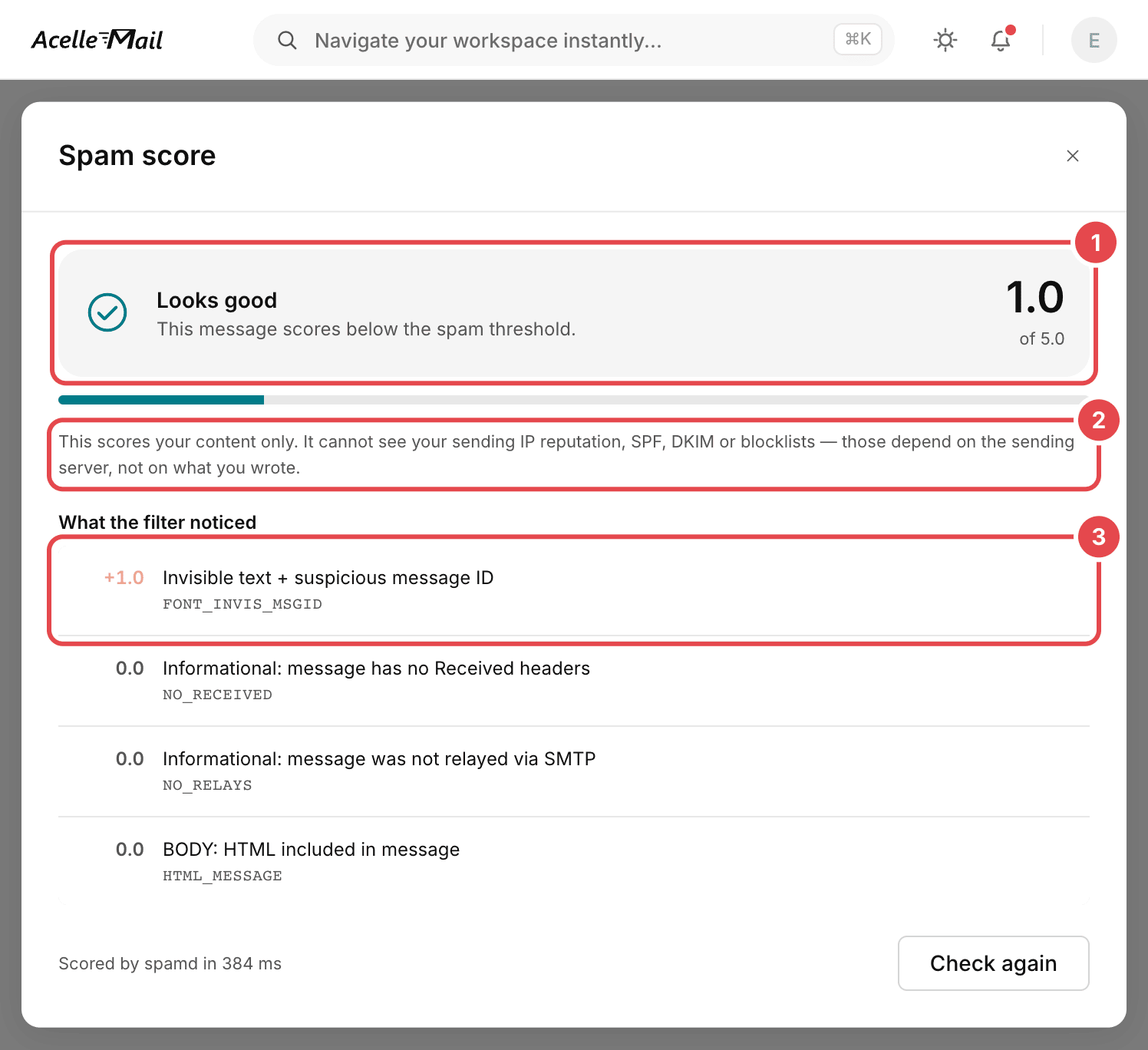
- The verdict and the score. Looks good means that "This message scores below the spam threshold."
The number after "of" is the threshold of the SpamAssassin server that AcelleMail uses.
- The scope note explains what the check cannot see: "This scores your content only. It cannot see your
sending IP reputation, SPF, DKIM or blocklists — those depend on the sending server, not on what you
wrote."
- What the filter noticed shows each rule that matched, along with its points. Here, a rule for
invisible text adds 1.0. Rules with 0.0 are only for information.
AcelleMail does not store the score, so check again after you change the email. The same content can
also score differently after the rules are updated.
The check appears only when an administrator has switched it on. Administrators can find it under
Settings → Spam Score:
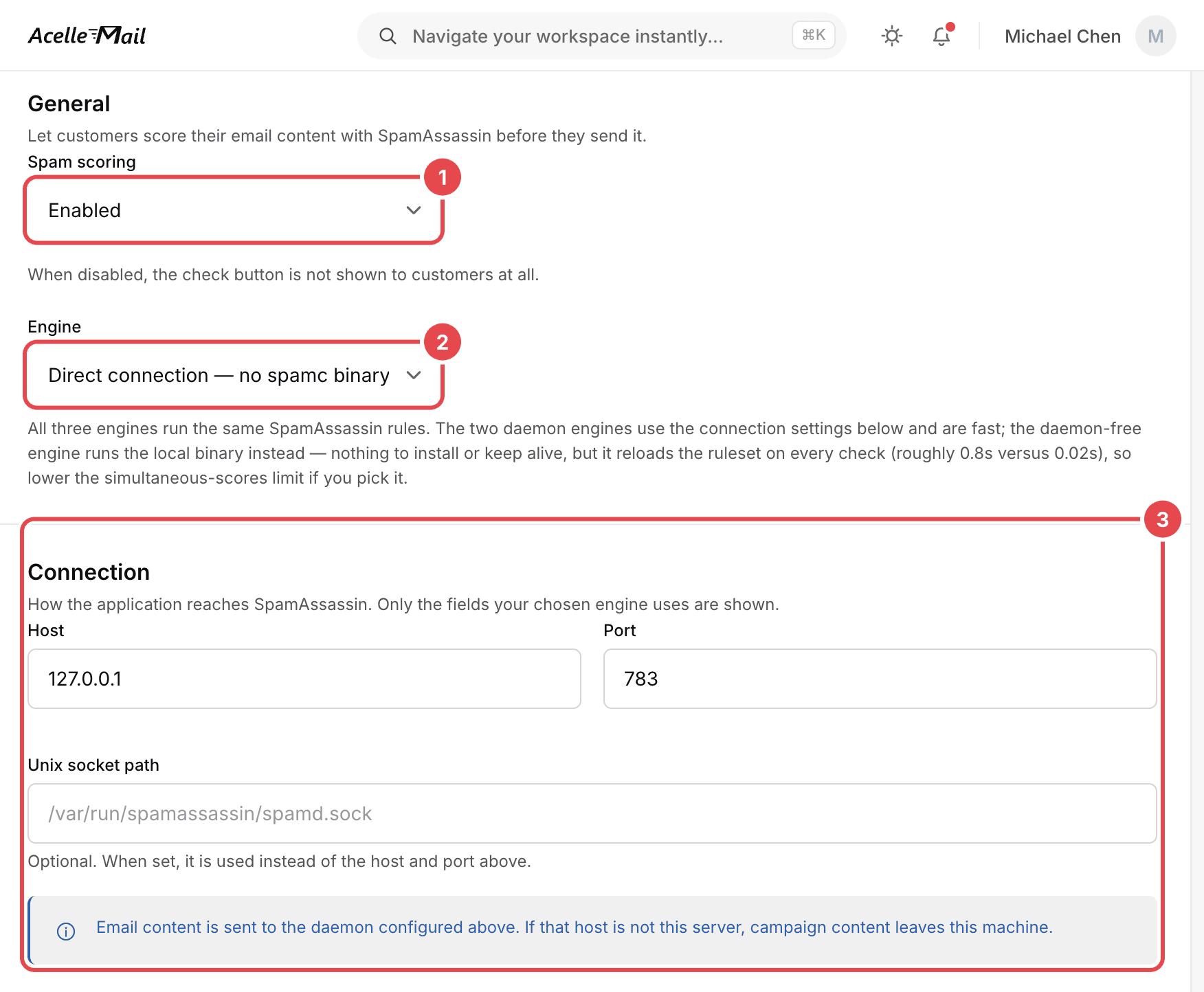
- Spam scoring: Enabled shows the button to customers. "When disabled, the check button is not
shown to customers at all."
- Engine: this controls how AcelleMail reaches SpamAssassin. All three engines run the same
SpamAssassin rules.
- Connection: this is the address of the SpamAssassin server.
8. Common mistakes#
| What you see |
Why it is a problem |
What to do |
| You rewrite good copy to remove "spam words". |
The heavier word rules look for stock spam phrases, not single words, and the providers say they rely on sender and reader signals. |
Leave out stock spam phrases, write clearly for people who asked for the email, and watch your complaints. |
| You treat a content score under 5 as a promise of the inbox. |
5 is SpamAssassin's default threshold, other servers use others, and the score cannot see reputation or readers. |
Use the score as one hint among several. |
| A link in your email points to a domain with a bad reputation, for example a shared link shortener. |
Domain blocklists also check the domains of links, and a listed link adds points. |
Link to your own domain. |
| You keep sending to people who unsubscribed. |
Gmail sends later email from that sender straight to Spam. |
Honour unsubscribes immediately. Yahoo asks bulk senders to do it within 2 days. |
| Your server's IP address is on the Spamhaus XBL, and you only ask for removal. |
The address is listed again if the problem behind it is not fixed. |
Fix the compromised machine first, then use check.spamhaus.org. |
| You read the answer 127.255.255.254 from Spamhaus as a listing. |
It is an error code for queries that come through public DNS resolvers. |
Use your own DNS resolver, or Spamhaus's Data Query Service. |
| You confuse AcelleMail's Blacklist with a public blocklist. |
The Blacklist is your own suppression list. |
Check public blocklists separately. |
| You send an email made mostly of images, with little text. |
It scores higher in SpamAssassin, and readers see little when images are not shown. |
Keep real text in the email. |
Summary#
- Filtering happens in layers: at the connection, on the message and in the mailbox.
- Blocklists check sending IP addresses and the domains of links. How you get off a list depends on the
list.
- Large providers expect authentication and valid reverse DNS.
- A rule-based filter adds up points to a threshold. SpamAssassin's default is 5, and many sites change
it.
- Most word rules carry little weight, and the heavier ones look for stock spam phrases. Sender
reputation and reader feedback carry much more.
- Readers train the filter through spam reports, Not spam and unsubscribes. Microsoft rates bulk mail
by its complaints (BCL).
- Check before you send, but treat a content score as one hint among several.
- In AcelleMail, use Check spam score on the campaign's Confirm step, once an administrator has
switched it on.
Terms used here are defined in the Email Marketing Glossary.
