
Before someone opens your email, they usually see the From name, the subject line and some preview text. Together, these help readers decide whether to open, skip or delete your message.
Advice about subject lines often comes with fixed rules about length, names or emoji. The evidence is less clear, and some familiar advice comes from older measurements of open rates.
This guide compares those rules with published research and explains the limits on misleading subject lines. It also shows where you set each part in AcelleMail.
This guide covers:
- What the inbox shows before someone opens your email
- The preview line: your preheader, the first words of the email, or an AI summary
- Length, capitals and emoji: what the evidence shows
- Names in the subject line: a famous result that did not hold up
- Honest subject lines: what the law says
- What mailbox providers and spam filters look at
- Testing subject lines without fooling yourself
- Before you send, in AcelleMail
It ends with the most common mistakes and a one-screen summary.
1. What the inbox shows before someone opens your email
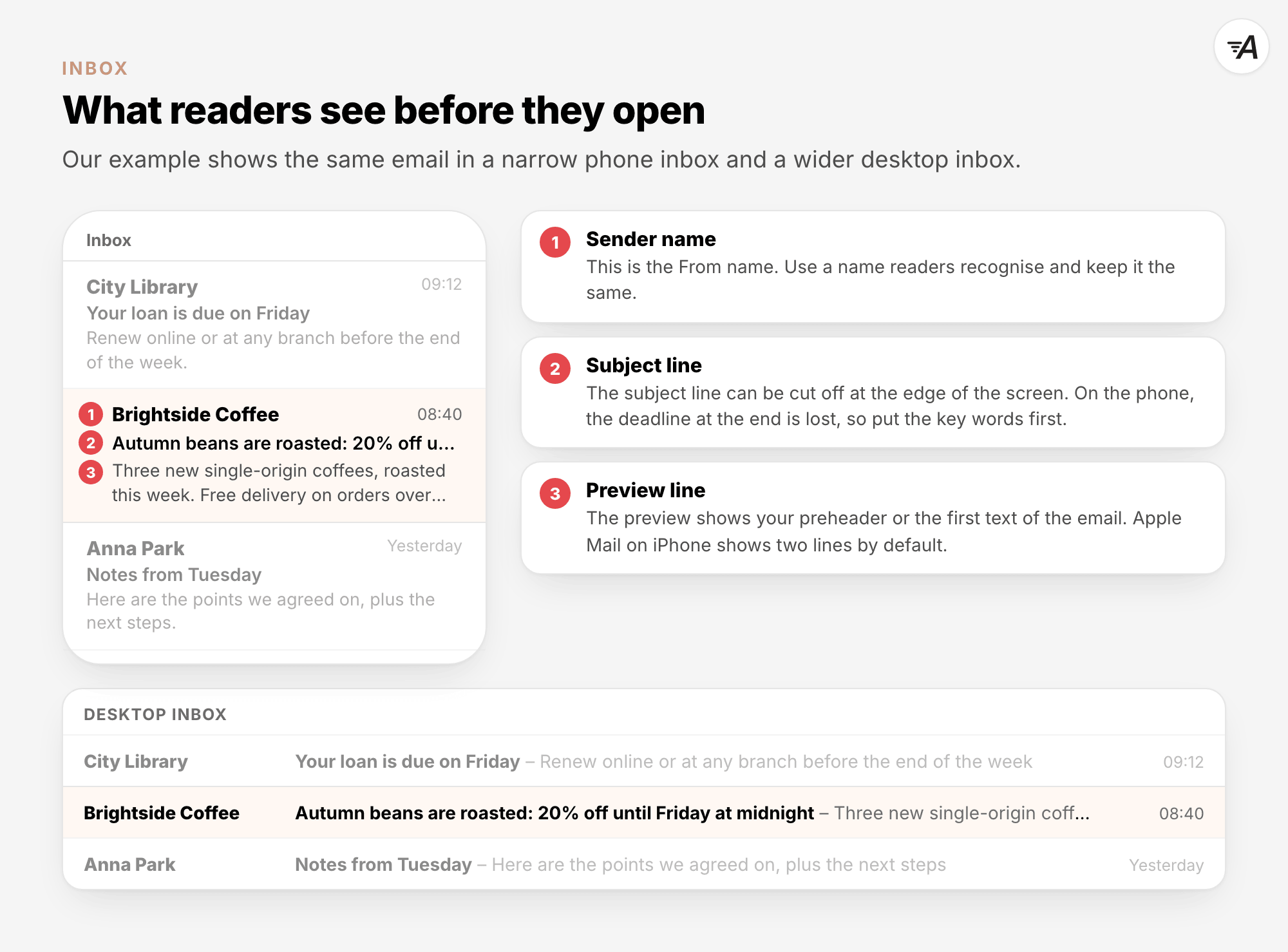
The sender name is the From name. The subject line comes from the email's Subject header, which RFC 5322 describes as "a short string identifying the topic" of the message.
Many mail apps also show a preview line taken from the email's text. Apple Mail on iPhone displays two lines by default, and readers can choose up to five. Google's Gmail API describes the snippet as "A short part of the message text."
A long subject line gets cut off at the edge of the screen. Phones usually show less of the subject line than a wide desktop window, so put the words that matter first.
The diagram below shows the three parts a reader sees before opening an email.
2. The preview line: your preheader, the first words of the email, or an AI summary
A preheader is a short line you write for the email preview. Most mail apps show the first text in the email, so a preheader puts your chosen words there.
Without a preheader, the preview may show a link to view the email in a browser. It may also show an image's alt text if that comes first.
Some inboxes now write their own preview text. Apple says: "When you turn on Apple Intelligence, summaries automatically appear under your emails." Readers can turn summaries off to see the first lines of the most recent message instead. Apple Intelligence is not available on all iPhone models or in all languages or regions.
Outlook also shows summaries when Copilot's Prioritize feature is on. The guidance says: "In your Message List, the first line of content from the email will be replaced with a brief summary of the message."
The diagram below shows where the preview line can come from.
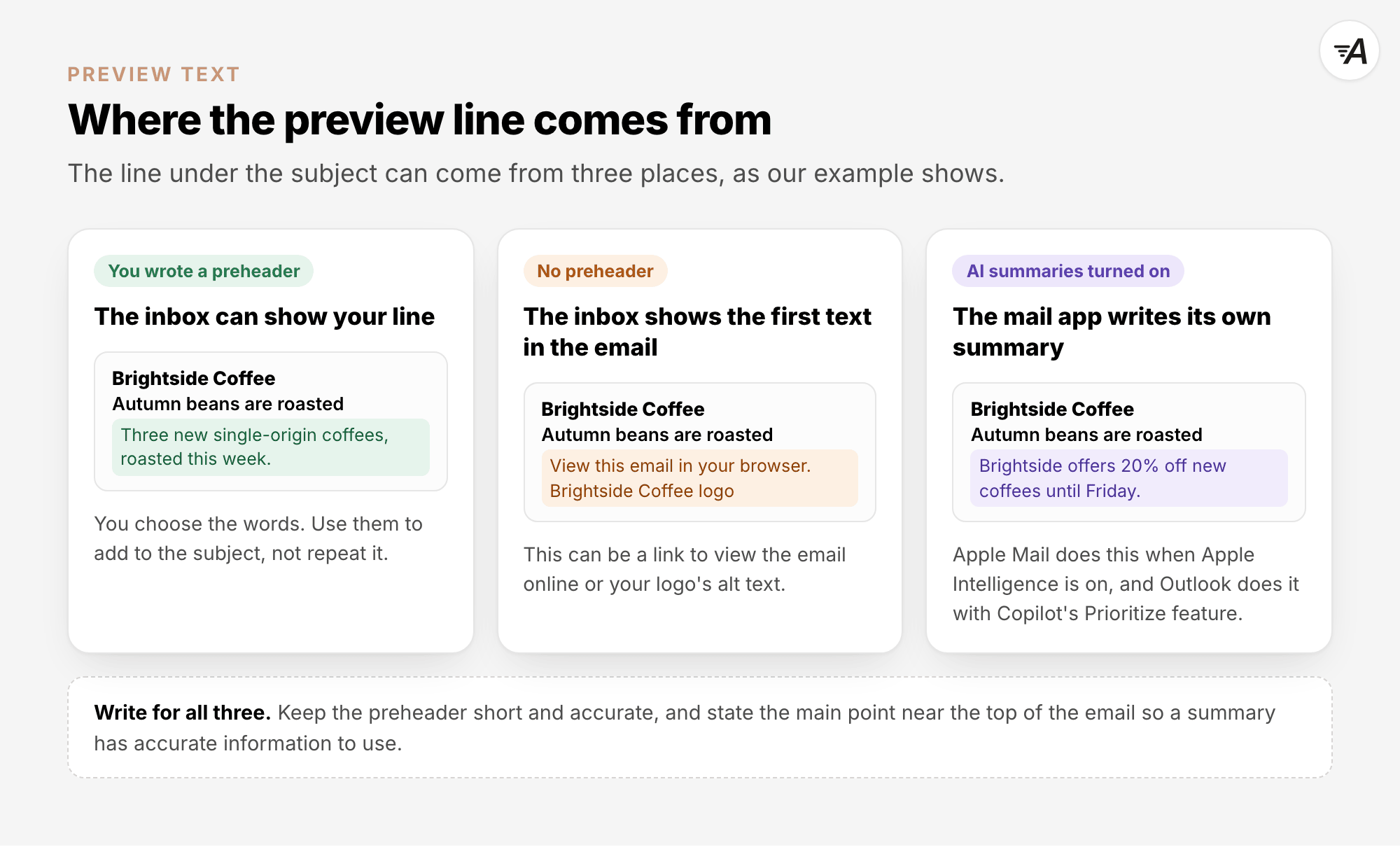
Your preheader may not appear, so state the main point in the email's opening paragraph too. This gives an AI summary something accurate to work with.
Many tools, including AcelleMail, insert the preheader as hidden text. Google's sender guidelines say: "Don’t use HTML and CSS to hide content in your messages. Hiding content might cause messages to be marked as spam." Short preheaders that match the email are common practice, but Google's warning covers hidden content in general and makes no exception for them. If you prefer to avoid hidden text, make the first visible line of the email do the preheader's job.
In AcelleMail: the Preheader text card
For an HTML campaign, the Preheader text card appears on the Template step once you have chosen a template. Its guidance recommends keeping the text under 100 characters, while the field accepts up to 150.
The Inbox preview row shows the From name, subject and preheader together in a generic inbox view. It does not represent any particular mail app.
The screenshot marks the Preheader text field (1) and the Inbox preview row beneath it (2).
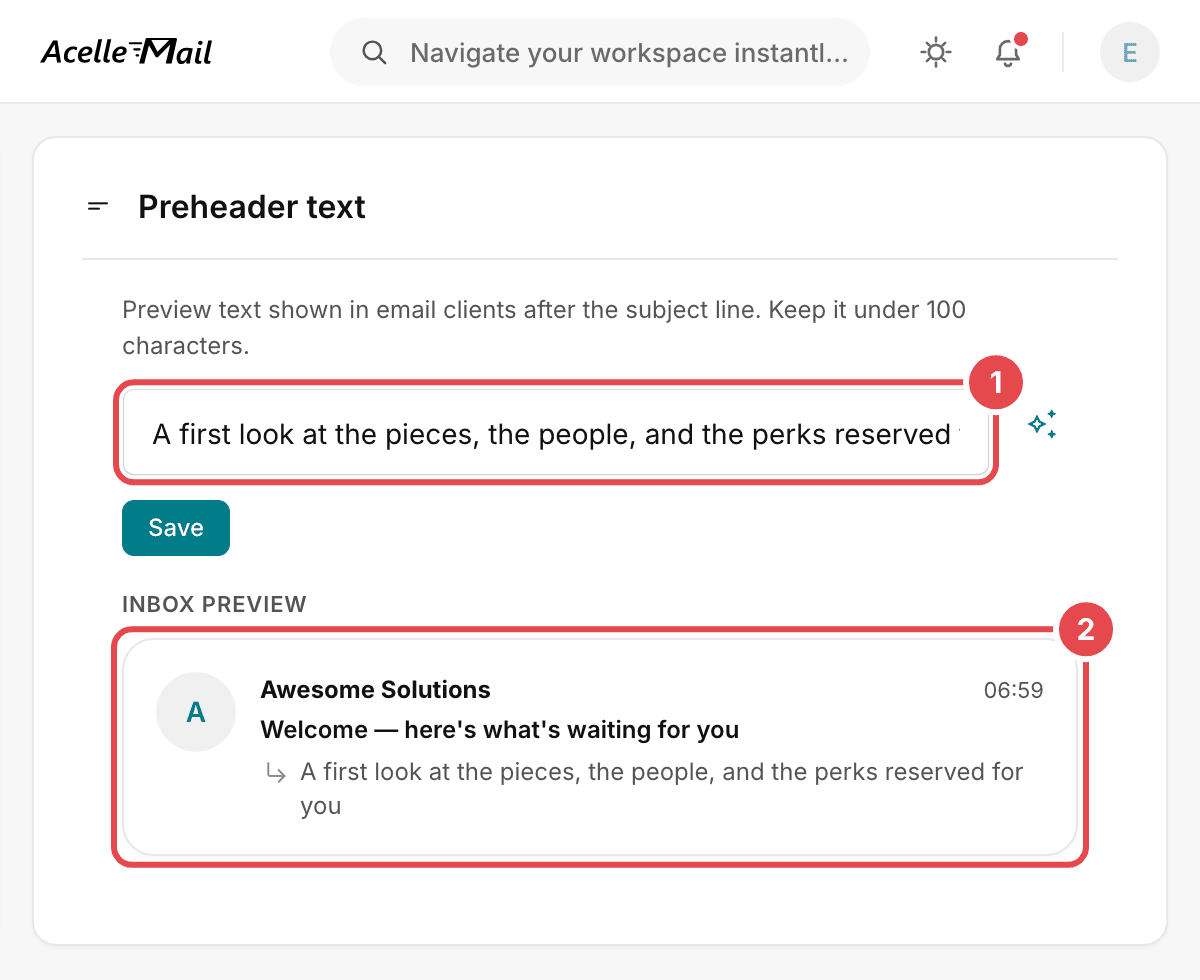
AcelleMail inserts the preheader as a hidden line at the very top of the email body. The Confirm step repeats the preview under How it lands in the inbox. The Email Marketing Glossary shows that row under "These terms in AcelleMail".
3. Length, capitals and emoji: what the evidence shows
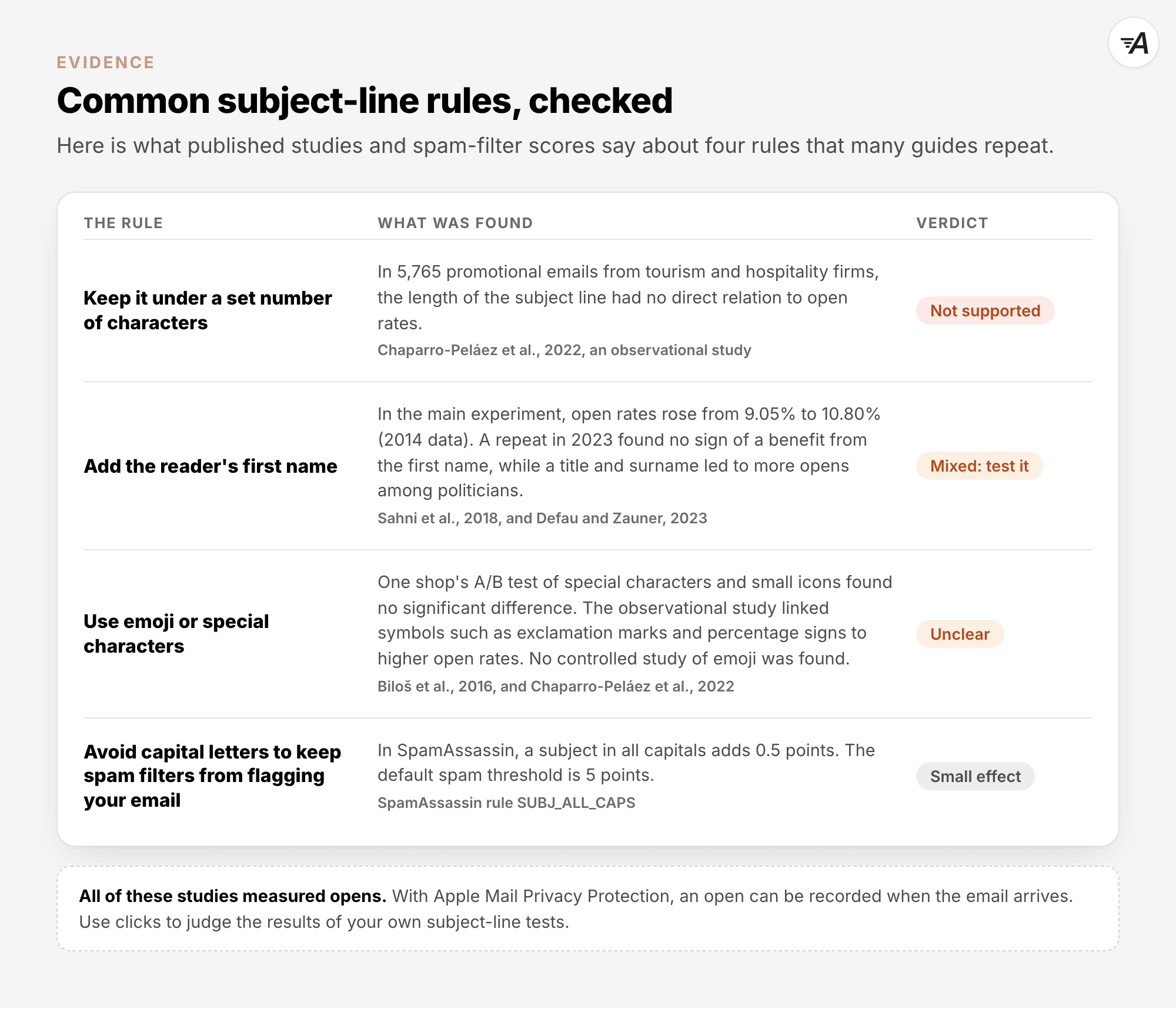
Two kinds of study appear in this section. A controlled study sends different versions to random groups, so it can show that a change caused a difference. An observational study looks for patterns in emails that were already sent. We found no controlled study that identifies a best subject-line length. A large observational study by Chaparro-Peláez, Hernández-García & Lorente-Páramo looked at 5,765 promotional emails sent by tourism and hospitality firms between 2013 and 2018. It found "no direct relation between the length of the subject line and the attention paid to promotional e-mails", where attention meant open rates. The authors did not record which device people used, so they could not rule out an effect from phones cutting subject lines short.
That study linked special characters with higher open rates. It counted symbols such as !, ?, % and €, not emoji. General promotions whose subject lines mentioned a discount also appeared to get lower open rates. These were observational findings, so they do not show that either change caused the result.
An A/B test is a controlled study: it sends two versions to random groups at the same time. Biloš, Turkalj & Kelić ran A/B tests on one Croatian retailer's newsletter. A subject line with special characters, such as small icons, did no better than a plain one: the test "showed no statistically significant difference" (p=0.791). In other words, the small gap between the two versions could easily have been chance. In two of three other tests, a general subject line about the newsletter got a higher open rate than one about the content of that edition.
We found no controlled, peer-reviewed study of emoji in subject lines for this guide. This leaves emoji as something to test with your own list.
SpamAssassin is a spam filter whose rules and scores are public. In it, a subject line in all capitals carries little weight: it adds 0.5 points (SUBJ_ALL_CAPS) to the spam score. The default spam threshold is 5 points, which SpamAssassin's own documentation calls "quite aggressive". Your readers give you a better reason to avoid all capitals. Spam Filters Explained shows how these points add up.
You also need to read open rates carefully. With Mail Privacy Protection on, Apple Mail downloads remote content "when you receive a message (instead of when you view it)". This can record an open before anyone reads the email. Studies that measured opens before Apple added this feature did not have this problem. Tests you run today can include automatic opens from readers who have Mail Privacy Protection on.
For tests you run now, compare click rates. Email Marketing Metrics Explained explains how to read these measurements.
4. Names in the subject line: a famous result that did not hold up
In 2018, Sahni, Wheeler & Chintagunta published results from randomised field experiments run with three companies. In their main experiment, adding the recipient's name to the subject line increased the open rate by 20%, from 9.05% to 10.80%. Sales leads rose by 31%, from 0.39% to 0.51%, and unsubscribes fell by 17%, from 1.2% to 1.0%.
In 2023, Defau & Zauner ran two randomised experiments with emails in German. The first repeated the first-name test with university students, and the second tested a title and surname with local and regional politicians. They wrote: "we find no indication that using the first name of the recipient in the subject line has a positive effect on opening rates or click-through rates". They also pointed out that the original data came from 2014.
Among university students, the open rate with a first name was 3.2% lower, although this was not statistically significant. A title and surname increased opens among the politicians by 11.8%, which was statistically significant. Clicks rose by 14%, but that difference was not statistically significant.
An earlier study by Wattal and colleagues analysed over 10 million email ads that one website sent to its customers. It found that "consumers respond negatively when firms are explicit in their use of personally identifiable information (i.e., a personalized greeting)". How well people knew the company changed that response. This was an observational study of personal greetings, not a test of names in subject lines.
Using a name is therefore not a reliable way to improve results, and it can look like a trick. Test it on your own list and judge the result by clicks.
The diagram below brings together the evidence from sections 3 and 4 about length, names, special characters and capitals.
In AcelleMail: merge tags in the subject
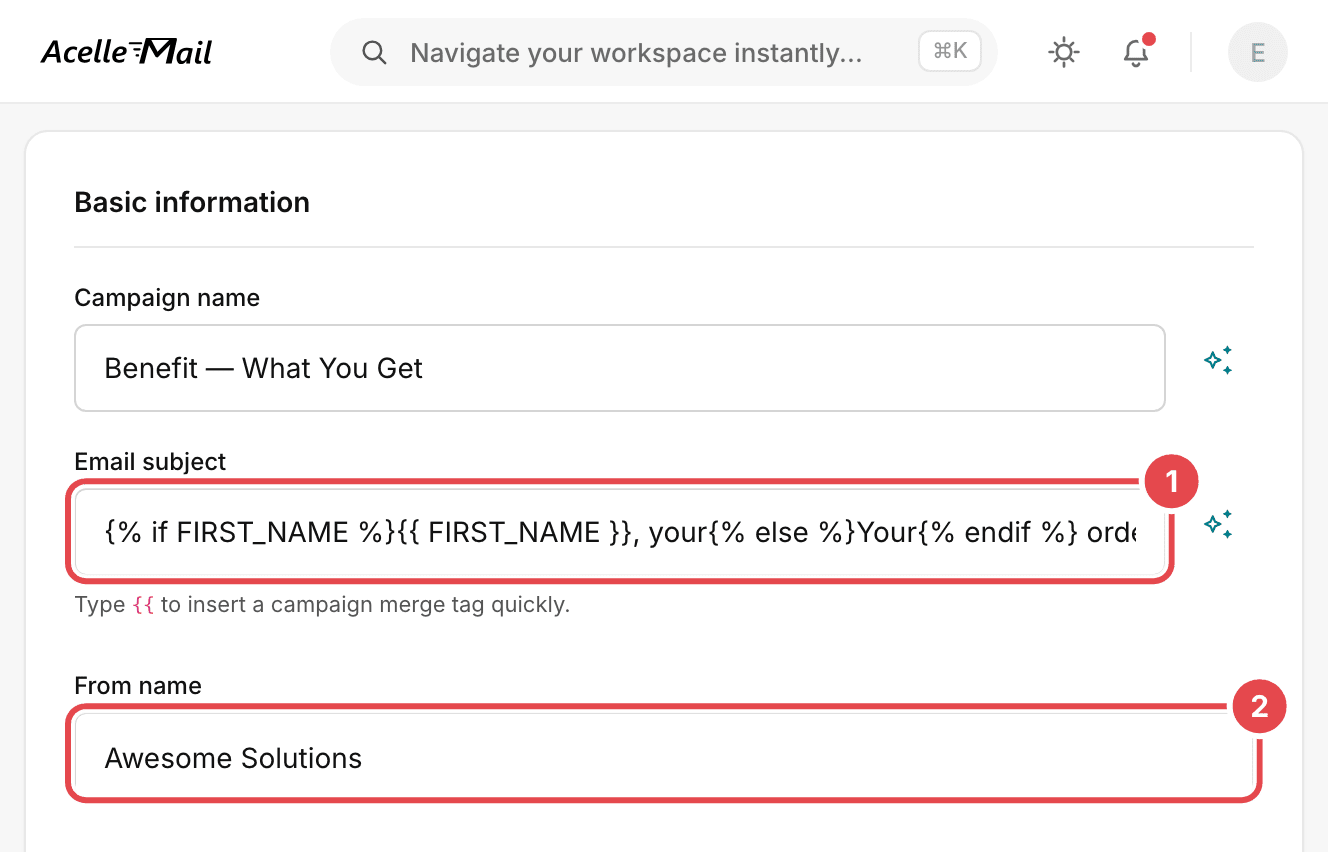
The Email subject field is on the campaign's Setup step. It takes up to 150 characters and accepts emoji. From name is on the same step.
A merge tag inserts information from each contact's record, such as their first name. Missing names need
attention. For a contact named Abel, {{ FIRST_NAME }}, your order is ready renders as "Abel, your
order is ready". For a contact without a first name, it renders as ", your order is ready".
Use this form when some contacts have no first name:
{% if FIRST_NAME %}{{ FIRST_NAME }}, your{% else %}Your{% endif %} order is ready
It produces "Abel, your order is ready" for Abel and "Your order is ready" for a contact without a first name.
In subject lines, AcelleMail allows the if tag but not filters, which change what a merge tag prints.
That rules out |default("there"), so use the if/else form above instead.
The screenshot shows the if/else tag in Email subject (1) and marks From name (2).
5. Honest subject lines: what the law says
This section describes the rules in general terms and is not legal advice.
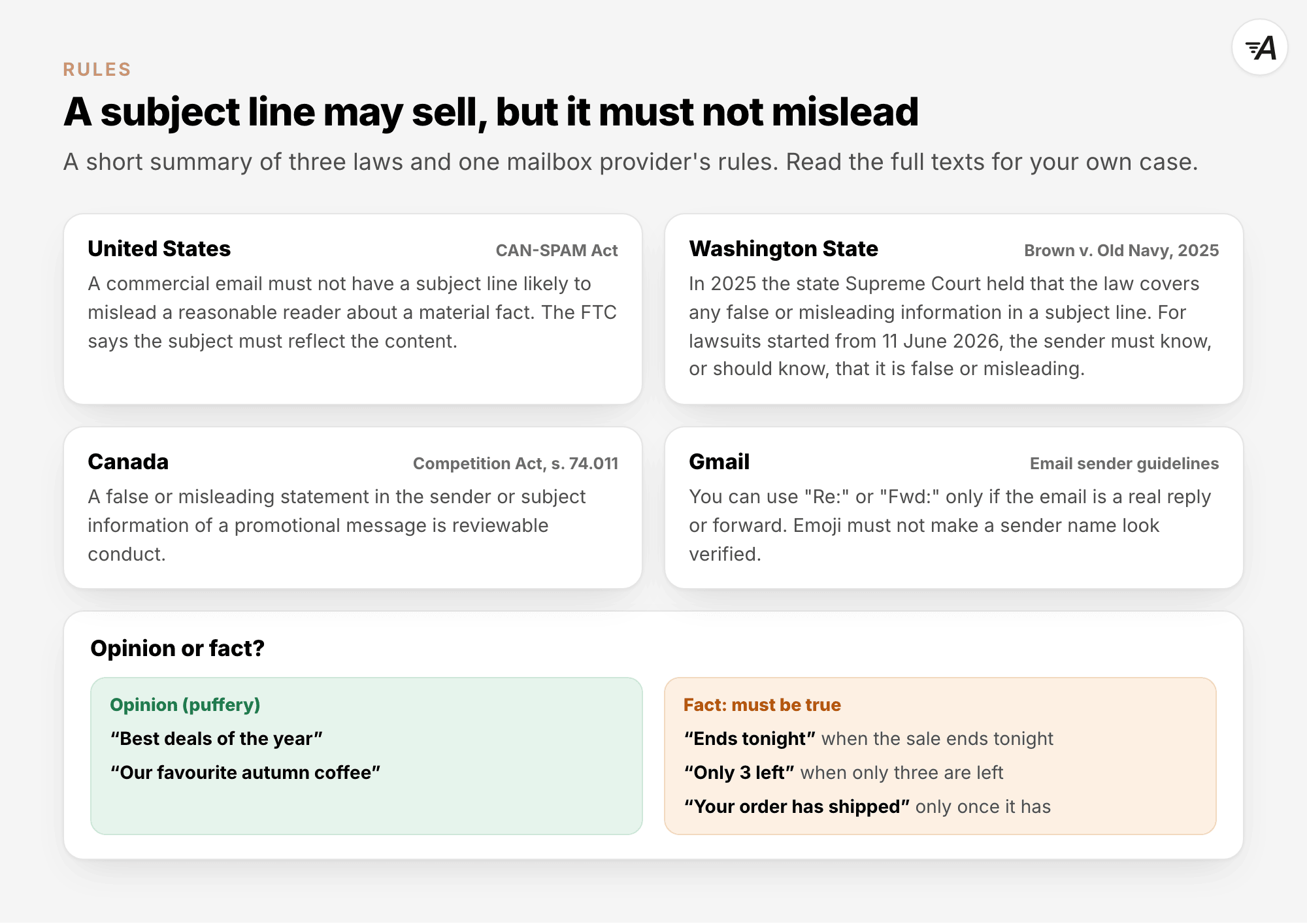
In the United States, the FTC's compliance guide to the CAN-SPAM Act puts the rule plainly: "Don’t use deceptive subject lines. The subject line must accurately reflect the content of the message." Each separate email that breaks the law can lead to penalties of up to $53,088.
The Act itself makes it illegal to send a commercial email when the sender knows, or should know from the circumstances, "that a subject heading of the message would be likely to mislead a recipient, acting reasonably under the circumstances, about a material fact regarding the contents or subject matter of the message" (15 U.S.C. 7704(a)(2)).
Washington State's law covers commercial email sent from a computer in Washington. It also covers commercial email sent to an address the sender knows, or has reason to know, belongs to a Washington resident. The law bans such email when it "Uses a subject line which, based on the person's actual knowledge or knowledge fairly implied on the basis of objective circumstances, contains false or misleading information in the subject line." The words about knowledge came from a 2026 amendment, which applies to lawsuits started on or after 11 June 2026.
Before that amendment, on 17 April 2025, Washington's Supreme Court answered a federal court's question in Brown v. Old Navy, LLC. It said: "We conclude that the statute prohibits the use of any false or misleading information in the subject line of a commercial e-mail."
The shoppers said that sales advertised as "today only" or "three days only" went on longer. The court's answer did not decide whether the shoppers' claims were true. The court also held that "instances of mere puffery are not prohibited". It said a subject such as "Best Deals of the Year" is not a misrepresentation, even if a better sale comes later. How long a promotion lasts, whether it is available, its terms and the price of goods are all facts.
The 2026 amendment also set the recipient's damages for each email sent in breach of the law at "$100, or actual damages, whichever is greater" (RCW 19.190.040). The court's 2025 opinion refers to $500 under the earlier version of the law.
In Canada, section 74.011 of the Competition Act applies when someone promotes a business or a product by electronic message. It covers sending "a false or misleading representation in the sender information or subject matter information of an electronic message".
As a practical check, treat "Ends tonight", "Only 3 left" and "Your order has shipped" as statements of fact. The sale must end tonight, only three must be left, and the order must have shipped. We based these examples on how the court separated opinion from fact.
The diagram below summarises the rules about honest subject lines.
For other CAN-SPAM rules, see Email Consent Explained. Transactional vs Marketing Email explains how the subject line affects whether a mixed email counts as marketing.
6. What mailbox providers and spam filters look at
Google's message formatting guidelines cover the subject, the From name and other parts of a message. They say these parts "should accurately represent the sender identity and message content, and shouldn’t be misleading". Google gives an example: "don’t send messages with subject lines starting with Re: or Fwd: unless the messages are actual replies or forwards". In RFC 5322, "Re: " is the prefix for a reply.
Google also asks senders not to use emoji that imitate graphic elements "with the intent to deceive or influence recipients". Its example is an emoji or image next to a From name or brand name that suggests the name has been verified.
Yahoo says: "Don't use false or misleading header information or deceptive subject lines to hide, forge or misrepresent the sender or origin of the email."
SpamAssassin gives each rule different scores depending on its settings. The scores below are the ones it uses when it checks blocklists over the network but does not use its learning filter, as in the examples in Spam Filters Explained. Many of its subject rules are switched off or add less than one point, but several add more. A subject with "As Seen" adds 3.099 points (SUBJ_AS_SEEN), and one with "Your Family" adds 2.999 (SUBJ_YOUR_FAMILY). Both add more points than a link on the Spamhaus domain blocklist, which adds 2.5. A subject that starts with "Buy" adds 1.498 (SUBJ_BUY), and one that starts with the label "ADV" adds 1.542 (ENGLISH_UCE_SUBJECT). Gmail and Outlook do not publish lists of spam words.
Your From name matters too, because readers see it next to the subject line. Use a name they recognise and keep it the same. Section 4 of How to Send Email Marketing That Works explains this choice.
7. Testing subject lines without fooling yourself
Test one change at a time, using random groups that receive their emails at the same time. If you change both the subject line and preview text, you cannot tell which change mattered.
Judge the result by clicks. Apple Mail Privacy Protection downloads remote content when a message arrives, so your tracking can count an open before anyone reads the email. A version may win on open rate only because of those automatic opens.
In AcelleMail
Each A/B test version has its own Email subject and Preview text. Preview text is that version's preheader, the same text that the Preheader text card sets for a normal campaign. Keep Preview text the same in both versions when you are testing only the subject line.
The options for choosing a winner are Highest click rate, Highest open rate and Manual selection. Choose Highest click rate. If you use Manual selection, compare the click rates yourself, because the report's recommendation and confidence figure are then based on open rate. Highest open rate includes Apple's automatic opens.
Email A/B Testing Explained covers sample size and how to read the result. Use it to decide whether your test gives you enough evidence to change future campaigns.
8. Before you send, in AcelleMail
On Setup, check Email subject and From name together. Make sure the sender is recognisable and the important words appear early in the subject line.
Review Preheader text and Inbox preview on Template. The preheader should add useful information to the subject line and match the email's content.
On Confirm, review the row under How it lands in the inbox once more before you send.
If your administrator has turned on spam scoring, a Check spam score button appears on Confirm, under the inbox row. Use it to check the subject line together with the rest of the email. Spam Filters Explained explains what that score means.
Use Send test email to send yourself a copy, and open it in two or three mail apps, such as Gmail, Outlook and Apple Mail. This shows you where each app cuts off the subject line and what appears in its preview line. Remember that some readers will see an AI summary instead.
9. Common mistakes
| What you see | Why it is a problem | What to do |
|---|---|---|
| You keep every subject line under a fixed character limit because a blog recommends it. | We found no controlled study showing that one length is best, and where the subject is cut off depends on the screen. | Put the important words first and check a test email on a phone. |
| You add the first name to every subject line. | The best-known improvement was not found again in 2023, and missing names can leave a comma at the start. | Use clicks to test names, and use the if/else form when names are missing. |
| You leave the preheader empty. | The inbox may show the email's first words, including a link to view it in a browser. | Write a short preheader that adds to the subject line. |
| You start a campaign subject line with "Re:" or "Fwd:". | Google's guidelines say not to use these prefixes unless the message is a real reply or forward. | Use a plain subject line that describes the email. |
| You write "Ends tonight" and then extend the sale. | A false deadline is the kind of fact that Washington's Supreme Court said the state's law covers. | State only deadlines you will keep. |
| You put an emoji badge beside your From name. | Google's guidelines say not to use emoji that suggest a verified name. | Use your plain brand name. |
| You choose the winning subject line by open rate. | With Mail Privacy Protection on, Apple Mail downloads remote content when emails arrive, so your tracking can count an open before anyone reads the email. | Choose the winner by clicks. |
Summary
- Readers see your From name, subject line and usually a preview before opening the email.
- The preview may come from your preheader, the email's first words or an AI summary.
- We found no controlled study that supports a fixed subject line length, and a large observational study found no link between length and opens. Put the important words first.
- The improvement from using first names was not found again in 2023. If you use names, allow for contacts without a name.
- Subject lines must not mislead under CAN-SPAM, Washington's law and Canada's Competition Act.
- Google's guidelines say not to use fake "Re:" or "Fwd:" prefixes, or emoji that suggest a verified sender name.
- Judge subject line tests by clicks, because Apple Mail Privacy Protection can make emails appear to have been opened when they arrive.
- In AcelleMail, review Email subject, From name, Preheader text and Inbox preview. Use the A/B test to compare subject lines.
Terms used here are defined in the Email Marketing Glossary.
0 comments
No comments yet — be the first to share a tip or question.