

The From address in an email can be faked. SMTP itself does not check that the sender controls the domain shown there. Email authentication gives receiving servers ways to check the domains involved.
SPF and DKIM authenticate domains that can differ from the From domain a reader sees. DMARC connects their results to that From domain. It also lets domain owners publish a policy for messages that fail and request reports.
Mailbox providers now require authentication from bulk senders, and some reject messages that fail. In May 2026, RFC 9989 made DMARC an IETF Standards Track specification. It replaced two older documents: RFC 7489 from 2015 and RFC 9091. Some older guides still describe rules that have changed.
This guide covers:
- One message, four names
- SPF: which servers may send for a domain
- DKIM: how a domain takes responsibility for a message
- DMARC: alignment with the From address
- The DMARC record after RFC 9989
- From p=none to enforcement
- DMARC reports
- Forwarding and mailing lists
- What mailbox providers require
It ends with the most common mistakes and a one-screen summary.
1. One message, four names
An email has an SMTP envelope and message content, which includes the headers and body. Recipients do not normally see the envelope. Email Sending Explained covers this distinction.
Four names matter for authentication:
- HELO/EHLO name. The sending server gives this name when it connects. An example is
out1.esp.example.net. SPF can check it. - MAIL FROM. This is the envelope sender, also called the Return-Path. Bounces return to this
address. SPF checks its domain, such as
esp.example.netinbounces@esp.example.net. - DKIM signing domain. The
d=value in a DKIM-Signature header identifies the domain that takes responsibility for the message, such asexample.com. - From domain. This is the domain in the From address that the reader sees. In
news@example.com, the From domain isexample.com. DMARC starts with this domain.
The diagram shows how these names can differ when a sending service sends for you.
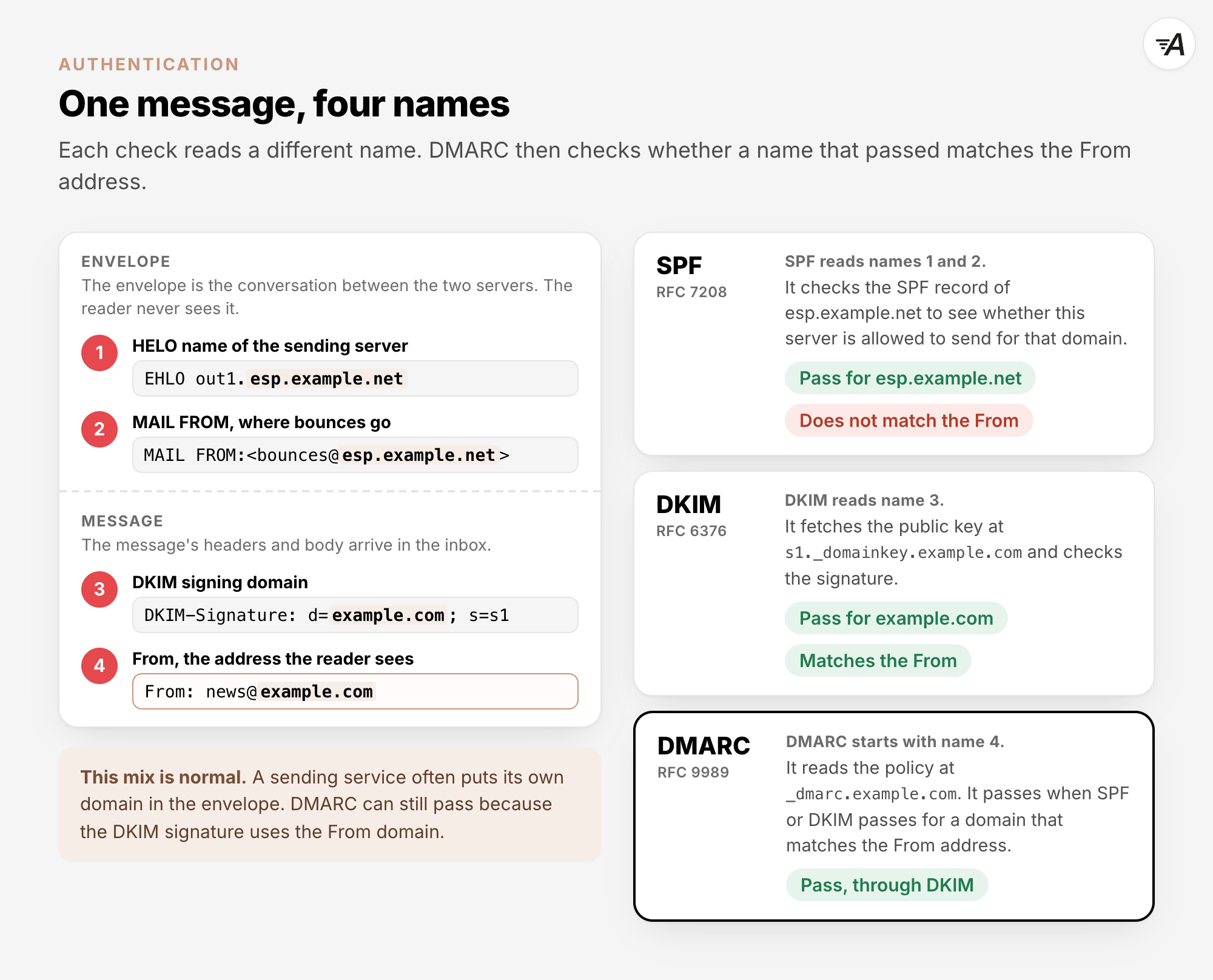
DMARC uses only the SPF result for the envelope sender, not the separate check of the HELO name. The HELO name still matters. From November 2026, Spamhaus is gradually requiring every sending IP to have a valid HELO name, a reverse DNS (PTR) record and a matching A record.
Receiving servers often record their results in an Authentication-Results header field at the top of the message. In Gmail on a computer, open the message and choose More next to Reply. Then choose "Show original" (Google's help page). Other email programs have a similar option to view the message source.
In this example, SPF passes for an unrelated domain. DMARC passes through DKIM because example.com
matches the From domain:
Authentication-Results: mx.example.org;
       spf=pass smtp.mailfrom=esp.example.net;
       dkim=pass header.d=example.com;
       dmarc=pass header.from=example.com
2. SPF: which servers may send for a domain
An SPF record is a TXT record, a line of text that you publish in your domain's DNS through your DNS provider. It lists the servers allowed to use the domain in MAIL FROM or HELO. For example, it can look like this:
v=spf1 include:_spf.example.net ip4:192.0.2.10 -all
The receiver compares the connecting IP address with that domain's record. A pass means that the domain allows the server to send. It does not prove anything about the visible From address.
Other results include fail, softfail, neutral, none, temperror and permerror. A domain name must have
only one SPF record. An SPF check may use at most 10 terms that cause DNS lookups, such as include:
and redirect=. If either rule is broken, the result is permerror, a permanent error, and SPF cannot
pass. Receivers should also allow no more than two "void lookups", which are lookups that find nothing.
Going over that limit gives permerror too. These rules come from RFC
7208.
Forwarding usually breaks SPF because the connecting IP address changes. A receiver may also reject a
message after an SPF -all failure, before checking DMARC. Aligned DKIM cannot prevent that rejection,
and the message will not appear in aggregate DMARC reports. RFC
9989 explains this limitation.
In AcelleMail
A sending service such as Amazon SES, Mailgun or SendGrid sets the Return-Path itself, whether you connect through its API or through its SMTP option.
On a plain SMTP or sendmail sending server, a bounce handler is optional. When the server has one, AcelleMail sets the Return-Path to that handler's mailbox. When it has none, AcelleMail does not set a separate envelope sender. The From address is then used as the envelope sender, so SPF checks the From domain.
With a bounce mailbox or a sending service, SPF often passes for a domain that is not yours. That is normal. DMARC can still pass through DKIM when the DKIM domain matches your From domain, as section 4 explains.
For a domain that AcelleMail signs itself, the DNS records include an SPF row only when the administrator has set one up for the installation. If an SPF row is present, Verify DNS records checks whether your published record allows a sample IP address from each service included in the row. It does not compare the record text.
3. DKIM: how a domain takes responsibility for a message
DKIM lets a domain take responsibility for a message. The sending server makes a body hash, a short fingerprint of the message body. It signs that hash and selected headers with a private key that only the sender holds, then adds a DKIM-Signature header.
The header's main tags are d= for the signing domain and s= for the selector. The tags h=, bh=
and b= identify the signed headers, body hash and signature.
The receiver gets a public key from <selector>._domainkey.<d= domain>, such as
s1._domainkey.example.com. Different selectors let you change keys while DKIM continues to work.
A DKIM pass means the signing domain takes responsibility for the message. It also means the signed parts have not changed since signing. The signing domain can still be unrelated to the From domain. RFC 6376 defines DKIM.
A forwarder that passes the message on without changes keeps the signature valid. A mailing list that edits the subject or adds a footer breaks the signature, as section 8 shows.
In AcelleMail
When you add a domain under Sending > Sending domains, AcelleMail usually creates a DKIM key for it. Depending on your plan, email may instead go through a service the administrator set up, such as Amazon SES, Mailgun or SendGrid. The domain is then registered with that service, which signs your email. Each domain you send from needs its own entry, so the Awesome Solutions demo lists its main domain and a subdomain.
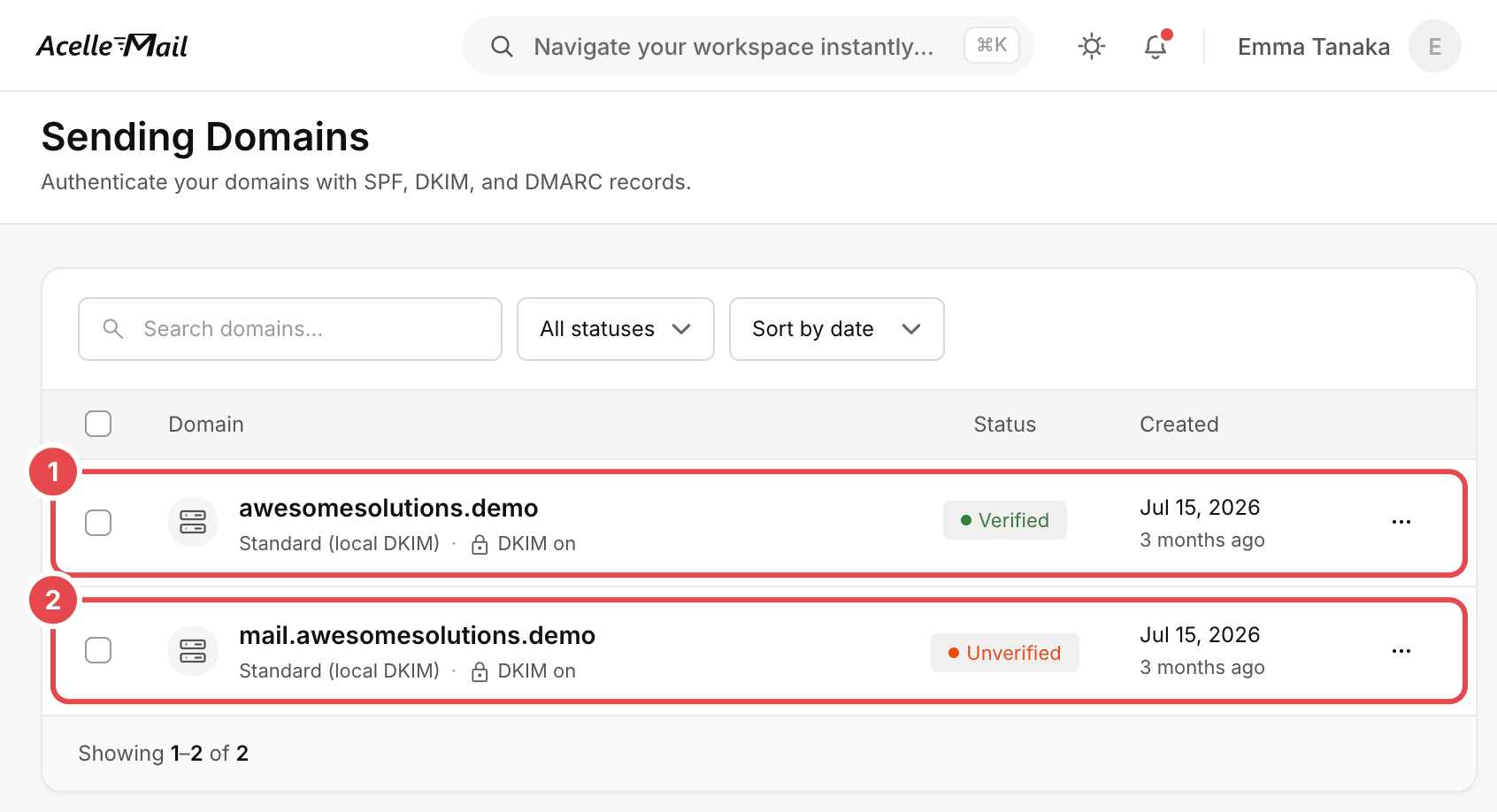
awesomesolutions.demois a Standard (local DKIM) domain with DKIM on. Its records have been checked, so it shows Verified.mail.awesomesolutions.demoalso has DKIM on, but it shows Unverified until its records are published and checked.
Open a domain to see its DNS records. A Local DKIM domain usually has two rows, plus an SPF row when the administrator has set one up for the installation. Domain identity is the platform's own ownership check and is not part of SPF, DKIM or DMARC. DKIM signature is the record that holds the public key.
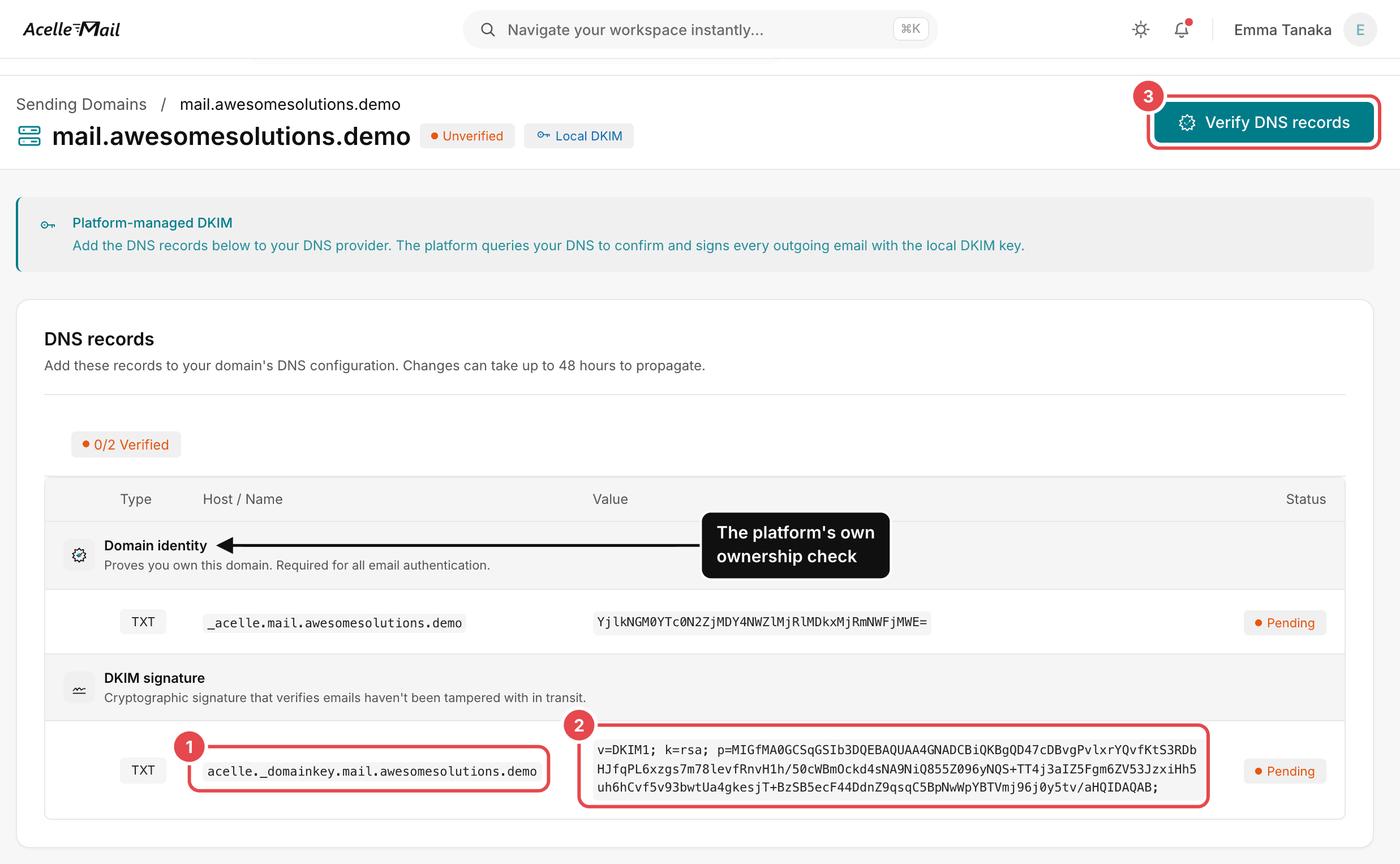
- The DKIM record's host name is the selector, followed by
_domainkeyand the domain:acelle._domainkey.mail.awesomesolutions.demo. - The value starts with
v=DKIM1; k=rsa; p=, and the public key followsp=. - After you publish the records at your DNS provider, click Verify DNS records. When every row passes, the domain shows Verified.
Selectors and record names depend on each installation's settings, so copy them from your own domain page.
AcelleMail creates 1024-bit RSA keys and has no option to change the key size. RFC
8301 allows that minimum size but recommends at least 2048
bits. It does not allow rsa-sha1 for signing or verification. Gmail requires a key of 1024 bits or
longer for mail to personal Gmail accounts, and recommends 2048 bits if your domain provider supports it
(Google's sender guidelines).
You cannot choose a selector when you add a domain, so a new key usually goes to the same host name as the old one. Rotating Your DKIM Key in AcelleMail explains how to change a key safely.
4. DMARC: alignment with the From address
DMARC starts with the domain in the From header, called the Author Domain. It requires an SPF or DKIM pass with a domain that aligns with the From domain.
One aligned pass is enough. RFC 9989 still recommends using both SPF and DKIM.
Relaxed alignment means the two domains share the same organisational domain, the main domain they
belong to. For example, mail.example.com and news.example.com both belong to example.com. RFC 9989
calls this the Organizational Domain, and section 5 explains how a receiver finds it. Strict alignment
requires an exact match between domain names. The adkim and aspf tags control these modes. Both use
relaxed alignment by default. RFC 9989 notes that "nearly all Domain Owners have found relaxed alignment
sufficient to meet their needs."
| Domain that passed SPF or DKIM | From domain | Aligned? |
|---|---|---|
| example.com | example.com | Yes, strict and relaxed |
| mail.example.com | news.example.com | Yes, relaxed only (same organisational domain, example.com) |
| esp.example.net | example.com | No |
Anyone can authenticate a domain they own. Alignment connects that authentication to the address your reader sees.
The receiver finds the From domain's DMARC policy and checks for an aligned pass. When a message fails DMARC, the receiver considers the policy and test mode along with its own evidence. The diagram shows this process through to aggregate reporting.
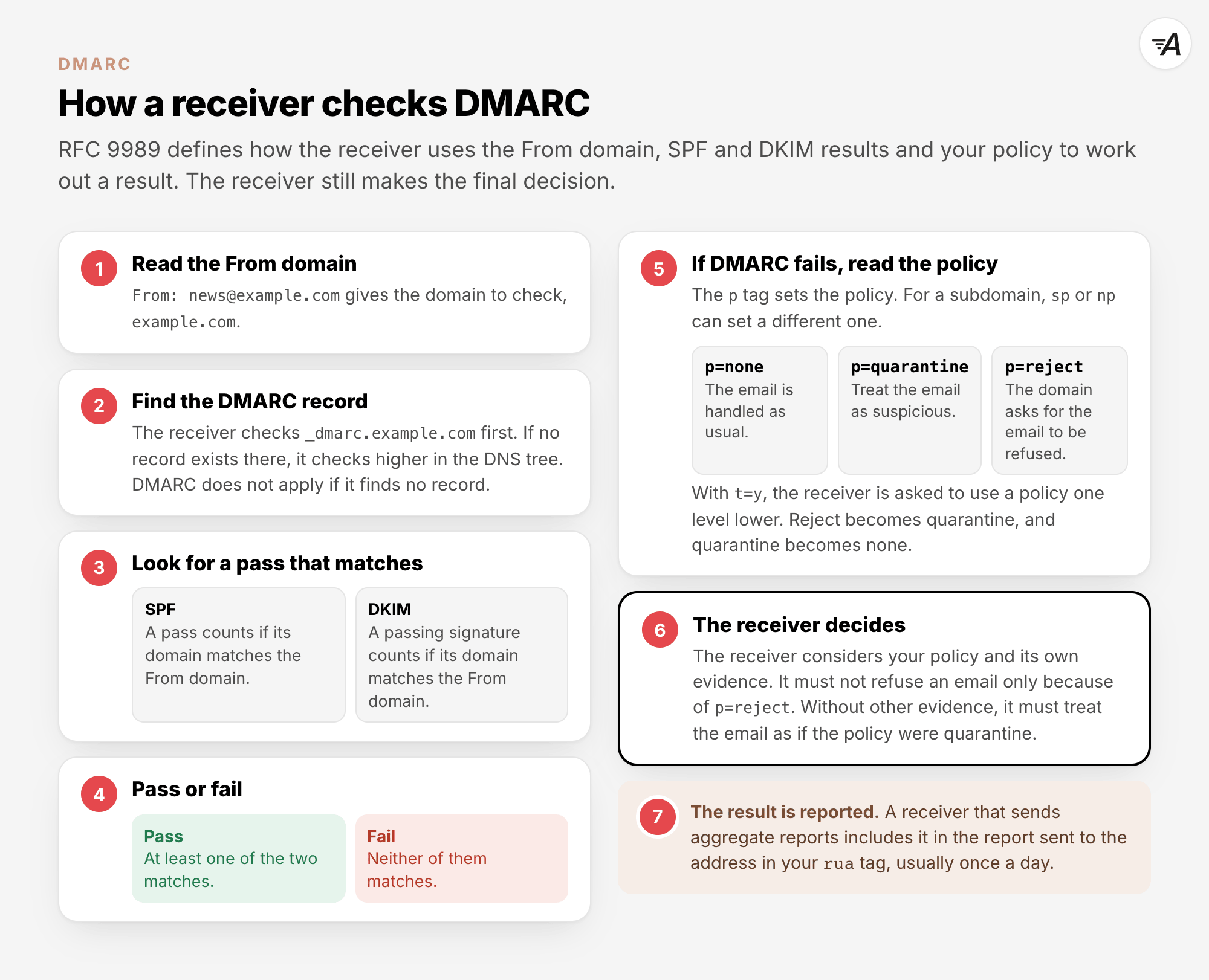
DMARC addresses certain forms of exact-domain spoofing. It does not protect against lookalike domains or a misleading From name. Passing DMARC also does not guarantee that a message will reach the inbox. Receivers may still reject or quarantine messages, as RFC 9989 explains. See Email Deliverability Explained.
In AcelleMail
In a campaign's Setup step, you choose the From address and whether AcelleMail signs the email.
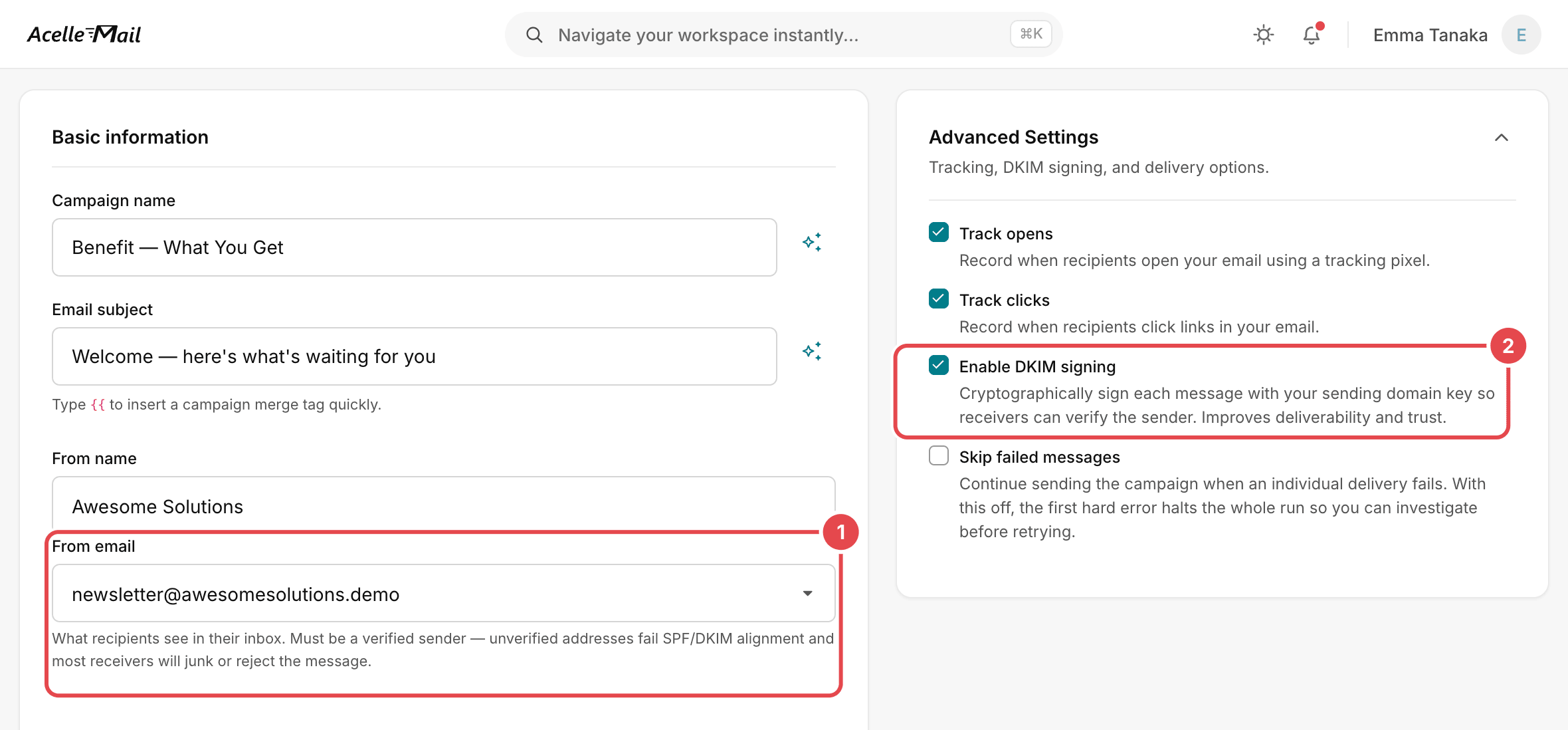
- From email is the address DMARC checks. Its help text warns that "unverified addresses fail SPF/DKIM alignment". That is a short form of two rules. SPF alignment depends on the envelope sender, not on the From address alone. For an aligned DKIM pass, AcelleMail needs a sending domain for the From domain, and receivers need its published DKIM record.
- Enable DKIM signing, under Advanced Settings, is on for every new campaign. AcelleMail then signs each message with the key for the sending domain that matches the From domain exactly.
A key for example.com does not sign mail from news@mail.example.com, even though relaxed DMARC
alignment would accept a signature from example.com. Add every From domain as its own sending domain.
On sending servers managed by the administrator, the From address must also use a verified domain unless the administrator allows unverified addresses for that server. A sending server you added to your own account accepts any From address. When a sending service signs for you, as Amazon SES does, its domain page in AcelleMail lists that service's DKIM records instead. For SES, these are three CNAME records.
If you run AcelleMail as a platform for clients, M3AAWG's Sender Best Common Practices says that you must authenticate with your own domain for clients who cannot provide theirs. It also says that you should sign with DKIM using both your domain and the client's.
5. The DMARC record after RFC 9989
A DMARC record is a TXT record at _dmarc.<domain>, such as _dmarc.example.com. Its first tag must
remain v=DMARC1. This monitoring example requests aggregate reports:
v=DMARC1; p=none; rua=mailto:dmarc-feedback@example.com
RFC 9989 defines these tags:
| Tag | What it says | Default |
|---|---|---|
| v | The version is always DMARC1. This tag always comes first. | required |
| p | This sets the policy for mail that fails DMARC: none (handle as usual), quarantine (treat as suspicious) or reject (refuse, within the limits in section 6). | none, if the record has a valid rua address |
| sp | This sets the policy for existing subdomains. | the p value |
| np | This sets the policy for subdomains that do not exist. RFC 9989 takes this tag from RFC 9091. | the sp value, or p if there is no sp |
| adkim, aspf | These tags set DKIM and SPF alignment: r (relaxed) or s (strict). | r |
| rua | This sets where aggregate reports go. | no reports |
| ruf | This sets where failure reports go. | no failure reports |
| fo | This sets when failure reports are sent. It is used only with ruf. | 0, a report when DMARC fails |
| t | This sets test mode. The t=y setting asks receivers to apply a policy one level less strict. This tag is new. | n |
| psd | This marks whether a domain is a public suffix. Registries use psd=y, and a domain owner can use psd=n for its own organisational domain. This tag is new. | u |
With t=y, reject becomes quarantine, and quarantine becomes none. This setting has no effect on none
or reporting.
The standard removed pct, rf and ri. Receivers rarely applied pct values other than 0 and 100
accurately. The new t=y and t=n settings serve the same purposes as pct=0 and pct=100.
Existing records keep working because v=DMARC1 has not changed. Receivers must ignore unknown tags.
You will still see pct in help pages, including Google's DMARC setup
page. RFC 9989 does not define it, so a receiver that
follows the new standard may apply your policy to all failing mail, even if your record says pct=10.
The way receivers find a policy also changed. The receiver first looks up _dmarc. followed by the
domain in the From address. If there is no record, it checks the parent names one at a time, with at
most eight queries. It does not stop at the first record it finds. Each part of a name between the dots
is called a label. Unless psd says otherwise, the name with a record and the fewest labels becomes the
organisational domain.
In the diagram, the receiver looks for a record for mail from news@mail.example.com. It finds no
record at _dmarc.mail.example.com, so it then looks up _dmarc.example.com and finds a record. It
continues to _dmarc.com, which has no record. So example.com is the organisational domain, and its
sp tag sets the policy.
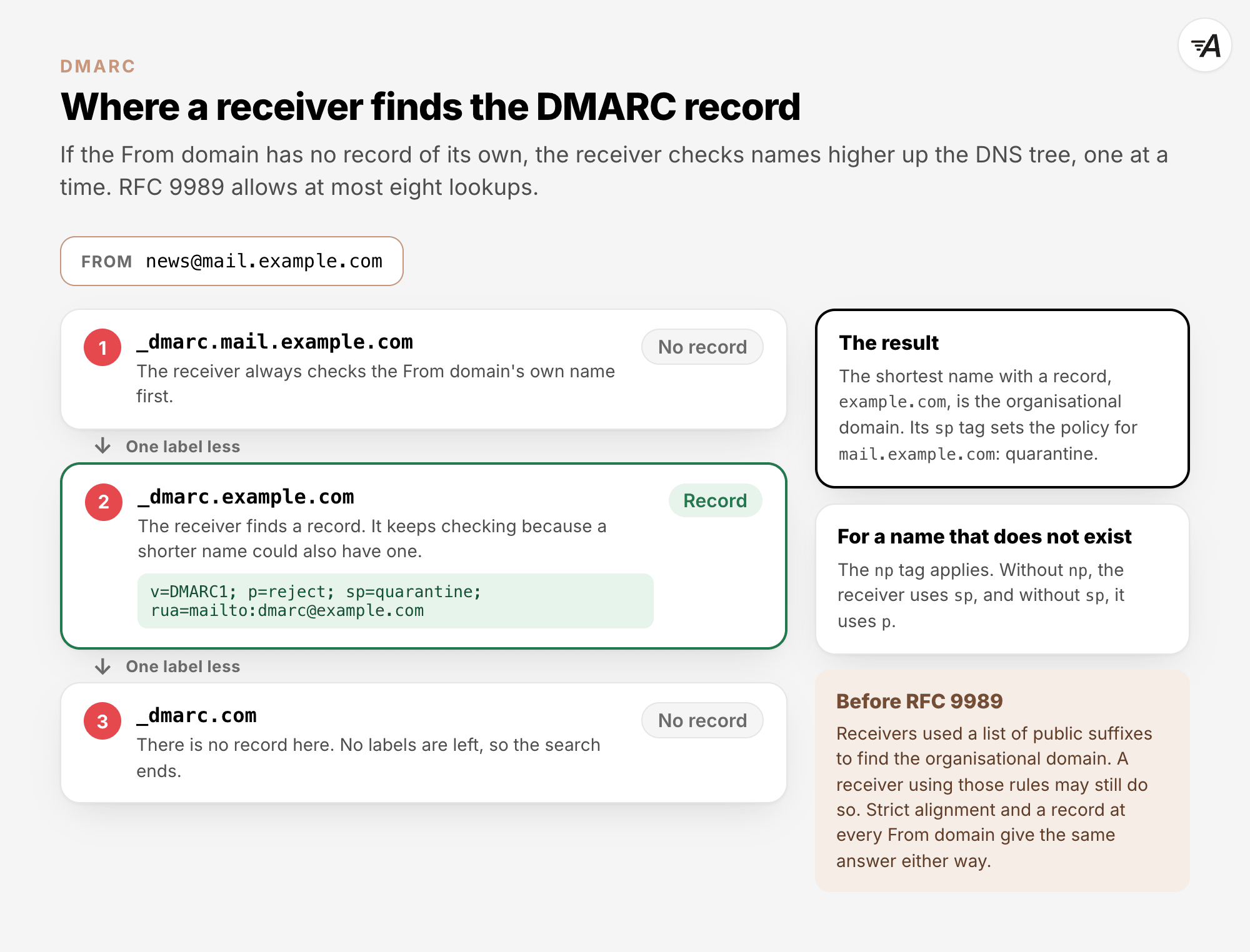
When the policy comes from a parent record, existing subdomains use sp. Subdomains that do not exist
use np. In both cases, the defaults above apply.
RFC 7489 used a Public Suffix List, so older receivers may get different results. RFC 9989 describes how
to avoid this difference by using strict alignment and explicit records for every domain used in a From
address. None of the provider pages reviewed for this guide says whether the provider already uses the
tree walk, np or t.
6. From p=none to enforcement
Monitoring starts with p=none and a rua address. RFC 9989 says that a p=none policy must not
change how receivers already handle email.
Before you enforce a policy, every legitimate email source needs aligned SPF or DKIM. Depending on how often you send, you may need to review reports for many months before you are sure all your email passes authentication. The steps below follow RFC 9989:
- Publish SPF and DKIM for each domain you send from. Check that at least one aligns with the From address.
- Publish
p=nonewith aruaaddress at the domain in the From address. Do the same at its organisational domain, if different. - Read the reports for at least a month, or longer if you rarely send email. Section 7 shows what they contain. For each legitimate source that fails, fix its authentication or stop sending through it.
- You can test
p=quarantinefirst by publishing it witht=y, which asks receivers to apply none. When you are ready, publishp=quarantinewithoutt=y. Keep it for as long as your monitoring period, and compare the results. - Consider
p=rejectonly for a domain that people do not use for everyday email. A subdomain kept for campaigns is one example. Do not use this policy on domains whose users post to mailing lists.
A domain that publishes p=reject must sign its messages with DKIM. It cannot rely on SPF alone. RFC
9989 also advises against this policy for general-purpose email domains.
Receivers must not reject a message only because its domain publishes p=reject. They must combine that
policy with other evidence. Without other evidence, they must treat the message as if the policy were
p=quarantine.
RFC 9989 itself notes that, in practice, "few Mail Receivers apply any mitigation techniques when receiving indirect mail flows", such as mailing lists. So mailing list messages that keep the original From address are often rejected. Plan for that when you choose a policy, and keep reviewing the reports.
7. DMARC reports
Aggregate reports go to the rua address. Receivers should send them at least every 24 hours, although
reporting is recommended rather than required.
RFC 9990 defines XML reports, preferably compressed with gzip. Records group messages by source IP address and result. They include message counts, the action taken and authentication details.
New fields record testing status and show whether the policy was found using psl or treewalk. RFC
9989 recommends using software to read these reports, and a reporting service can do this for you. You
add its address to your rua tag, and because that address is outside your own organisational domain,
the service publishes a consent record in its own DNS.
This example shows one record:
<record>
  <row>
    <source_ip>192.0.2.10</source_ip>
    <count>1200</count>
    <policy_evaluated>
      <disposition>pass</disposition>
      <dkim>pass</dkim>
      <spf>fail</spf>
    </policy_evaluated>
  </row>
  <identifiers>
    <header_from>example.com</header_from>
  </identifiers>
  <auth_results>
    <dkim><domain>example.com</domain><selector>s1</selector><result>pass</result></dkim>
    <spf><domain>esp.example.net</domain><result>pass</result></spf>
  </auth_results>
</record>
There were 1,200 messages from 192.0.2.10, using From domain example.com. SPF passed for
esp.example.net, which does not align. The DMARC policy result therefore records SPF as fail.
DKIM passed for example.com and aligns, so DMARC passed. A disposition of pass means the policy did
not apply to these messages. Reports in the older 2015 format, which has no pass value, show none here.
Failure reports, requested through ruf, contain copies or parts of messages, which may include
personal data. Receivers that are careful about privacy remove much of the information or do not send
these reports at all, so expect few. RFC 9991 covers them.
8. Forwarding and mailing lists
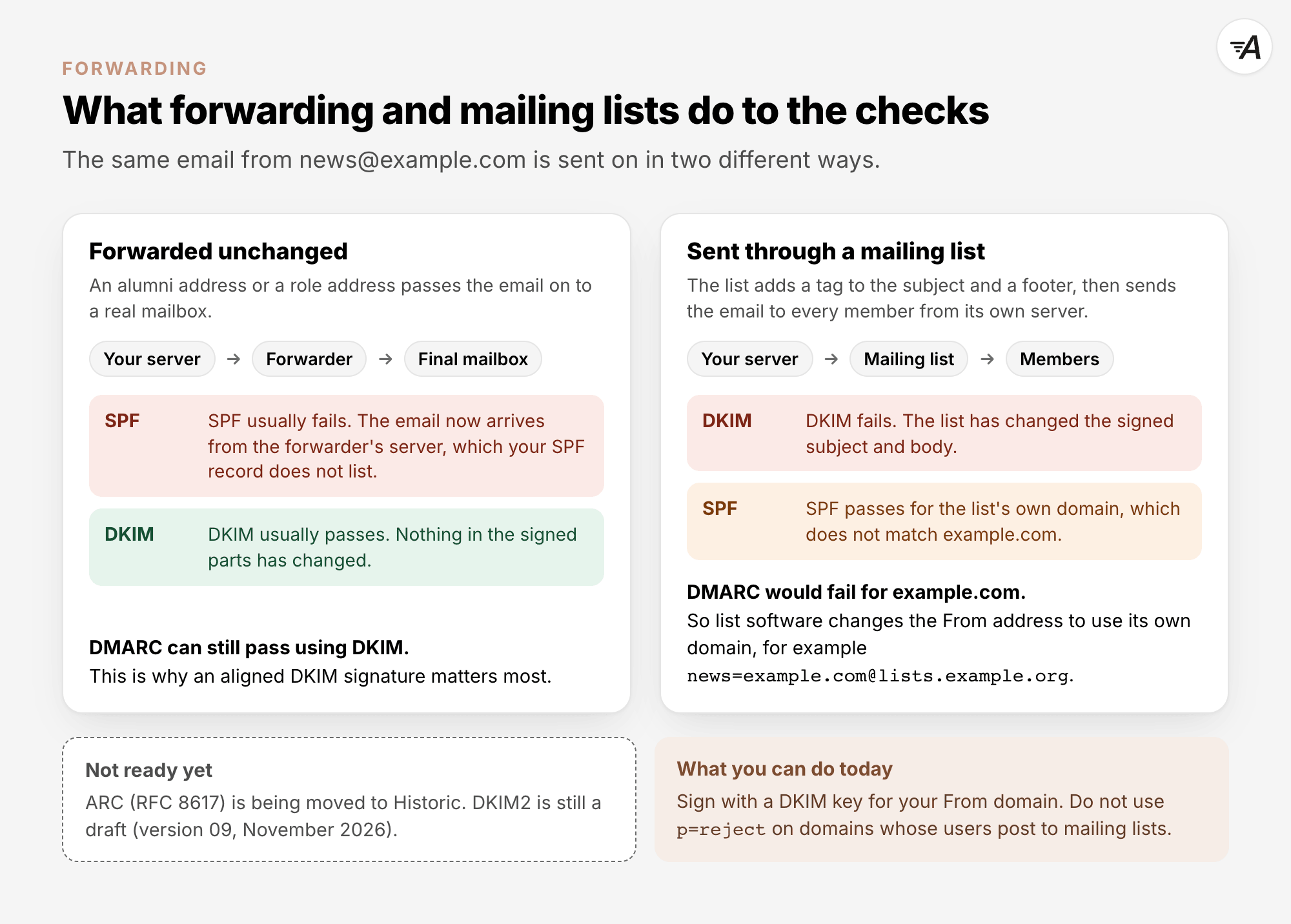
An alumni address or role address may forward mail to another inbox. SPF usually fails because the forwarder's IP address was not authorised by the original envelope sender's domain. DKIM usually still passes when the message stays unchanged, so DMARC can pass when the DKIM domain aligns with the From domain.
Mailing lists can add subject tags or footers that break DKIM. Their sending servers also break SPF alignment. They may therefore change the From address to use their own domain.
ARC is defined in the Experimental RFC 8617. It was intended to preserve authentication results through these changes. The IETF has given the DMARC working group responsibility for moving ARC to Historic status. The current draft "recommends that ARC no longer be deployed or relied upon between disparate senders and receivers".
DKIM2 aims to record changes to a message as it is sent. Version 09, dated 1 November 2026, is still an Internet-Draft that can change, so senders cannot rely on it yet.
For now, use aligned DKIM, and keep p=reject off domains whose users post to mailing lists. The
diagram compares the two cases.
9. What mailbox providers require
The providers' own pages, read on 3 November 2026, set these rules. They differ by provider and by volume.
| Provider | Who it applies to | What is required |
|---|---|---|
| Gmail | All senders to personal Gmail accounts, not Google Workspace accounts. Stricter rules apply above 5,000 messages a day. | All senders need SPF or DKIM. Above 5,000 a day, senders need SPF, DKIM and a DMARC record. The policy can be none. Their From domain must align with the SPF or DKIM domain. |
| Yahoo | All senders. Stricter rules apply to bulk senders, and Yahoo gives no number for them. | All senders need SPF or DKIM. Bulk senders need SPF and DKIM and a DMARC policy of at least p=none, and DMARC must pass. Relaxed alignment is acceptable. |
| Outlook.com | Domains that send more than 5,000 messages a day, according to Microsoft's announcement. | SPF and DKIM must pass. DMARC must pass with at least one aligned domain. The policy can be p=none. Failure produces 550 5.7.515. |
| Orange | All senders. Large senders, with more than 1,000 messages a day, have extra rules (page updated 1 September 2026). | SPF, DKIM and DMARC must all pass. Large senders must also use a From domain that matches the authenticated domains. Orange does not say whether relaxed alignment is enough. Codes include 515 for DMARC failure and 535 for missing DKIM. |
| iCloud Mail | Bulk senders. | Senders need SPF, DKIM and a published DMARC policy. Mail is rejected when these requirements are not met. |
| GMX | All senders. | Senders need a valid, aligned DKIM signature. Relaxed alignment is accepted. SPF alone is not enough. DMARC is recommended. |
Gmail's FAQ describes increasing enforcement from
November 2025. The SMTP error
documentation
lists 421 4.7.40 and 550 5.7.40 for missing DMARC information. Alignment errors include 421 4.7.32
and 421 5.7.32. Policy rejection can produce 550 5.7.26.
Spamhaus is a blocklist operator, rather than a mailbox provider. Its guidelines also ask for aligned DKIM. They call for aggregate reporting from the start and enforcement later.
Authentication is one part of sending email successfully. Email Deliverability Explained and How to Send Email Marketing That Works cover the wider requirements.
10. Common mistakes
| What you see | Why it is a problem | What to do |
|---|---|---|
| You have two SPF records or more than 10 terms that cause lookups. | SPF returns permerror. | Combine the records and remove unused includes. |
| SPF and DKIM pass, but DMARC fails. | Neither the SPF domain nor the DKIM domain aligns with the domain in the From address. | Add the exact domain in the From address as a sending domain in AcelleMail and publish its records. Keep Enable DKIM signing on. |
You send from news.example.com without adding that sending domain. |
AcelleMail does not sign it with the parent domain's key. | Add the subdomain separately and publish its records. |
An older guide recommends gradually increasing enforcement with pct. |
Intermediate percentages were unreliable. The tag is no longer part of the standard. | Start with p=none, then move to quarantine and use t=y to test. Consider a reject policy where appropriate. |
Staff post to mailing lists from a domain using p=reject. |
Mailing list emails can be rejected, and members can be unsubscribed. | Keep that domain's policy set to quarantine or none. Use a separate subdomain for marketing. |
The domain stays at p=none for years without anyone reviewing the reports. |
The policy asks for no action, and no one reviews the failures. | Read the reports and work towards appropriate enforcement. |
| You think Verified means DMARC is set up. | For Local DKIM, AcelleMail checks ownership and DKIM records, and an SPF row if one is listed. It does not check DMARC. | Publish _dmarc separately at your DNS provider. |
You expect ruf reports to include full copies of messages. |
In practice, receivers remove much of the information from these reports or do not send them at all. | Rely on aggregate reports for regular monitoring. |
Summary
- SPF checks the envelope domain, and DKIM checks the signing domain. DMARC checks whether a domain that passes SPF or DKIM aligns with the From address.
- Authentication for an unrelated domain proves nothing about the From address. One aligned SPF or DKIM pass is enough for DMARC.
- Forwarding usually causes SPF to fail, while DKIM often still passes. Mailing lists can disrupt both checks. ARC is being moved towards Historic status, and DKIM2 remains a draft.
- RFC 9989 removed
pct,rfandri. It addedtandpsd, and tooknpfrom RFC 9091. It specifies a DNS tree walk, while existingv=DMARC1records continue to work. - Start with
p=noneand reports, then consider quarantine. Use reject only for suitable domains whose users do not post to mailing lists. - Receivers must not reject messages based on
p=rejectalone. Mailing list messages can still be rejected in practice. - Gmail, Yahoo, Outlook.com, Orange, iCloud Mail and GMX require authentication. Orange requires all three checks to pass. iCloud Mail rejects bulk mail that does not meet its requirements.
- In AcelleMail, add every domain used in a From address and publish the records its domain page lists. Keep Enable DKIM signing on. Publish DMARC separately at your DNS provider.
Terms used here are defined in the Email Marketing Glossary.
0 comments
No comments yet — be the first to share a tip or question.